
1. Introduction
This manual provides essential information for the safe and efficient installation, operation, and maintenance of your Tecnolite PAN-LED/72W/40/S LED Panel. Please read this manual thoroughly before installation and keep it for future reference.
The Tecnolite PAN-LED/72W/40/S is a high-efficiency LED panel designed for various lighting applications, operating at 100-240V, with a Color Rendering Index (CRI) of 85, 72W power consumption, and a color temperature of 4000K.
2. Safety Instructions
- Always disconnect power before installation, maintenance, or cleaning.
- Installation should be performed by a qualified electrician in accordance with local electrical codes.
- Do not operate the LED panel if it is damaged.
- Ensure the mounting surface can support the weight of the fixture.
- Do not look directly into the LED light source when it is illuminated.
- This product is designed for indoor use unless otherwise specified.
3. Package Contents
Verify that all components are present and undamaged:
- 1 x Tecnolite PAN-LED/72W/40/S LED Panel
- Mounting accessories (e.g., suspension cables, ceiling anchors) - Specific components may vary.
- Instruction Manual (this document)
4. Setup and Installation
The Tecnolite PAN-LED/72W/40/S LED Panel is typically installed using a suspension system. Follow these general steps for installation:
- Prepare the Installation Area: Ensure the power is off at the circuit breaker. Mark the desired locations for the suspension points on the ceiling.
- Install Ceiling Anchors: Securely attach the ceiling anchors for the suspension cables.
- Attach Suspension Cables: Connect the suspension cables to the ceiling anchors and to the designated attachment points on the LED panel. Adjust the cable length to achieve the desired hanging height.
- Wiring: Connect the LED panel's electrical wiring to the main power supply (100-240V) according to local electrical codes. Ensure proper grounding.
- Final Check: Verify all connections are secure and the panel is level. Restore power and test the light.

Image 1: The Tecnolite PAN-LED/72W/40/S LED Panel shown suspended from a ceiling by four cables, illustrating its typical installation method.
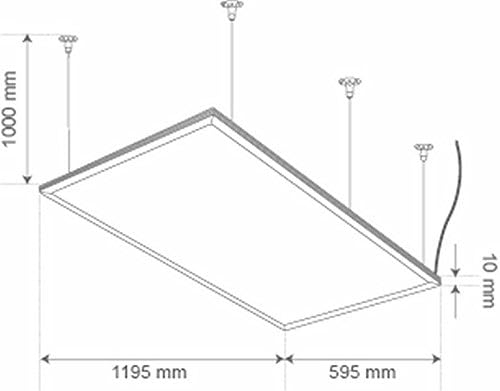
Image 2: A technical diagram illustrating the approximate surface dimensions of the LED panel (1195mm x 595mm) and a thickness of 10mm, along with recommended suspension cable length (1000mm). These are the physical panel dimensions.
Note on Bulb Base E27: While the specifications mention an E27 bulb base, this is typically for traditional light fixtures. For an integrated LED panel like this, it likely refers to a connection point or a component within the driver, not a user-replaceable bulb. Consult a qualified electrician for wiring details.
5. Operating Instructions
The Tecnolite PAN-LED/72W/40/S LED Panel operates as a standard lighting fixture. Once properly installed and wired, it can be controlled via a standard wall switch connected to its power supply circuit.
- Turning On/Off: Use the connected wall switch to turn the LED panel on or off.
- Dimming: This panel is not explicitly stated to be dimmable. If dimming functionality is desired, ensure a compatible dimmer switch and driver are used, and consult a qualified electrician.
6. Maintenance
The Tecnolite PAN-LED/72W/40/S LED Panel requires minimal maintenance.
- Cleaning: Ensure the power is off before cleaning. Gently wipe the surface of the panel with a soft, dry, or slightly damp cloth. Do not use abrasive cleaners or solvents.
- Inspection: Periodically inspect the suspension cables and electrical connections for any signs of wear or damage.
- LED Longevity: LED panels have a long operational life and do not require bulb replacement.
7. Troubleshooting
| Problem | Possible Cause | Solution |
|---|---|---|
| Light does not turn on. | No power supply, loose wiring, faulty switch. | Check circuit breaker. Verify all electrical connections. Test the switch. |
| Light flickers. | Unstable power supply, loose connection, incompatible dimmer (if used). | Ensure stable power. Check wiring. Remove dimmer or replace with compatible one. |
| Reduced light output. | Dust accumulation, end of product life. | Clean the panel surface. If the product is very old, it may be reaching its end of life. |
If troubleshooting steps do not resolve the issue, contact Tecnolite customer support or a qualified electrician.
8. Specifications
| Feature | Detail |
|---|---|
| Model Number | PAN-LED/72W/40/S |
| Brand | Tecnolite |
| Light Type | LED |
| Wattage | 72W |
| Voltage | 100-240V |
| Color Temperature | 4000 Kelvin |
| Color Rendering Index (CRI) | 85 |
| Length | 6.5 cm |
| Width | 129 cm |
| Height | 65.5 cm |
| Weight | 10.4 Kilograms |
| Bulb Base | E27 (Note: Refers to internal connection, not a user-replaceable bulb.) |
| Batteries Required | No |

Image 3: A low-resolution image of a technical data table. The specific content is unreadable, but it appears to contain various electrical and performance specifications for the product.
9. Warranty and Support
For warranty information and customer support, please refer to the official Tecnolite website or contact your local Tecnolite distributor. Keep your purchase receipt as proof of purchase.
You can visit the Tecnolite store on Amazon for more information: Tecnolite Store