1. Introduction
This manual provides essential instructions for the safe and effective use of your Silverline Audio Replacement Power Supply/AC Adapter, Model KY-999. This adapter is designed as an aftermarket replacement for the EBS AD-9 adapter, ensuring compatibility and reliable power delivery for your devices.
The adapter is engineered for energy efficiency, high quality, and dependable performance, featuring advanced safety mechanisms to protect your equipment.
2. Safety Information
To ensure safe operation and prevent damage to your devices, please observe the following safety guidelines:
- Tip Negative Design: This power supply features a center negative (-) pin and an outer positive (+) barrel. It is crucial to use this adapter only with devices that require a center negative power input.
- Warning: Do not use power supplies with a center positive pin with devices requiring a center negative input, as this will cause damage to the device.
- Overload Protection: The adapter includes an automatic overload circuit disconnect to prevent damage from excessive current.
- Thermal Protection: Automatic thermal cut-off protects against overheating.
- Short Circuit Protection: Built-in protection against short circuits.
- Over Voltage Protection: Safeguards against voltage spikes.
- Certifications: This product is compliant with FCC, CE, and RoHS safety standards.
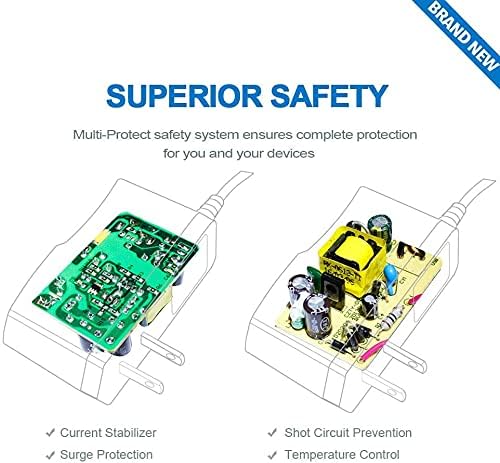
Image: Internal components and safety features of the Silverline Audio power adapter, highlighting its multi-protect safety system for device protection.
3. Setup and Connection
Follow these steps to properly connect your power supply:
- Verify Compatibility: Ensure your device requires a 9V DC, 1A, center negative power input.
- Connect to Device: Insert the barrel connector of the power supply into the power input jack of your device. Ensure a secure fit.
- Connect to Power Outlet: Plug the AC adapter into a standard 100-240V AC wall outlet.
- Power On: Turn on your device. It should now receive power.

Image: The Silverline Audio power adapter, illustrating its physical appearance and the critical center negative (-) polarity symbol for correct connection.
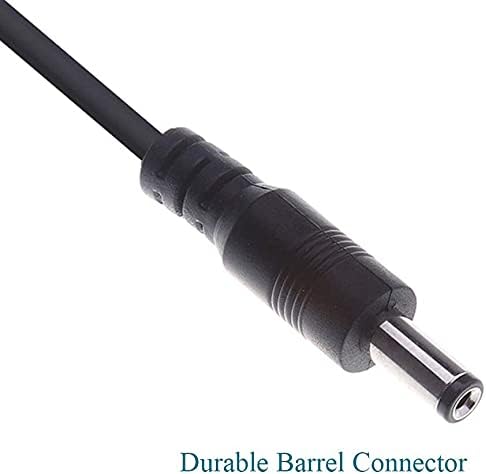
Image: A detailed close-up of the durable barrel connector, emphasizing its robust construction for reliable connection to devices.
4. Operation
Once properly connected, the Silverline Audio power supply operates automatically. It provides a stable 9V DC output to your compatible device. No further user interaction is required for its basic function.
The slim design of the adapter allows it to occupy only one outlet on a power strip, freeing up space for other devices.
5. Maintenance
The Silverline Audio power supply requires minimal maintenance:
- Keep the adapter clean and dry. Avoid exposure to moisture or extreme temperatures.
- Do not attempt to open or repair the adapter. Refer servicing to qualified personnel.
- Inspect the cord and connector periodically for any signs of damage. Discontinue use if damage is observed.
6. Troubleshooting
If you encounter issues with your power supply, consider the following:
- No Power to Device:
- Ensure the adapter is securely plugged into both the wall outlet and your device.
- Check if the wall outlet is functional by plugging in another device.
- Verify that your device is compatible with a 9V DC, center negative power supply.
- Device Malfunction:
- If your device is not functioning correctly, ensure the power supply is not damaged.
- Confirm that the device itself is working properly with its original or another known good power supply.
If problems persist, discontinue use and contact the manufacturer for assistance.
7. Specifications
| Feature | Specification |
|---|---|
| Model Number | KY-999 |
| Input Voltage | 100-240V AC, 50-60Hz |
| Output Voltage | 9V DC |
| Current Rating | 1 Amp |
| Cord Length | 36 inches |
| Connector Type | Barrel Connector |
| Polarity | Center Negative (-) |
| Color | Black |
| Safety Standards | CE, FCC, RoHS |
8. Warranty and Support
Specific warranty details for the Silverline Audio Replacement Power Supply/AC Adapter (Model KY-999) are not provided within the product information. For warranty claims, technical support, or further inquiries, please contact Silverline Audio directly through their official support channels.