
Important Safety Information
Read all instructions before using this appliance. Your safety and the safety of others are very important. We have provided many important safety messages in this manual and on your appliance. Always read and obey all safety messages.
- Electrical Requirements: This air conditioner requires a 115V, 10Amp, 60Hz grounded electrical outlet. Do not use extension cords or adapter plugs.
- Grounding Instructions: This appliance must be grounded. In the event of an electrical short circuit, grounding reduces the risk of electric shock by providing an escape wire for the electric current.
- Child Safety: Do not allow children to play on or in the unit. Close supervision is necessary when the appliance is used near children.
- Service: Do not attempt to repair or replace any part of your air conditioner unless specifically recommended in this manual. All other servicing should be referred to a qualified technician.
- Ventilation: Ensure proper ventilation around the unit. Do not block air inlets or outlets.
Product Overview
The Frigidaire FFRS10C2Q1 is a 10,000 BTU window-mounted air conditioner designed for casement or slider windows. It provides efficient cooling and features various operational modes for user comfort.
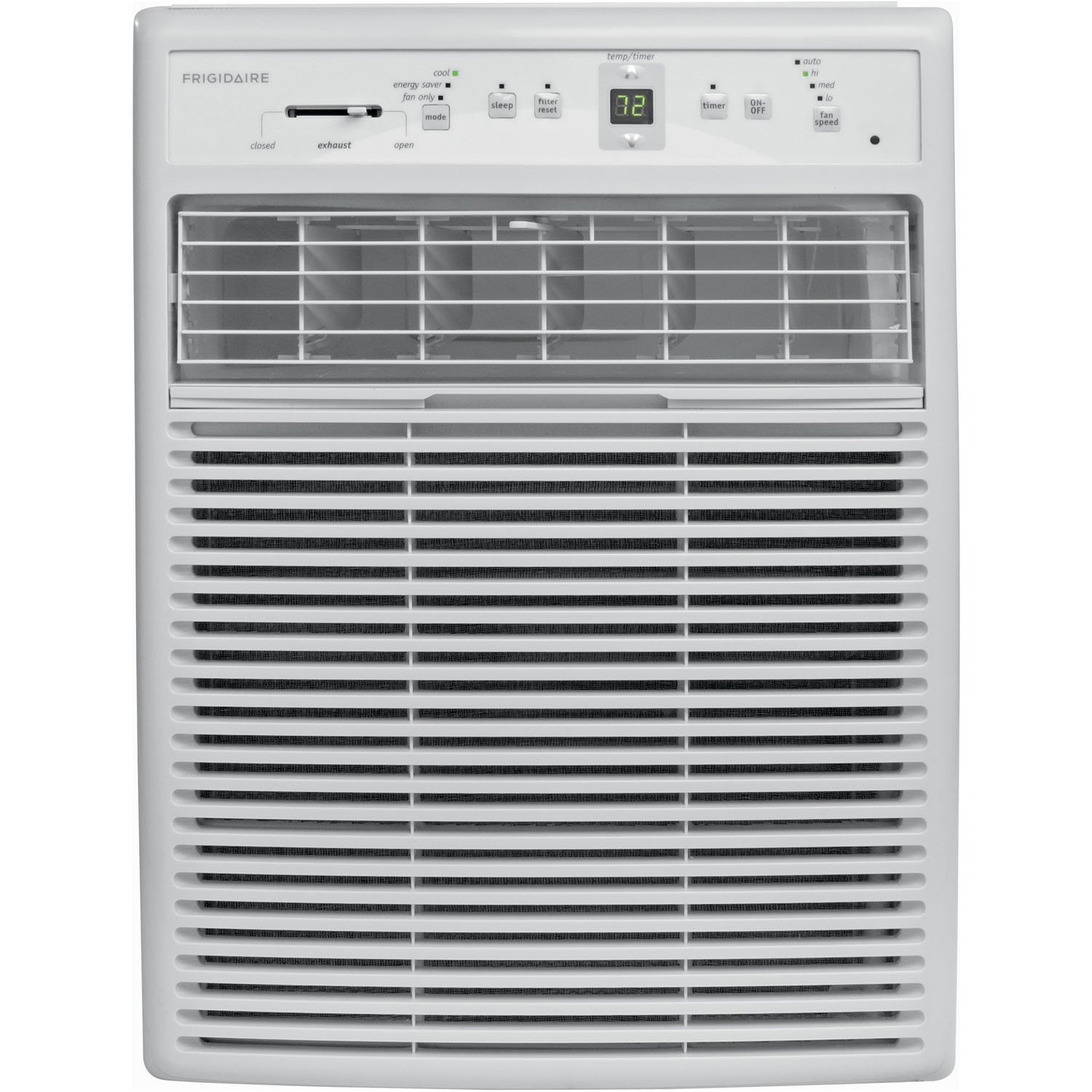
Figure 1: Front view of the Frigidaire FFRS10C2Q1 air conditioner, showing the control panel at the top, the adjustable louver for air direction, and the main air intake grille.
Control Panel Features
The control panel, located on the top front of the unit, allows you to manage all functions of the air conditioner. Refer to Figure 1 for its location.
- FRIGIDAIRE Logo: Brand identification.
- Mode Button: Cycles through operating modes: Cool, Energy Saver, Fan Only.
- Sleep Button: Activates Sleep mode for quiet, energy-efficient operation during sleep.
- Filter Reset Button: Illuminates when the air filter needs cleaning. Press to reset after cleaning.
- Temp/Timer Display: Shows the set temperature or timer settings.
- Timer Button: Sets the auto-on or auto-off timer.
- ON-OFF Button: Powers the unit on or off.
- Fan Speed Indicator: Displays current fan speed: Auto, Hi, Med, Lo.
- Exhaust Vent Lever: Manually adjustable lever for closed, exhaust, or open ventilation.
Setup and Installation
Proper installation is crucial for the efficient operation of your air conditioner. This unit is designed for installation in casement or slider windows.
Pre-Installation Checklist:
- Verify window dimensions are compatible with the unit.
- Ensure a grounded 115V, 10Amp, 60Hz electrical outlet is available near the installation site.
- Gather necessary tools: screwdriver, measuring tape, level.
Installation Steps:
- Prepare the Window: Open the casement or slider window to the required width. Clean the window sill and frame.
- Install Mounting Brackets (if applicable): Follow the specific instructions provided with your unit for installing any necessary mounting brackets or support frames in the window opening.
- Place the Unit: Carefully lift the air conditioner and place it into the window opening. Ensure it is level or slightly tilted outwards to allow for condensate drainage.
- Secure the Unit: Extend the side panels to fill the window opening and secure them with screws as per the installation kit instructions. Ensure the unit is firmly seated and sealed to prevent air leaks.
- Seal Gaps: Use foam insulation strips or weatherstripping to seal any gaps around the unit and side panels to maximize efficiency.
- Plug In: Once securely installed, plug the power cord into the dedicated 115V, 10Amp, 60Hz grounded outlet.
Note: For detailed, step-by-step installation instructions, refer to the separate installation guide included with your product packaging.
Operating Instructions
This section details how to operate your Frigidaire FFRS10C2Q1 air conditioner using its control panel.
Turning On/Off:
- Press the ON-OFF button to turn the unit on or off.
Selecting Operating Mode:
- Press the Mode button repeatedly to cycle through the available modes:
- Cool: Provides cooling and dehumidification.
- Energy Saver: The fan will cycle on and off with the compressor to save energy.
- Fan Only: Circulates air without cooling.
Adjusting Temperature:
- In Cool mode, use the temperature up/down buttons (usually integrated with the Temp/Timer display) to set your desired temperature. The display will show the set temperature.
Setting Fan Speed:
- Press the Fan Speed button (often integrated with the Mode button or a separate button) to select desired fan speed: Auto, Hi, Med, Lo.
Using Sleep Mode:
- Press the Sleep button to activate Sleep mode. The unit will gradually increase the set temperature over several hours to conserve energy and provide comfortable sleeping conditions.
Setting the Timer:
- Press the Timer button to set the auto-on or auto-off time. Follow the display prompts to adjust the hours.
Adjusting Air Direction:
- Manually adjust the horizontal and vertical louvers (air deflectors) to direct the airflow as desired.
Exhaust Vent:
- Slide the Exhaust Vent Lever to select:
- Closed: Recirculates indoor air.
- Exhaust: Draws air from inside and exhausts it outside.
- Open: Allows fresh air to enter the room.
Maintenance
Regular maintenance ensures optimal performance and extends the life of your air conditioner.
Air Filter Cleaning:
- The Filter Reset light will illuminate after approximately 250 hours of operation, indicating the filter needs cleaning.
- To Clean:
- Turn off the unit and unplug it from the power outlet.
- Open the front grille and carefully slide out the air filter.
- Wash the filter with warm, soapy water. Rinse thoroughly.
- Allow the filter to air dry completely before reinserting it. Do not use hot water or harsh cleaners.
- Slide the dry filter back into place and close the front grille.
- Plug in the unit and press the Filter Reset button to turn off the indicator light.
Unit Cleaning:
- Exterior: Wipe the cabinet with a soft, damp cloth. Do not use harsh chemicals or abrasive cleaners.
- Coils: Periodically check the condenser coils (at the back of the unit) for dirt and debris. If dirty, gently brush them clean.
- Winter Storage: If storing the unit for winter, clean the filter and exterior thoroughly. Cover the unit to protect it from dust.
Troubleshooting
Before calling for service, review this section. It may save you time and expense. This section includes common occurrences that are not the result of a defect in workmanship or materials.
| Problem | Possible Cause | Solution |
|---|---|---|
| Air conditioner will not start. |
|
|
| Air conditioner not cooling as expected. |
|
|
| Water dripping inside. |
|
|
| Noisy operation. |
|
|
Specifications
Key technical specifications for the Frigidaire FFRS10C2Q1 air conditioner:
| Feature | Detail |
|---|---|
| Model Name | FFRS10C2Q1 |
| Brand | Frigidaire |
| Cooling Capacity | 10,000 British Thermal Units (BTU) |
| Power Requirement | 115 Volts, 10 Amp, 60 Hz |
| Form Factor | Window-Mounted (Casement/Slider) |
| Item Weight | 40.82 kg (approx. 90 lbs) |
| Seasonal Energy Efficiency Ratio (SEER) | 14 |
| BEE Star Rating | 4 Star |
Warranty and Support
Frigidaire stands behind the quality of its products. For any issues not covered in the troubleshooting section, please contact customer support.
Warranty Information:
- Type of Guarantee: 1 year on parts and labor.
- This warranty covers manufacturing defects and issues arising from normal use. It does not cover damage from improper installation, misuse, or natural disasters.
- Keep your purchase receipt as proof of purchase for warranty claims.
Customer Support:
For technical assistance, service scheduling, or to order replacement parts, please contact Frigidaire Customer Service. Refer to the contact information provided in your product packaging or on the official Frigidaire website.
Manufacturer: Frigidaire