1. Introduction and Overview
The Grässlin Talento 371 Easy Plus is a digital time switch designed for precise control of electrical circuits. This device features a single channel with 20 memory positions, allowing for flexible weekly and holiday programming. It is equipped with a sealable quartz for reliable timekeeping and a CR2032 battery for power reserve.
Key features include:
- Operating Voltage: 230 V AC, 50-60 Hz
- Power Reserve: Up to 6 years with 1 x CR2032 battery
- Mounting: DIN rail
- Width: 2 modules
- Shortest Switching Time: 1 minute (ON/OFF)
- Applications: Suitable for advertising lighting, street lighting, shop window lighting, and control of roller shutters and grilles.
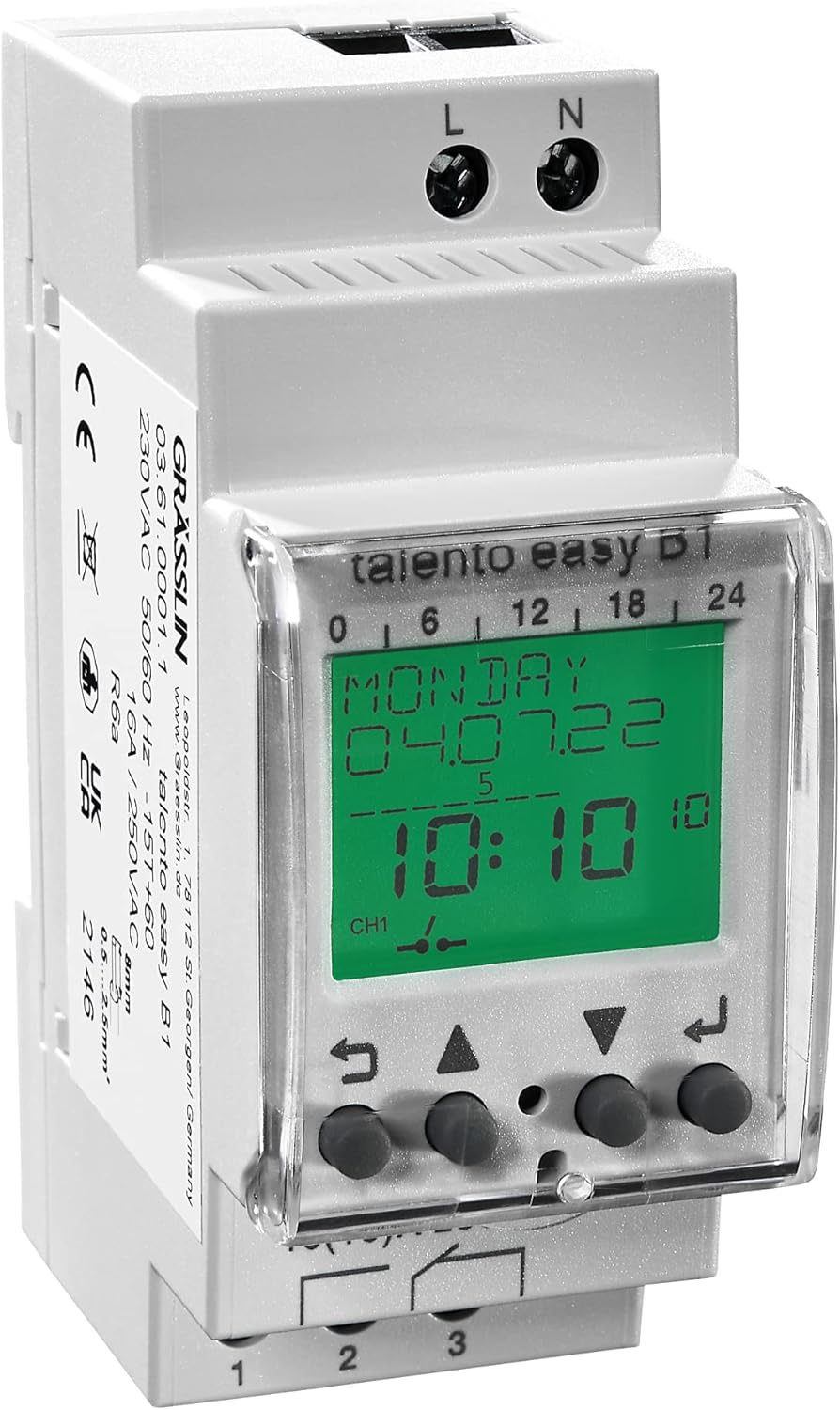
Figure 1: Front view of the Grässlin Talento 371 Easy Plus Digital Time Switch, showing the display and control buttons.
2. Safety Instructions
WARNING: Installation and maintenance of electrical devices must only be performed by qualified electricians. Failure to comply with these instructions can result in electric shock, fire, or serious injury.
- Always disconnect power before installing or servicing the device.
- Ensure the device is installed in a dry, protected environment, away from direct sunlight, moisture, and extreme temperatures.
- Verify that the supply voltage matches the device's specifications (230 V AC).
- Do not exceed the maximum switching capacity of 16 A.
- Use appropriate wiring and ensure all connections are secure.
3. Setup and Installation
3.1 Mounting
The Talento 371 Easy Plus is designed for DIN rail mounting. Securely attach the device to a standard DIN rail in your electrical panel. Ensure sufficient space for wiring and ventilation.
3.2 Wiring
Connect the device according to the wiring diagram provided. The terminals are typically labeled L (Live), N (Neutral), and output terminals (1, 2, 3 for switching contacts). Ensure correct polarity and secure connections.

Figure 2: Wiring diagram for the Grässlin Talento 371 Easy Plus, showing connections for Live (L), Neutral (N), and output contacts (1, 2, 3).
3.3 Initial Power-up and Settings
Upon initial power-up, the device may require setting the current time and date. Refer to the display and use the navigation buttons (typically indicated by arrows and an 'Enter' or 'Return' symbol) to adjust these settings. The internal CR2032 battery ensures that settings are retained during power outages.
4. Operating Instructions
4.1 Programming ON/OFF Times
The Talento 371 Easy Plus allows for up to 20 ON/OFF program steps. To set a program:
- Enter programming mode (refer to the device's display for specific button presses, usually a 'P' or 'Menu' button).
- Select a program number (1-20).
- Set the desired ON time (hour and minute).
- Set the desired OFF time (hour and minute).
- Select the days of the week for which this program should be active (e.g., Monday-Friday, daily, or specific days).
- Confirm and save the program. Repeat for additional program steps.
4.2 Weekly and Holiday Programs
The device supports weekly programming, allowing different schedules for each day. Additionally, a holiday program feature enables you to define specific periods where the regular schedule is temporarily suspended, useful for extended absences.

Figure 3: Display showing time management features, including shortest switching time of 1 minute and 12/24 hour setting.
4.3 Manual Override
A manual override function is available to temporarily switch the output ON or OFF, independent of the programmed schedule. This is typically accessed via a dedicated button or a combination of buttons. The device will return to its programmed schedule at the next scheduled switching event.
5. Maintenance
5.1 Battery Replacement
The device uses a CR2032 battery to maintain time and program settings during power outages. If the display becomes dim or settings are lost frequently, the battery may need replacement. To replace the battery:
- Disconnect all power to the device.
- Carefully open the battery compartment (refer to the device casing for location, usually on the side or back).
- Remove the old CR2032 battery.
- Insert a new CR2032 battery, ensuring correct polarity.
- Close the battery compartment and restore power.
5.2 Cleaning
Clean the exterior of the device with a soft, dry cloth. Do not use abrasive cleaners or solvents. Ensure no moisture enters the device.
6. Troubleshooting
- Device not powering on: Check the main power supply to the device. Ensure all wiring connections (L and N) are secure and correct.
- Programs not executing: Verify that the current time and date are set correctly. Check that the program steps are enabled for the desired days and times. Ensure the manual override is not active.
- Incorrect time display: The internal battery (CR2032) might be low or depleted. Replace the battery as described in Section 5.1.
- Display is dim or blank: This often indicates a low or dead CR2032 battery. Replace the battery.
If problems persist after following these steps, contact Grässlin customer support or a qualified electrician.
7. Specifications

Figure 4: Technical specifications for the Grässlin Talento 371 Easy Plus.
| Specification | Value |
|---|---|
| Brand | Grässlin |
| Model Number | 036100011 |
| Operating Voltage | 230 V AC |
| Frequency | 50 - 60 Hz |
| Width | 2 modules |
| Installation Type | DIN rail |
| Contact | NO contact |
| Power Reserve | 6 Years |
| Switching Capacity at 250 V AC, cos phi = 1 | 16 A |
| Switching Capacity at 250 V AC, cos phi = 0.6 | 10 A |
| Shortest Switching Times | 1 min / 1 s (pulse) |
| Time Accuracy at 25 °C | Typically ± 0.5 s/day |
| Standby Output | 6 VA |
| Type of Protection | IP 20 |
| Protection Class | II |
| Ambient Temperature | -10 °C ... +55 °C |
| Dimensions (L x W x H) | 9.1 x 5.1 x 8.4 cm |
| Weight | 173 g |
8. Warranty and Support
For information regarding warranty terms and conditions, please refer to the documentation provided with your purchase or visit the official Grässlin website. Spare parts availability information is currently unavailable.
For technical support or further assistance, please contact Grässlin customer service through their official channels. Always provide your product model number (036100011) when seeking support.


