
Bravo magiko
Bravo Magiko 1 Universal Remote Control User Manual
Model: Magiko
Introduction
The Bravo Magiko 1 Universal Remote Control is a self-learning rolling code device designed to operate various gate and garage door openers. It is capable of storing up to four different rolling codes, offering versatility and convenience. This manual provides detailed instructions for setup, operation, and maintenance to ensure optimal performance of your remote control.
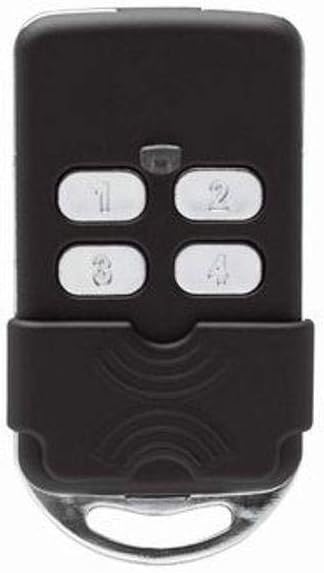
Figure 1: Front view of the Bravo Magiko 1 Universal Remote Control, displaying its four numbered buttons (1, 2, 3, 4) and a protective sliding cover at the bottom. The remote is black with silver buttons.
Setup
1. Battery Installation
The Bravo Magiko 1 comes with a 3V CR2032 battery pre-installed. If replacement is needed, carefully open the remote control casing and insert a new CR2032 battery, ensuring correct polarity.
2. Programming the Remote Control
The Magiko 1 is a self-learning remote control. The programming procedure typically involves a sequence of button presses on both your original remote and the Magiko 1. Please note that specific programming steps can vary depending on the brand and model of your existing gate or garage door opener.
- Clear Existing Codes (if necessary): Refer to the specific instructions provided with your Magiko 1 for clearing any pre-existing codes. This usually involves holding down two buttons simultaneously until the indicator light behaves in a specific way.
- Initiate Learning Mode: On the Magiko 1, press and hold the button you wish to program. The indicator light will typically flash slowly.
- Transmit Original Code: While holding the button on the Magiko 1, bring your original remote control close to the Magiko 1 and press the button you wish to copy. Hold it until the Magiko 1's indicator light changes its flashing pattern (e.g., flashes rapidly or becomes solid), indicating successful code learning.
- Test the Programmed Button: After programming, test the button on the Magiko 1 to ensure it operates your gate or garage door correctly.
Important: Before purchase and programming, verify compatibility with your specific gate or garage door opener brand and model. Detailed programming instructions for various systems can often be found on the manufacturer's official website or through online video tutorials. For BFT rolling codes, it is highly recommended to search for specific video tutorials online as the included instructions may not be sufficiently clear for this particular type.
Operating Instructions
Once programmed, operating the Bravo Magiko 1 is straightforward:
- Activating a Device: Press the corresponding numbered button (1, 2, 3, or 4) that you have programmed for a specific gate or garage door. The indicator light will illuminate during transmission.
- Multiple Devices: The remote can store up to four different rolling codes, allowing you to control up to four separate devices with a single remote.
- Indicator Light: The built-in indicator light provides visual feedback during programming and operation, confirming button presses and code transmission.
- Protective Cover: The remote features a sliding protective cover to prevent accidental button presses when carried in a pocket or bag. Slide the cover down to reveal the buttons and up to protect them.
Maintenance
Battery Replacement
When the remote's range decreases significantly or the indicator light becomes dim, it may be time to replace the battery. The Bravo Magiko 1 uses a 3V CR2032 battery.
- Carefully open the remote control casing, typically by prying it open along the seam with a small flat-head screwdriver.
- Remove the old CR2032 battery.
- Insert a new 3V CR2032 battery, ensuring the positive (+) side faces upwards.
- Close the remote control casing securely.
The remote is designed to retain programmed codes even when the battery is removed, so re-programming should not be necessary after a battery change.
Care and Cleaning
To ensure the longevity of your remote control:
- Avoid exposing the remote to extreme temperatures, direct sunlight, or moisture.
- Clean the remote with a soft, dry cloth. Do not use abrasive cleaners or solvents.
- Protect the remote from physical impact, as the plastic casing, while durable, can be damaged by severe drops.
Troubleshooting
| Problem | Possible Cause | Solution |
|---|---|---|
| Remote does not operate the gate/garage door. |
|
|
| Short operating range. |
|
|
| Indicator light does not illuminate. |
|
|
For complex programming issues, especially with certain rolling code systems like BFT, searching for specific video tutorials online (e.g., on YouTube) can provide clearer visual guidance than written instructions.
Specifications
- Model Name: Magiko
- Brand: Bravo
- Connectivity Technology: Radio Frequency
- Number of Buttons: 4
- Controller Type: Button Control
- Maximum Supported Devices: 4
- Compatible Devices: Garage Door Openers (Porta garage)
- Color: Black
- Power Source: 1 x CR2032 3V Battery (included)
- Product Dimensions: 3 x 7 x 13 cm (approximately 1.18 x 2.76 x 5.12 inches)
- Item Weight: 299.37 grams (approximately 10.56 ounces)
- Maximum Range: 10 Meters (approximately 32.8 feet)
- Special Feature: Universal, Self-learning, Rolling Code
Warranty
The Bravo Magiko 1 Universal Remote Control comes with a 2-year warranty from the date of purchase. This warranty covers manufacturing defects and malfunctions under normal use. Please retain your proof of purchase for warranty claims. For specific terms and conditions, refer to the warranty information provided at the time of purchase or contact the manufacturer.
Support
For further assistance, technical support, or detailed programming guides for specific gate/garage opener models, please visit the official Bravo website. Online resources, including FAQs and video tutorials, are often available to help with common issues and advanced programming techniques.
Related documentsmagiko


Ask a question about this manual
Ask about setup, troubleshooting, compatibility, parts, safety, or missing instructions. Manuals+ will review the question and use this page’s manual context to help answer it.