
ProForm PFTL99715
ProForm Power 995i Exercise Treadmill User Manual
Model: PFTL99715
Introduction
The ProForm Power 995i Exercise Treadmill is designed to provide an effective and engaging fitness experience. This manual provides essential information for the safe and proper setup, operation, maintenance, and troubleshooting of your treadmill. Please read this manual thoroughly before using the product.
The Power 995i features a robust drive system, a spacious running belt, advanced cushioning, and iFit compatibility for interactive workouts. Its space-saver design allows for convenient storage when not in use.
Important Safety Information
- Always consult with a physician before beginning any exercise program.
- Read all instructions in this manual before using the treadmill.
- Keep children and pets away from the treadmill at all times.
- Place the treadmill on a level surface with at least 6 feet of clear space behind it and 2 feet on each side.
- Wear appropriate exercise clothing and athletic shoes.
- Do not operate the treadmill if it has a damaged cord or plug, or if it is not working properly.
- Always hold the handrails when starting or stopping the treadmill.
- Use the safety key clip. Attach the clip to your clothing before beginning a workout. If the clip is pulled from the console, the treadmill will stop.
- Do not exceed the maximum user weight capacity of 350 lbs (159 kg).
- Unplug the treadmill from the power outlet before cleaning, performing maintenance, or moving it.
Setup and Assembly
Assembly of the ProForm Power 995i Treadmill requires two people and basic tools. Follow the instructions provided in the separate assembly guide for detailed steps. Ensure all parts are present and undamaged before beginning assembly.
Unpacking and Placement
- Carefully remove all components from the packaging.
- Place the treadmill in a suitable location, ensuring adequate clearance around the unit.
- Inspect all parts for any shipping damage. Contact customer support immediately if any parts are damaged or missing.
Assembly Overview
The main assembly steps typically involve attaching the uprights, console, and handrails to the base unit. Ensure all bolts and nuts are securely tightened as per the assembly guide to prevent instability during use.

Figure 1: Fully assembled ProForm Power 995i Treadmill.
Operating Instructions
Console Features

Figure 2: Treadmill console with tablet holder and display.
The 7-inch backlit iFit display provides essential workout metrics. The console includes quick speed and incline controls, an EKG grip pulse sensor, and an iPod compatible audio system with 2-inch speakers.
Starting a Workout
- Ensure the treadmill is plugged into a grounded outlet.
- Attach the safety key clip to your clothing and insert the safety key into the console.
- Step onto the treadmill belt, placing your feet on the side rails.
- Press the START button or one of the quick speed buttons (e.g., 2 MPH, 4 MPH) to begin.
- Adjust speed using the SPEED + or - buttons, or the quick speed buttons (0-12 MPH).
- Adjust incline using the INCLINE + or - buttons, or the quick incline buttons (0-15%).
Using iFit and Preset Workouts
The treadmill is iFit enabled, allowing access to iFit workout apps and Google Maps routes via Bluetooth connectivity. Connect your compatible device (e.g., tablet) to the console to utilize these features. The treadmill offers 30 preset workout apps for varied training.

Figure 3: User engaging in a workout on the treadmill.
Stopping a Workout
To stop the workout, press the STOP button. The belt will gradually slow down and come to a complete stop. Alternatively, pulling the safety key from the console will immediately stop the treadmill.
Maintenance
Regular maintenance ensures the longevity and optimal performance of your ProForm Power 995i Treadmill. Always unplug the treadmill before performing any maintenance.
Cleaning
- Wipe down the console and other surfaces with a damp cloth after each use to remove sweat and dust.
- Periodically vacuum underneath the treadmill to prevent dust and debris from accumulating in the motor area.
Belt Lubrication
The treadmill belt is pre-lubricated at the factory. Refer to your specific assembly guide or contact customer support for information on when and how to re-lubricate the belt, if necessary.
Belt Adjustment
If the walking belt begins to slip or drift to one side, it may need adjustment. Consult the detailed instructions in your assembly guide for proper belt tensioning and centering procedures. Incorrect adjustment can damage the belt or motor.
Space Saver Design
The treadmill features a Space Saver design with Easy Lift Assist for convenient folding and storage. To fold, lift the walking platform until it locks into the upright position. To unfold, gently push the latch and lower the platform to the floor.

Figure 4: Folding the treadmill for storage.
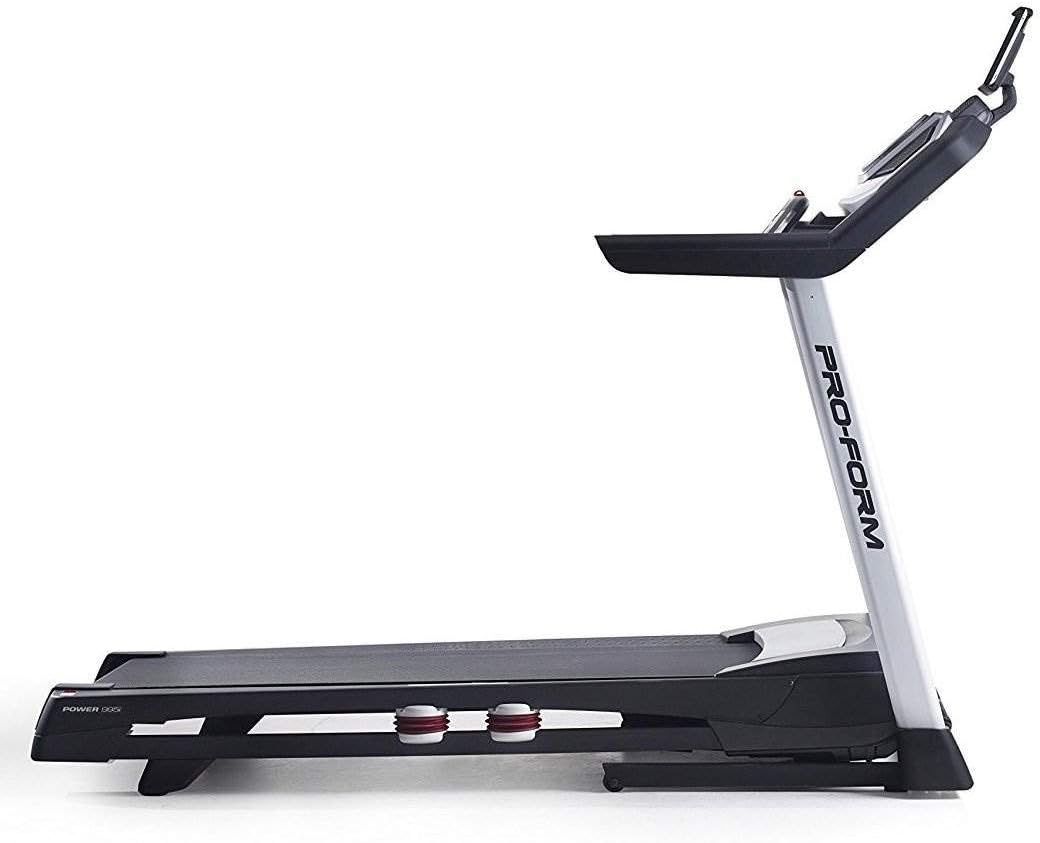
Figure 5: Treadmill in folded position.
Troubleshooting
If you encounter issues with your ProForm Power 995i Treadmill, refer to the common problems and solutions below. For more complex issues, contact customer support.
| Problem | Possible Cause | Solution |
|---|---|---|
| Treadmill does not power on. | Power cord not plugged in; circuit breaker tripped; safety key not inserted. | Ensure power cord is securely plugged in. Check household circuit breaker. Insert safety key fully into the console. |
| Walking belt slips. | Belt tension too loose. | Adjust the walking belt tension as per the assembly guide. |
| Walking belt drifts to one side. | Belt not centered. | Adjust the walking belt centering as per the assembly guide. |
| Unusual noise during operation. | Loose components; motor cover rubbing; worn parts. | Check all assembly bolts for tightness. Ensure motor cover is secure. If noise persists, contact customer support. |
| iFit connectivity issues. | Bluetooth not enabled; app not updated; device incompatibility. | Ensure Bluetooth is enabled on your device and the treadmill. Update the iFit app to the latest version. Verify device compatibility with iFit Bluetooth features. |
Specifications
- Model: PFTL99715
- Drive System: 3.0 CHP* drive System
- Running Belt: 20 inches x 60 inches non-stretch 1-ply commercial belt
- Cushioning: ProShox cushioning
- Rollers: 2.5 inches precision Machined and balanced non-flex roller
- Display: 7 inches backlit iFit display
- Speed Range: 0-12 MPH (Digital Quick Speed Control)
- Incline Range: 0-15% (Digital Quick Incline Control)
- Workout Programs: 30 preset workout Apps
- Audio: iPod Compatible audio (2-2 inches speakers)
- Heart Rate Monitoring: EKG grip Pulse
- Cooling: CoolAire workout Fan
- User Capacity: 350 lbs (159 kg)
- Dimensions (LxWxH): 87.5 x 32 x 59.5 inches (approximate, based on package dimensions and general treadmill size)
- Folded Size: Space Saver design with Easy Lift Assist
- Item Weight: 225 Pounds
- Power Source: Corded Electric
- Connectivity: Bluetooth
*Continuous Horsepower ("CHP") is a term used in the treadmill industry for consumer comparison purposes. The CHP rating is measured in laboratory testing using a dynamometer, which measures the mechanical power of the motor. The CHP rating does not denote the operational horsepower of the treadmill in ordinary household use. In ordinary household use, the motor does not operate at the horsepower shown.
Warranty and Support
Warranty Information
The ProForm Power 995i Treadmill comes with the following warranty:
- Frame and Motor: Lifetime Warranty
- Parts: 3 Year Warranty
- Labor: 1 Year Warranty
Please retain your proof of purchase for warranty claims. The warranty covers defects in materials and workmanship under normal use. It does not cover damage resulting from misuse, accident, or unauthorized modifications.
Customer Support
For technical assistance, parts replacement, or warranty inquiries, please contact ProForm customer support. Refer to the contact information provided with your product packaging or visit the official ProForm website for the most current support details.
You can also refer to the official User Guide (PDF) for additional information.
Related documentsPFTL99715

Ask a question about this manual
Ask about setup, troubleshooting, compatibility, parts, safety, or missing instructions. Manuals+ will review the question and use this page’s manual context to help answer it.