
1. Introduction
This manual provides essential information for the safe and efficient operation, installation, and maintenance of your Kaiser EH 6355 Em built-in electric oven. Please read these instructions carefully before using the appliance and keep them for future reference.

Figure 1: Front view of the Kaiser EH 6355 Em built-in electric oven, showcasing its black finish and bronze Empire design elements.
2. Safety Instructions
Always adhere to the following safety guidelines to prevent accidents and ensure proper functioning of the oven:
- Ensure the oven is correctly installed by a qualified technician before first use.
- Do not allow children to operate the oven unsupervised. The oven surfaces can become very hot during operation.
- Always use oven mitts when handling hot dishes or oven accessories.
- Never use abrasive cleaners or sharp objects to clean the oven interior or exterior, as this can damage surfaces.
- Keep flammable materials away from the oven during operation.
- If the power cord is damaged, it must be replaced by the manufacturer, its service agent, or similarly qualified persons to avoid a hazard.
3. Product Overview
The Kaiser EH 6355 Em is a 60 cm built-in electric oven featuring a classic Empire design with modern functionality. Key components include:
- Control Knobs: Electromechanical rotary knobs for function selection and temperature control.
- Analog Clock: Electronic analog timer with automatic shut-off and acoustic signal.
- Oven Door: Triple-glazed for improved insulation, with a removable inner glass pane for easy cleaning.
- Oven Cavity: Features catalytic self-cleaning panels and Easy Clean enamel for simplified maintenance.
- Accessories: Includes a rotisserie spit, baking tray, and oven rack.

Figure 2: The oven's distinctive Empire design with bronze accents and branding.

Figure 3: Detailed view of the electromechanical control knobs, used for selecting oven functions and setting temperature.

Figure 4: The electronic analog clock, which functions as a timer and provides automatic shut-off.
4. Setup & Installation
The Kaiser EH 6355 Em oven is designed for built-in installation into a standard 60 cm kitchen cabinet. Professional installation is recommended.
4.1 Unpacking
- Carefully remove all packaging materials.
- Inspect the oven for any signs of damage. If damaged, do not install and contact your supplier.
- Retain packaging for potential future transport or service.
4.2 Electrical Connection
- Ensure the electrical supply matches the voltage and frequency specified on the oven's rating plate.
- The oven must be properly earthed.
- The electrical connection should be made by a qualified electrician.
4.3 Cabinet Installation
- Ensure the cabinet opening dimensions match the oven's dimensions (refer to Section 7: Specifications).
- Provide adequate ventilation around the oven to prevent overheating.
- Secure the oven into the cabinet using the provided screws.
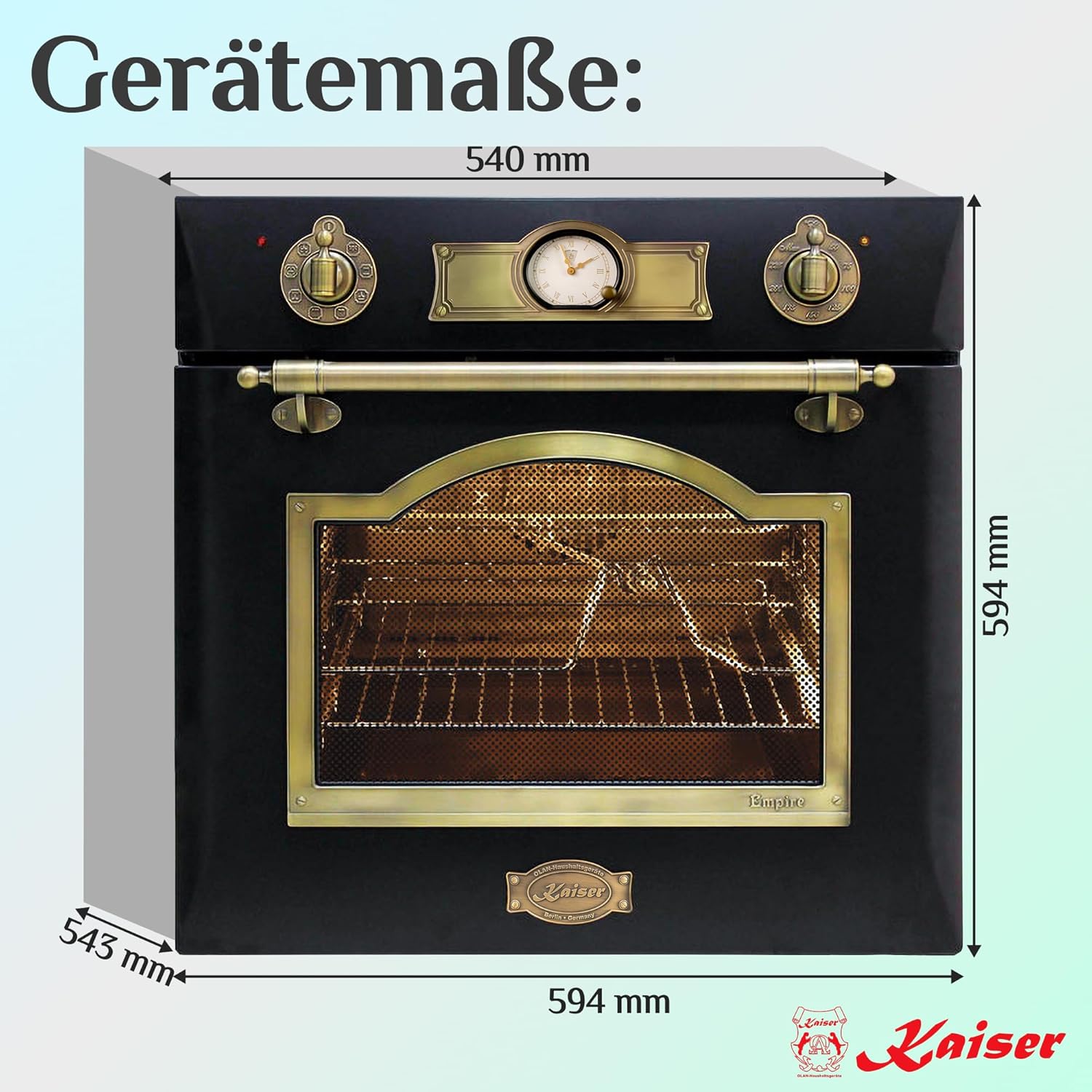
Figure 5: Diagram illustrating the external dimensions of the Kaiser EH 6355 Em oven for installation planning.
5. Operating Instructions
Your Kaiser EH 6355 Em oven offers 8 multifunction cooking modes. Familiarize yourself with the controls before use.
5.1 Setting the Time
- Upon first connection or after a power outage, the clock will need to be set.
- Refer to the specific instructions in the full user manual for setting the electronic analog clock.
5.2 Selecting a Cooking Function
- Turn the left control knob to select the desired cooking function (e.g., Top/Bottom Heat, Convection, Grill, Rotisserie).
5.3 Setting the Temperature
- Turn the right control knob to set the desired temperature for your chosen function.
- The oven will begin to heat up once both function and temperature are set.
5.4 Using the Timer
- The analog clock can be used as a minute minder or to program the cooking duration.
- When programmed for cooking duration, the oven will automatically switch off after the set time. An acoustic signal will sound.
5.5 Cooking Modes
The oven features 8 cooking modes, including:
- Top/Bottom Heat: Traditional baking and roasting.
- Convection (Fan-assisted): For even cooking on multiple levels.
- Infrared Grill: For grilling and browning.
- Rotisserie: For roasting poultry or large cuts of meat evenly.
- Defrost: Gentle thawing of frozen foods.

Figure 6: The oven interior, highlighting the hot air system for uniform heat distribution and the circulation system for cooling.

Figure 7: The oven door, featuring triple glazing and a convenient recipe table printed on the inner glass for quick reference.
6. Maintenance & Cleaning
Regular cleaning and maintenance will prolong the life of your oven and ensure optimal performance.
6.1 Catalytic Self-Cleaning
- The oven is equipped with catalytic panels that absorb grease and food residues.
- During normal operation at high temperatures (above 200°C), these panels oxidize and break down residues.
- For heavy soiling, run the oven at its maximum temperature for approximately one hour.
- After cooling, wipe away any remaining ash with a damp cloth.
6.2 Easy Clean Enamel
- The oven interior is coated with Easy Clean enamel, making it smooth and easy to wipe clean.
- Use a soft cloth and mild detergent for cleaning. Avoid abrasive sponges or harsh chemicals.
6.3 Exterior Cleaning
- Clean the exterior surfaces with a soft cloth and a non-abrasive cleaner.
- For bronze elements, use a specialized cleaner suitable for metal finishes to maintain their appearance.
6.4 Oven Door Cleaning
- The inner glass pane of the oven door can be removed for thorough cleaning. Refer to the full manual for instructions on how to safely remove and reattach it.
7. Troubleshooting
If you encounter issues with your oven, consult the following table before contacting service.
| Problem | Possible Cause | Solution |
|---|---|---|
| Oven does not heat up | No power supply; Function/temperature not set; Timer not set correctly | Check power connection; Ensure function and temperature knobs are set; Set the timer or ensure it's not in automatic shut-off mode. |
| Uneven cooking results | Incorrect temperature/function; Overloading oven; Improper placement of dishes | Verify settings; Avoid overcrowding; Use appropriate rack positions. |
| Oven light not working | Bulb faulty or loose | Replace the oven bulb (ensure oven is cool and disconnected from power). |
| Excessive smoke during cooking | Food spillage; Excessive fat/grease | Clean oven interior thoroughly; Use a drip tray for fatty foods. |
8. Specifications
Detailed technical specifications for the Kaiser EH 6355 Em built-in electric oven:
| Feature | Specification |
|---|---|
| Brand | Kaiser |
| Model Number | EH 6355 Em |
| Type | Built-in Electric Oven |
| Size | 60 cm |
| Color | Black with Bronze Accents |
| Heating Method | Multifunction (Top/Bottom Heat, Convection, Grill, Rotisserie) |
| Number of Cooking Functions | 8 |
| Energy Efficiency Class | A |
| Cavity Volume | 67 Liters |
| Energy Consumption (Conventional) | 0.90 kWh/cycle |
| Energy Consumption (Convection) | 0.81 kWh/cycle |
| Control Type | Electromechanical Rotary Knobs |
| Timer | Electronic Analog Clock with Automatic Shut-off |
| Cleaning System | Catalytic Self-Cleaning, Easy Clean Enamel |
| Oven Door | Triple Glazed, Removable Inner Glass |
| Dimensions (W x H x D) | 594 mm x 594 mm x 543 mm |
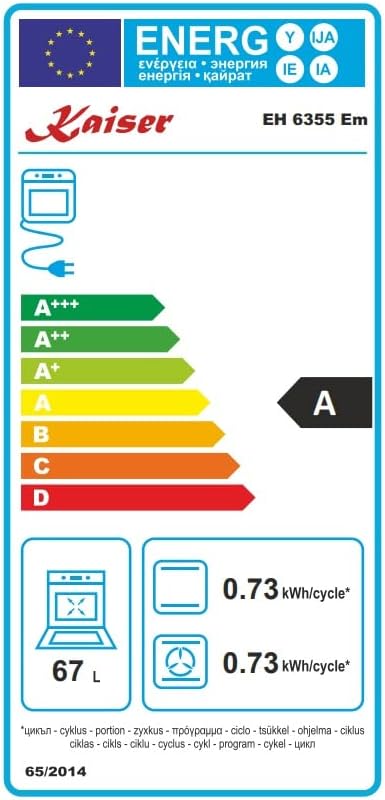
Figure 8: The EU energy label for the Kaiser EH 6355 Em oven, indicating its A-class energy efficiency.

Figure 9: Product data sheet providing detailed energy consumption and volume information for the oven.
9. Warranty & Support
Your Kaiser EH 6355 Em oven comes with a manufacturer's warranty. For specific details regarding warranty coverage, duration, and terms, please refer to the warranty card included with your product or visit the official Kaiser website.
For technical support, spare parts, or service requests, please contact your retailer or an authorized Kaiser service center. When contacting support, please have your model number (EH 6355 Em) and serial number ready.
Information regarding returns and refunds within 30 days of receipt, or for defective/damaged products, can typically be found on the retailer's help pages where the product was purchased.


