Introduction
This manual provides instructions for the proper setup, operation, and maintenance of your TELESIN 9.5cm Suction Cup Mount. This mount is designed to securely attach action cameras, such as GoPro and SJCAM models, as well as other optical equipment with a standard tripod mount, to smooth, non-porous surfaces. Please read this manual thoroughly before use to ensure safe and effective operation.
Package Contents
- 1 x TELESIN 9.5cm Suction Cup Mount
- 1 x Tripod Mount Adapter
Features
- Strong 9.5cm diameter suction cup for secure attachment.
- Compatible with GoPro HERO3, HERO3+, HERO4, HERO5, and SJCAM SJ4000, SJ5000 cameras.
- Includes a tripod mount adapter for broader camera compatibility.
- Adjustable arms provide a broad range of motion for flexible positioning.
- Lightweight and durable construction.
Setup Instructions
1. Attaching the Suction Cup Mount
Ensure the mounting surface is clean, dry, and smooth. Press the suction cup firmly against the desired surface. Flip the lever down to create a vacuum seal, securing the mount in place.

Image 1: Close-up view of the suction cup mount, showing the lever in the locked position to create a secure vacuum seal on a smooth surface.
2. Attaching Your Camera
The mount features an integrated GoPro-style mount. For GoPro or compatible action cameras, align the camera's mounting tabs with the mount's slots and secure with the provided thumb screw (if applicable, usually comes with the camera). For cameras with a standard 1/4-inch tripod screw thread, use the included tripod mount adapter. Screw the adapter onto your camera, then attach the adapter to the GoPro-style mount.

Image 2: Detailed view of the tripod mount adapter, showing the 1/4-inch screw thread for attaching various cameras.

Image 3: The TELESIN suction cup mount with an action camera attached, illustrating the adjustable arm for flexible camera positioning.
Operating Instructions
Once your camera is securely attached to the mount and the suction cup is firmly fixed to a smooth surface, you can adjust the camera's angle using the adjustable arms. The mount features two ball heads for precise positioning. Loosen the adjustment knobs, position your camera as desired, and then tighten the knobs to lock the angle. Always ensure all connections are tight before recording.
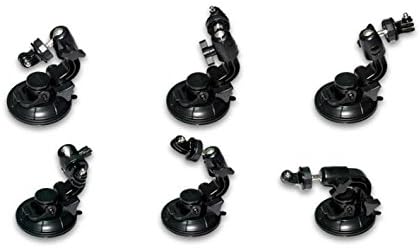
Image 4: Various perspectives of the TELESIN suction cup mount, demonstrating its versatility and adjustable components.
Important Usage Guidelines
- Surface Compatibility: This mount is designed for smooth, non-porous surfaces such as glass, polished metal, and certain plastics. Ensure the surface is clean and dry for optimal suction.
- Activity Recommendation: This mount is recommended for non-impact activities only. It is NOT RECOMMENDED for high-impact sports like surfing, snowboarding, or off-road driving where strong vibrations or sudden impacts may occur.
- Regular Checks: Periodically check the suction cup's seal and the tightness of all connections, especially during extended use or in changing environmental conditions.
- Temperature: Extreme temperatures can affect suction performance. Avoid prolonged exposure to direct sunlight in hot environments or extreme cold.
Maintenance
To maintain the longevity and performance of your suction cup mount:
- Cleaning: Clean the suction cup and mounting surface with a damp cloth and mild soap. Ensure both are completely dry before re-attaching.
- Storage: Store the mount in a clean, dry place away from direct sunlight when not in use. Avoid storing with the suction cup pressed against uneven surfaces to prevent deformation.
- Inspection: Regularly inspect the suction cup for any signs of damage, cracks, or wear. Replace the mount if significant damage is observed.
Troubleshooting
| Problem | Possible Cause | Solution |
|---|---|---|
| Suction cup does not hold securely. | Surface is dirty, wet, porous, or uneven. Suction cup is damaged. | Clean and dry the surface thoroughly. Ensure the surface is smooth and non-porous. Inspect the suction cup for damage; replace if necessary. |
| Camera angle shifts during use. | Adjustment knobs are not tightened sufficiently. | Ensure all adjustment knobs on the arm are tightened firmly after positioning the camera. |
Specifications
| Brand | TELESIN |
| Model Number | GP-SUC-003 |
| Suction Cup Diameter | 9.5 cm (approximately 3.7 inches) |
| Mounting Type | Suction Cup (Dashboard, Window, Smooth Surfaces) |
| Compatible Devices | GoPro HERO series, SJCAM series, Cameras with 1/4-inch tripod mount |
| Special Feature | Adjustable Arm with Dual Ball Heads |
| Item Weight | 6.4 ounces (approx. 181 grams) |
| Color | Black |
Warranty and Support
TELESIN provides a 1-year warranty for this product, covering manufacturing defects. For warranty claims, technical support, or further assistance, please contact TELESIN customer service through their official website or the retailer where the product was purchased. Please retain your proof of purchase for warranty validation.


