1. Introduction
The SAMSUNG Level U Bluetooth Wireless In-ear Headphones are designed for high-quality audio on the go. Featuring an ergonomic design for comfortable long-term wear, 12mm speaker units, and active dual-mic noise reduction, these headphones deliver clear sound and ease of use.
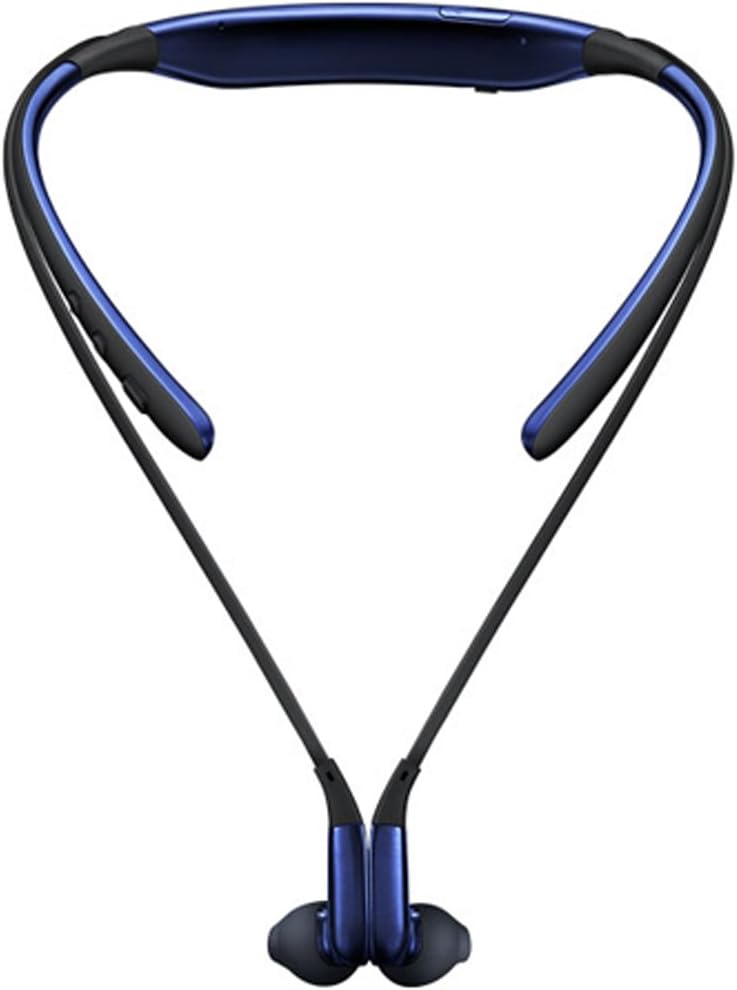
Image: Front view of the SAMSUNG Level U Bluetooth Wireless In-ear Headphones.
2. What's in the Box
Ensure all items are present:
- SAMSUNG Level U Wireless Headphones
- 3 sets of ear gels (2 sets standard gels, 1 set stabilizing gels)
- Micro USB Charging Cable
- Rubber Bands
- User Manual
3. Setup
3.1. Charging the Headphones
- Connect the Micro USB Charging Cable to the charging port on the headphones.
- Connect the other end of the cable to a compatible USB power source.
- The LED indicator will show charging status. A full charge provides up to 11 hours of talk time or 10 hours of play time.
3.2. Pairing with a Bluetooth Device
- Ensure the headphones are powered off.
- Press and hold the Power/Play/Pause button until the LED indicator flashes blue and red, indicating pairing mode.
- On your Bluetooth-enabled device (e.g., smartphone), go to the Bluetooth settings and search for available devices.
- Select "SAMSUNG Level U" or "EO-BG920BBEBUS" from the list.
- Once connected, the LED indicator will turn solid blue.
4. Operating Instructions
4.1. Wearing the Headphones
Place the neckband comfortably around your neck. Insert the earbuds into your ears. The magnetic earbuds can be clasped together when not in use to prevent tangling and secure them around your neck.

Image: A person wearing the SAMSUNG Level U Bluetooth Wireless In-ear Headphones.
4.2. Basic Controls
- Power On/Off: Press and hold the Power/Play/Pause button.
- Play/Pause Music: Press the Power/Play/Pause button once.
- Volume Up/Down: Use the dedicated volume buttons (+/-).
- Next/Previous Track: Press and hold the volume up (+) button for the next track, or volume down (-) button for the previous track.
- Answer/End Call: Press the Power/Play/Pause button once.
- Reject Call: Press and hold the Power/Play/Pause button.
- Activate Voice Command (S Voice/Google Assistant): Press and hold the Power/Play/Pause button.
5. Maintenance
- Cleaning: Wipe the headphones with a soft, dry cloth. Do not use harsh chemicals or abrasive materials.
- Ear Gels: Regularly remove and clean the ear gels with mild soap and water. Ensure they are completely dry before reattaching.
- Storage: Store the headphones in a cool, dry place away from direct sunlight and extreme temperatures.
- Water/Sweat Resistance: While designed for active use, avoid prolonged exposure to moisture. Dry thoroughly if exposed to sweat or light splashes.
6. Troubleshooting
6.1. Cannot Pair Headphones
- Ensure headphones are in pairing mode (flashing blue/red LED).
- Check that Bluetooth is enabled on your device.
- Move the headphones closer to your device.
- Restart both the headphones and your device.
6.2. No Sound or Low Volume
- Ensure headphones are properly connected to your device.
- Adjust the volume on both the headphones and your connected device.
- Check if the headphones are charged.
6.3. Intermittent Connection
- Ensure there are no obstructions between the headphones and your device.
- Avoid interference from other wireless devices.
- Keep the headphones within the recommended operating range (up to 10 meters).
7. Specifications
| Feature | Detail |
|---|---|
| Model Name | SAMSUNG Level U |
| Item Model Number | EO-BG920BBEBUS |
| Connectivity Technology | Bluetooth |
| Wireless Communication Technology | Bluetooth |
| Headphones Jack | Wireless |
| Control Type | Call Control |
| Control Method | App, Voice |
| Battery Life | Up to 11 Hours (Talk Time) / 10 Hours (Play Time) |
| Noise Control | Active Noise Cancellation |
| Speaker Units | 12mm |
| Microphone | Dual Mic Noise Reduction and Echo Cancelation |
| Special Features | Magnetic Ear Buds, Stabilizing Ear Gels |
| Item Weight | 4 ounces |
| Product Dimensions | 6.33 x 7.93 x 1.02 inches |
| UPC | 887276091396 |
8. Warranty and Support
For warranty information and customer support, please refer to the documentation included in your product packaging or visit the official Samsung support website.
Online resources and FAQs may also be available on the Samsung support portal.


