
Introduction
Thank you for purchasing the EinCar Bluetooth FM Transmitter MP3 Player. This device allows you to stream music and make hands-free calls through your car's FM radio. It features Bluetooth connectivity, MP3 playback from SD/MMC cards, and a convenient steering wheel remote control for safe operation. Please read this manual carefully before use to ensure proper installation and operation.
Product Overview
The EinCar Bluetooth FM Transmitter is designed for ease of use and integrates seamlessly into your vehicle's audio system. It includes a main unit, a steering wheel remote control, and a full-function remote control.

Image: Overview of the EinCar Bluetooth FM Transmitter, showing the main unit, steering wheel remote control, standard remote control, and auxiliary cable. Icons indicate Bluetooth, FM Transmitter, Music playback, Hands-free calling, Charging, and Sync capabilities.
Key Features:
- Bluetooth connectivity for wireless audio streaming and hands-free calls.
- FM Transmitter function to broadcast audio to your car radio.
- MP3 player with support for SD/MMC cards.
- 1.5-inch LCD display for clear information.
- Steering wheel remote control for convenient and safe operation.
- Full-function remote control included.
- USB port for charging devices or playing music (if supported by specific model).
Setup
1. Powering On the Device
- Insert the main unit of the FM transmitter into your car's 12V cigarette lighter socket.
- The device will power on automatically and the LCD display will illuminate.

Image: The main unit of the EinCar Bluetooth FM Transmitter correctly inserted into the car's 12V power outlet, ready for operation.
2. Installing the Steering Wheel Remote Control
- Attach the steering wheel remote control to your steering wheel using the adjustable strap. Ensure it is securely fastened and does not obstruct your driving.
- Position the remote control where it is easily accessible without taking your hands off the wheel.

Image: A close-up view of the steering wheel remote control, showing its ergonomic design and how it attaches to the steering wheel for convenient access to media and call controls.
Operating Instructions
1. Setting the FM Frequency
- Tune your car's FM radio to an unused frequency (one with static or no broadcast).
- On the FM transmitter, use the frequency adjustment buttons (usually 'CH+' and 'CH-' or arrow keys) to match the frequency of your car radio.
- Ensure the frequencies match exactly for optimal sound quality.
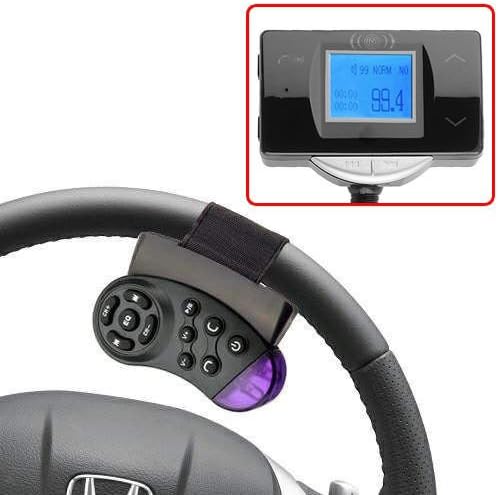
Image: The LCD screen of the FM transmitter displaying the current FM broadcast frequency, in this case, 99.4 MHz. This screen also shows track information and Bluetooth status.
2. Bluetooth Pairing
- Once the transmitter is powered on, it will automatically enter Bluetooth pairing mode. The Bluetooth icon on the LCD display will flash.
- On your smartphone or other Bluetooth-enabled device, search for available Bluetooth devices.
- Select the device named "BT-CAR" (or similar) from the list.
- Once paired, the Bluetooth icon on the transmitter's display will become solid, and you will hear a confirmation tone.
3. Playing Music via Bluetooth
- After successful Bluetooth pairing, open your music player application on your smartphone.
- Start playing music. The audio will be transmitted to the FM transmitter and then broadcast to your car radio.
- Adjust the volume on your car radio and/or your smartphone for desired sound levels.
4. MP3 Playback from SD/MMC Card
- Insert an SD or MMC card containing MP3 audio files into the designated card slot on the main unit.
- The device will automatically detect the card and begin playing music.
- Use the playback controls on the main unit, steering wheel remote, or full-function remote to navigate tracks (play/pause, next/previous).

Image: A detailed view of the side of the main unit, highlighting the slot for an SD/MMC memory card, which allows for direct MP3 playback without a Bluetooth connection.
5. Hands-Free Calling
- When a call comes in, the music playback will pause, and the caller ID may be displayed on the LCD screen.
- Press the 'Answer' button (usually a phone icon) on the main unit or remote control to answer the call.
- Speak into the built-in microphone on the main unit.
- To end a call, press the 'End Call' button (usually a phone icon or hang-up symbol).
- To redial the last number, press and hold the 'Answer' button.
6. Using the Steering Wheel Remote Control
The steering wheel remote provides convenient access to essential functions:
- CH+/CH-: Adjust FM frequency.
- V+/V-: Adjust volume.
- Play/Pause: Control music playback.
- Previous/Next Track: Skip between songs.
- Answer/End Call: Manage phone calls.
- EQ: Cycle through equalizer presets (if available).

Image: The EinCar Bluetooth FM Transmitter main unit and the steering wheel remote control shown installed in a car's dashboard and steering wheel, demonstrating their integrated use.
Maintenance
- Keep the device dry. Moisture can damage electronic circuits.
- Do not expose the device to extreme temperatures.
- Clean the device with a soft, dry cloth. Do not use harsh chemicals or abrasive cleaners.
- Avoid dropping or subjecting the device to strong impacts.
- When not in use for extended periods, unplug the device from the car's power socket.
Troubleshooting
| Problem | Possible Cause | Solution |
|---|---|---|
| No power | Loose connection; Car socket issue | Ensure the device is firmly plugged into the 12V socket. Check if the car's cigarette lighter socket is working. |
| Poor sound quality/Static | FM frequency interference; Volume too low/high | Find a clearer FM frequency on your car radio and match it on the transmitter. Adjust volume levels on both the transmitter/phone and car radio. Avoid frequencies used by strong local radio stations. |
| Bluetooth not connecting | Device not in pairing mode; Bluetooth off on phone | Ensure Bluetooth is enabled on your phone. Restart both the transmitter and your phone. Delete previous pairings and re-pair. |
| Remote control not working | Battery low/dead; Obstruction | Replace the battery in the remote control. Ensure there are no obstructions between the remote and the main unit. |
Specifications
- Model: B00Y4IYYL0
- Connectivity Technology: Bluetooth, USB
- Power Source: Car 12V (Battery)
- Special Feature: Hands-Free Calling
- Display: 1.5-inch LCD
- Supported Media Files: MP3
- Supported Storage: SD/MMC Card
- Control Method: Remote Control (Steering Wheel & Standard)
- Audio Output Mode: FM Transmission
- Compatible Devices: Smartphone, Tablet, Laptop, Car Stereo System
- UPC: 712407026681
Warranty and Support
For warranty information or technical support, please refer to the documentation provided with your purchase or contact your retailer. Keep your purchase receipt as proof of purchase.