
Keyless2Go R-TOY-14T3.go
Keyless2Go Replacement Key Fob Instruction Manual
Model: R-TOY-14T3.go | FCC ID: GQ43VT14T
Product Overview
The Keyless2Go Replacement Key Fob is designed to provide a reliable and affordable solution for replacing your original keyless entry remote. This remote is a complete unit, including all necessary electronics and a pre-installed battery, ready for programming.
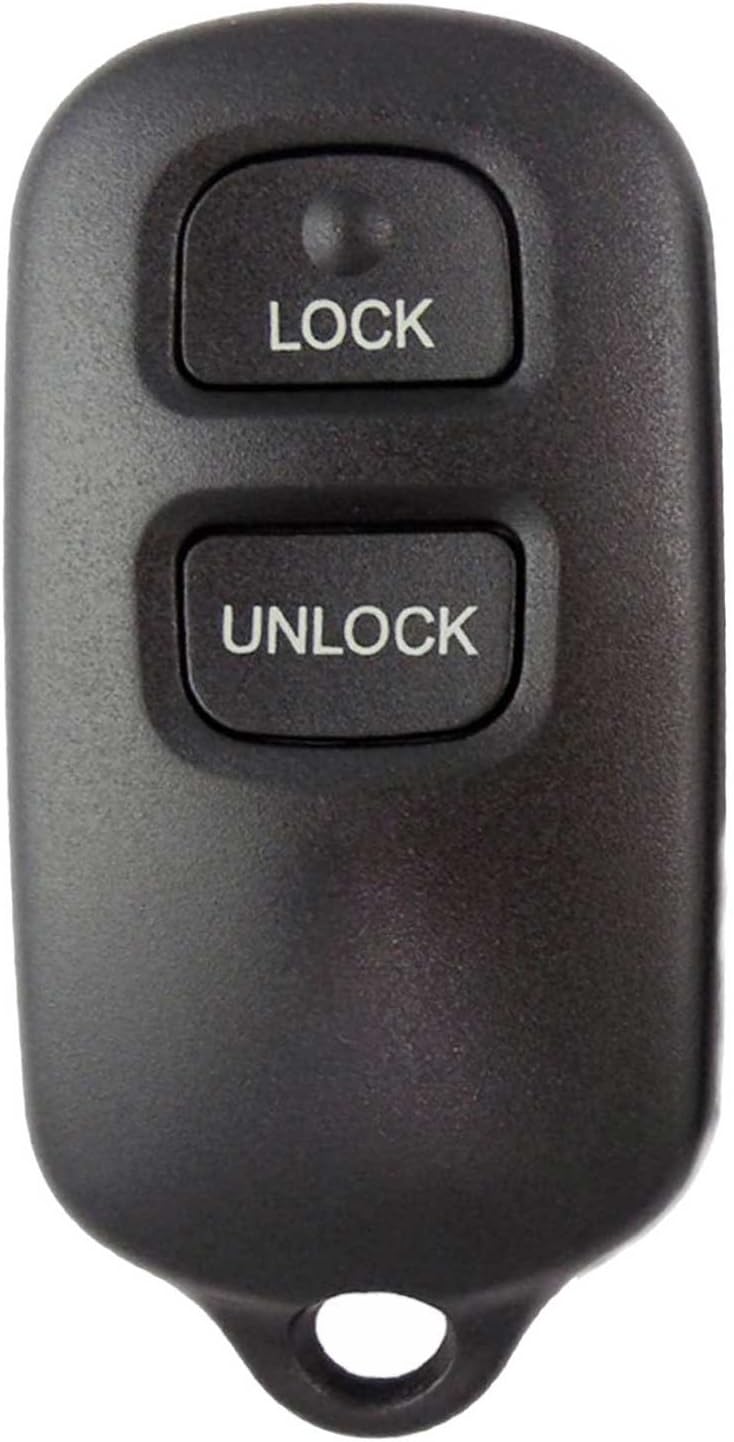
Front view of the key fob, showing the 'LOCK' and 'UNLOCK' buttons.

Back view of the key fob, featuring a blank area and a red panic button.
Key Features:
- Brand new replacement key fob remote for select Toyota vehicles.
- Each remote is tested for transmission before shipping.
- Includes all electronics and battery.
- FCC ID: GQ43VT14T, Part #: 89742-06010.
Compatibility
This replacement key fob is compatible with various Toyota and Pontiac models. Please ensure your vehicle is listed below and that your original remote does not have an LED light, as this replacement will not work with LED-equipped originals.
| Make | Model | Years |
|---|---|---|
| Pontiac | Vibe | 2003 - 2008 |
| Toyota | Camry | 2000 - 2006 |
| Toyota | Corolla | 2003 - 2008 |
| Toyota | Matrix | 2003 - 2008 |
| Toyota | Sienna | 1999 - 2003 |
| Toyota | Solara | 1999 - 2003 |
Important Note: If your original remote has an LED indicator, this replacement remote will not be compatible. Always verify compatibility with your vehicle's specific requirements before programming.

Visual representation of the key fob and compatible vehicle, highlighting DIY programming.
Setup and Programming
This Keyless2Go remote requires programming to your vehicle. DIY programming instructions are provided to assist you with this process. It is crucial to follow the instructions precisely for successful programming.
Programming Steps:
- Access Instructions: A website link to free DIY programming instructions will be provided with your order. Please refer to this link for detailed, step-by-step guidance.
- Vehicle Preparation: Ensure your vehicle is in the correct state as specified in the programming instructions (e.g., doors closed, ignition off).
- Programming Sequence: Follow the specific sequence of actions involving your vehicle's ignition, doors, and existing remote (if applicable) as outlined in the provided instructions. This may include turning the ignition on/off, opening/closing doors, and pressing buttons on the remote.
- Confirmation: The vehicle's locks may cycle or a light may flash to confirm successful programming. If programming fails, repeat the steps carefully.
Note: Some vehicles may require all existing remotes to be reprogrammed simultaneously with the new remote. If you encounter difficulties, refer to the troubleshooting section or contact support.
Operating the Key Fob
Once successfully programmed, your Keyless2Go remote will function similarly to your original factory remote.
Button Functions:
- LOCK Button: Press once to lock all vehicle doors.
- UNLOCK Button: Press once to unlock the driver's door. Press twice within a few seconds to unlock all vehicle doors.
- Panic Button (Red Square on Back): Press and hold to activate the vehicle's alarm system. Release to deactivate.
The remote operates wirelessly, allowing you to lock and unlock your vehicle from a distance. Optimal range may vary based on environmental factors and vehicle battery strength.
Maintenance
The Keyless2Go remote is designed for durability and requires minimal maintenance.
Battery Replacement:
The remote comes with a pre-installed lithium metal battery. When the remote's range decreases significantly or it stops responding, the battery may need replacement.
- Carefully open the remote casing using a small flat-head screwdriver or a prying tool.
- Note the orientation of the existing battery.
- Remove the old battery and insert a new one of the same type (typically a coin cell battery, e.g., CR2032), ensuring correct polarity.
- Snap the remote casing back together securely.
Cleaning: Wipe the remote with a soft, dry cloth. Avoid using harsh chemicals or abrasive cleaners.
Storage: Store the remote in a dry place, away from extreme temperatures and direct sunlight.
Troubleshooting
If you experience issues with your Keyless2Go remote, consider the following troubleshooting steps:
- Remote Not Responding:
- Ensure the remote is properly programmed to your vehicle. Re-attempt programming if unsure.
- Check the battery. A low or dead battery is a common cause of non-responsiveness. Replace if necessary.
- Verify vehicle compatibility. This remote will not work if your original remote had an LED.
- Reduced Range:
- Replace the battery.
- Ensure there are no obstructions between the remote and the vehicle.
- Environmental interference (e.g., strong radio signals, power lines) can affect range.
- Programming Difficulties:
- Carefully re-read and follow the DIY programming instructions provided with your order. Even minor deviations can cause failure.
- Ensure all vehicle doors are closed and the ignition is in the correct position as per instructions.
- If your vehicle requires all remotes to be programmed at once, ensure all remotes (new and existing) are present during the programming sequence.
If problems persist after attempting these steps, please contact Keyless2Go customer support for assistance.
Specifications
| Attribute | Detail |
|---|---|
| Brand | Keyless2Go |
| Model Number | R-TOY-14T3.go |
| FCC ID | GQ43VT14T |
| Part Number | 89742-06010 |
| UPC | 731882400144 |
| Product Dimensions | 1"L x 0.5"W |
| Item Weight | 0.634 ounces |
| Color | Black |
| Material | Plastic |
| Number of Buttons | 3 (Lock, Unlock, Panic) |
| Battery Type | 1 Lithium Metal battery (included) |
Support and Legal Information
Customer Support:
Keyless2Go provides free technical support with every order. If you have questions regarding programming, compatibility, or any other issues, please refer to the contact information provided with your purchase or visit the official Keyless2Go website.
For general inquiries, you can visit the Keyless2Go Store on Amazon.
Legal Disclaimer:
All product names, brands, logos, and other trademarks mentioned are the property of their respective owners. These are used solely to simplify the identification of the proper parts for a particular vehicle. Keyless2Go is not affiliated with, endorsed by, or sponsored by any of the companies or trademarks referenced in this manual or on its products.
Ask a question about this manual
Ask about setup, troubleshooting, compatibility, parts, safety, or missing instructions. Manuals+ will review the question and use this page’s manual context to help answer it.