
Texas Instruments 84PLCE/PWB/2L1/A
Contents
TI-84 PLUS CE Graphing Calculator User Manual
Model: 84PLCE/PWB/2L1/A
Introduction
This manual provides comprehensive instructions for the Texas Instruments TI-84 PLUS CE Graphing Calculator. It covers setup, operation, maintenance, and troubleshooting to ensure you get the most out of your device. The TI-84 PLUS CE is designed to facilitate the comprehension of math and science topics with its high-resolution, full-color backlit display and advanced functionality.
Product Overview
Key Features
- High-resolution, full-color backlit display
- Sleek Design
- TI Rechargeable Battery
- Familiar 84 Plus Family Functionality
- Ability to import and use images
Components
The TI-84 PLUS CE calculator features a robust design with a clear, color display and a comprehensive keypad. It includes a rechargeable battery for extended use.
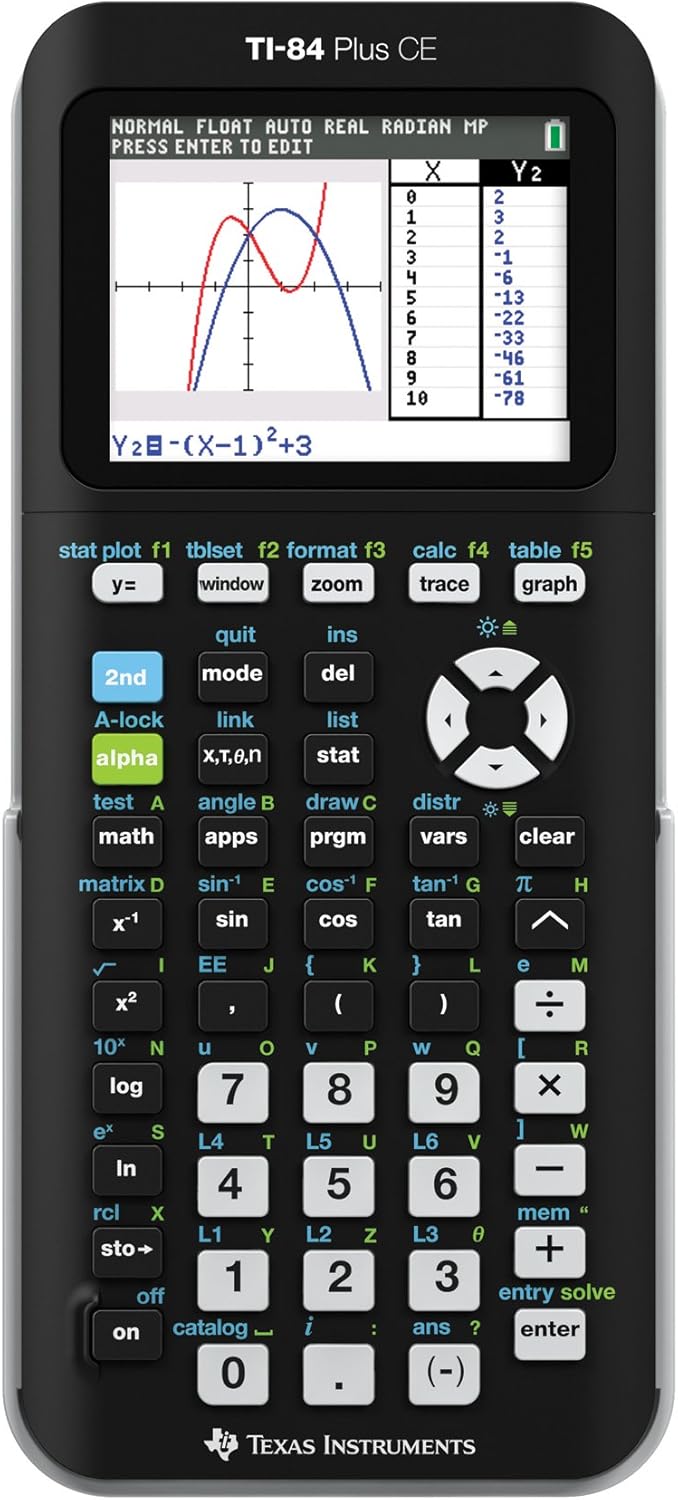
Figure 1: Front view of the TI-84 PLUS CE Graphing Calculator. This image shows the calculator's full-color display with a sample graph and data table, highlighting its intuitive interface and key layout.

Figure 2: Angled view of the TI-84 PLUS CE Graphing Calculator. This perspective provides a clearer look at the calculator's sleek design and the arrangement of its various function keys.

Figure 3: Alternative angled view of the TI-84 PLUS CE Graphing Calculator. This image further illustrates the calculator's compact and modern form factor.
Setup
Charging the Calculator
The TI-84 PLUS CE comes with a rechargeable Lithium Metal battery. Before first use, or if the battery is low, connect the calculator to a power source using the provided USB cable. A full charge typically takes approximately 4 hours. The battery indicator on the screen will show charging status.
Initial Power On
To turn on the calculator, press the ON button located at the bottom left of the keypad. The screen will illuminate, and the calculator will be ready for use.
Operating Instructions
Basic Operations
Perform standard arithmetic operations using the numeric keypad and operation buttons (+, -, *, /). Use the ENTER key to execute calculations. The calculator supports complex expressions and order of operations.
Graphing Functions
To graph an equation, press the Y= button, enter your function(s), and then press GRAPH. Adjust the viewing window using the WINDOW button. Utilize the TRACE and CALC functions to analyze graphs, find intercepts, minimums, maximums, and more.
Using Pre-loaded Apps
The calculator includes various pre-loaded applications. To access them, press the APPS button. Navigate through the list using the arrow keys and press ENTER to select an application. These apps extend the calculator's functionality for specific mathematical and scientific tasks.
Maintenance
Battery Care
To maximize battery life, avoid fully discharging the calculator frequently. Recharge the battery when the low battery indicator appears. Store the calculator in a cool, dry place when not in use for extended periods.
Cleaning
Clean the calculator's screen and casing with a soft, dry cloth. Do not use liquid cleaners, abrasive materials, or solvents, as these can damage the display or finish. Keep the calculator free from dust and debris.
Troubleshooting
Common Issues and Solutions
- Calculator will not turn on: Ensure the battery is charged. If the battery is fully depleted, it may take a few minutes of charging before the calculator responds. Try pressing the ON button firmly.
- Screen is blank or dim: Adjust the display contrast by pressing 2nd then the UP or DOWN arrow keys. Ensure the battery is charged.
- Calculator is frozen: Press and hold the ON button for several seconds to perform a soft reset. If this does not work, remove and reinsert the battery (if applicable for your model, though this model has a built-in rechargeable battery, a hard reset might involve a small reset button if available, consult the official user guide).
- Error messages: Refer to the official Texas Instruments user guide for specific error code explanations and solutions.
Specifications
| Attribute | Value |
|---|---|
| Product Dimensions | 8.6 x 6.1 x 1.8 inches |
| Item Weight | 10.6 ounces |
| Item Model Number | 84PLCE/PWB/2L1/A |
| Batteries | 1 Lithium Metal battery (included) |
| Manufacturer | Texas Instruments |
| Color | Black |
| Calculator Type | Graphing |
| Power Source | Battery Powered |
| Screen Size | 2.8 inches |
Warranty and Support
Texas Instruments provides a limited warranty for its products. For detailed warranty information, please refer to the official documentation included with your purchase or visit the Texas Instruments website. For technical support, FAQs, and additional resources, please visit the official Texas Instruments support page.
An official User Guide is available for download: Download User Guide (PDF)
Ask a question about this manual
Ask about setup, troubleshooting, compatibility, parts, safety, or missing instructions. Manuals+ will review the question and use this page’s manual context to help answer it.