
Sena 10U-SH-02
Sena 10U-SH-02 Motorcycle Bluetooth Communication System User Manual
Model: 10U-SH-02
Introduction
This user manual provides comprehensive instructions for the installation, operation, and maintenance of your Sena 10U-SH-02 Motorcycle Bluetooth Communication System. Designed specifically for the Shoei Neotec helmet, this system offers advanced communication capabilities for motorcyclists, ensuring connectivity and convenience on the road. Please read this manual thoroughly before using the product to ensure proper function and safety.
Product Overview
The Sena 10U-SH-02 is an integrated Bluetooth communication system engineered to fit seamlessly within the Shoei Neotec helmet. It provides a discreet yet powerful solution for rider-to-rider intercom, phone calls, music streaming, and FM radio reception. The system includes a main unit, speakers, microphone, and a handlebar remote for intuitive control.
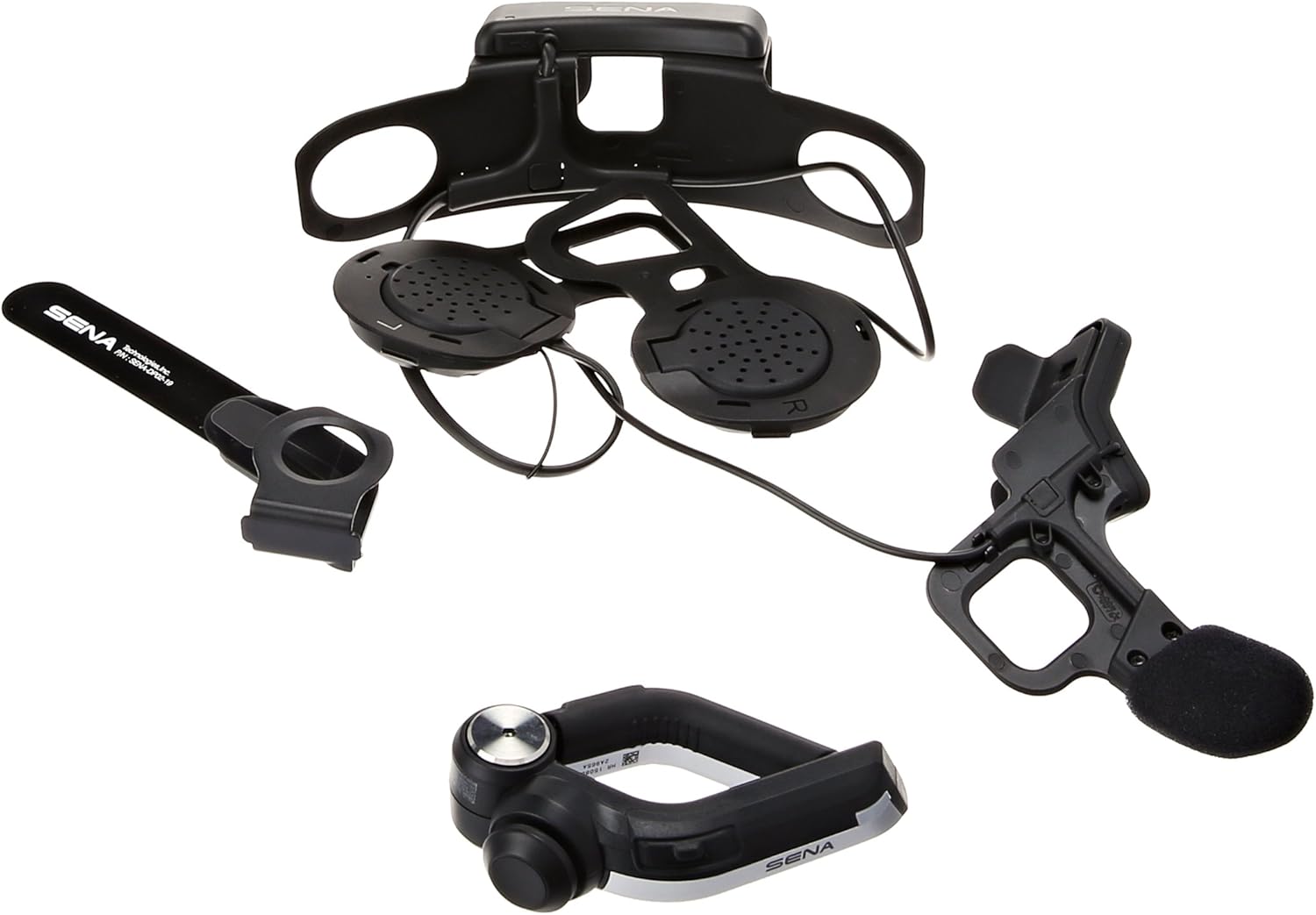
Figure 1: Overview of Sena 10U-SH-02 components.
Features
- Bluetooth 4.0 Technology: Ensures stable and efficient wireless communication.
- Four-Way Intercom: Communicate with up to four riders simultaneously, with a range of up to 1.6 kilometers (1.0 mile).
- Universal Intercom & Group Intercom: Enhanced connectivity options for various riding groups.
- Handlebar Remote: Provides safe and easy operation of system functions without removing hands from the handlebars.
- Music Sharing: Share audio with a fellow rider.
- Built-in FM Radio Tuner: Features a station scan and save function.
- Voice Prompts: Intuitive audio cues for system status and operations.
- Advanced Noise Control: Reduces background noise for clearer audio.
- Smartphone App: Exclusive app for iPhone and Android for configuration and control.
- Long Talk Time: Up to 10 hours of talk time on a single charge.
- Firmware Upgradeable: Ensures the system stays up-to-date with the latest features and improvements.
What's in the Box
The Sena 10U-SH-02 package includes the following components:
- Sena 10U-SH-02 Main Unit (integrated for Shoei Neotec helmet)
- Handlebar Remote
- USB Power & Data Cable
- User Manual (this document)

Figure 2: Contents of the Sena 10U-SH-02 package.
Setup
1. Installation into Shoei Neotec Helmet
The Sena 10U-SH-02 is designed for a custom fit within the Shoei Neotec helmet. Follow these steps for proper installation:
- Carefully remove the helmet's interior padding to access the ear pockets and internal shell.
- Position the main unit and speakers within the designated ear pockets. Ensure the speakers are aligned with your ears for optimal audio.
- Route the microphone boom towards the front of the helmet, ensuring it is positioned correctly for clear voice pickup.
- Secure all wires and components within the helmet's internal channels to prevent interference and discomfort.
- Reinstall the helmet's interior padding, ensuring no wires are pinched or exposed.

Figure 3: Internal component placement within the helmet.

Figure 4: Rear view of the integrated system in the helmet.
2. Charging the Unit
Before first use, fully charge the Sena 10U-SH-02. The charging time is approximately 3 hours. Use the provided USB power and data cable to connect the unit to a USB power source.
3. Handlebar Remote Installation
Mount the handlebar remote securely on your motorcycle's handlebar in a position that allows for easy and safe access while riding. Ensure it does not interfere with the operation of other controls.
Operating Instructions
1. Power On/Off
- Power On: Press and hold the main button on the helmet unit or the handlebar remote until you hear a voice prompt.
- Power Off: Press and hold the main button until you hear a voice prompt indicating power off.
2. Bluetooth Pairing
To pair your Sena 10U-SH-02 with your smartphone or other Bluetooth devices:
- With the unit off, press and hold the main button for 5 seconds until the LED flashes red and blue, indicating pairing mode.
- On your smartphone, enable Bluetooth and search for new devices.
- Select "Sena 10U-SH-02" from the list of available devices.
- If prompted, enter the PIN "0000".
- Once paired, the LED will turn blue.
3. Intercom Communication
The 10U-SH-02 supports four-way intercom communication. Refer to the detailed instructions in the Sena Smartphone App for setting up group intercoms.
- Starting Intercom: Briefly press the Intercom button on the handlebar remote to initiate communication with a paired intercom friend.
- Ending Intercom: Briefly press the Intercom button again to end the conversation.
4. Phone Calls
- Answering a Call: Briefly press the Phone button on the handlebar remote.
- Ending a Call: Briefly press the Phone button again.
- Voice Dialing: Press and hold the Phone button to activate your smartphone's voice assistant (e.g., Siri, Google Assistant).
5. Music and FM Radio
- Play/Pause Music: Briefly press the Play/Pause button on the handlebar remote.
- Next/Previous Track: Use the joystick or dedicated buttons on the handlebar remote.
- FM Radio On/Off: Press the FM button.
- Scan Stations: Use the scan function via the handlebar remote or smartphone app.

Figure 5: Internal control pad for basic functions.
Maintenance
- Cleaning: Use a soft, damp cloth to clean the exterior of the unit and remote. Do not use harsh chemicals or abrasive cleaners.
- Battery Care: To prolong battery life, avoid storing the unit in extreme temperatures. Charge the unit regularly, even if not in frequent use.
- Firmware Updates: Periodically check the Sena website or smartphone app for available firmware updates to ensure optimal performance and access to new features.
Troubleshooting
| Problem | Possible Cause | Solution |
|---|---|---|
| Unit does not power on. | Low battery. | Charge the unit for at least 3 hours. |
| Cannot pair with smartphone. | Unit not in pairing mode; Bluetooth off on phone. | Ensure unit is in pairing mode (red/blue flashing LED). Enable Bluetooth on your phone. |
| Intercom connection issues. | Out of range; interference; incorrect pairing. | Move closer to the other rider. Re-pair intercom connections. Avoid strong electromagnetic fields. |
| Audio quality is poor. | Microphone/speaker placement; wind noise; low volume. | Adjust microphone and speaker positions. Ensure Advanced Noise Control is active. Increase volume. |
For more detailed troubleshooting, please refer to the Sena website or contact customer support.
Specifications
| Feature | Detail |
|---|---|
| Model | 10U-SH-02 |
| Bluetooth Version | 4.0 |
| Intercom Range | Up to 1.6 km (1.0 mile) in open terrain |
| Talk Time | Up to 10 hours |
| Charging Time | 3 hours |
| Battery Type | Lithium Polymer |
| Audio Features | Built-in SBC Codec, Advanced Noise Control, Wide volume control |
| FM Radio | Built-in FM radio with RDS AF (Radio Data System Alternate Frequencies), Radio region: worldwide, 10 preset station memory with automatic scan function |
| Dimensions | 6.9 x 11.2 x 4.2 inches (Product Dimensions) |
| Weight | 14.4 ounces (Item Weight) |
Warranty and Support
For warranty information and technical support, please visit the official Sena website or contact their customer service department. Keep your proof of purchase for warranty claims.
Online Resources:
Related documents10U-SH-02


Ask a question about this manual
Ask about setup, troubleshooting, compatibility, parts, safety, or missing instructions. Manuals+ will review the question and use this page’s manual context to help answer it.