
Ai UPK750-Parent
Ai Multi-Application Pocket Instruction Manual
Model: UPK750-Parent | Brand: Ai
Introduction
The Ai Multi-Application Pocket is designed to provide a universal dash mount solution, offering a clean, factory-integrated look for various vehicle applications from 1981 to 2013. This product is crafted from durable materials to ensure a good fit and long-lasting performance. It includes all necessary instructions and hardware for installation.
Product Components
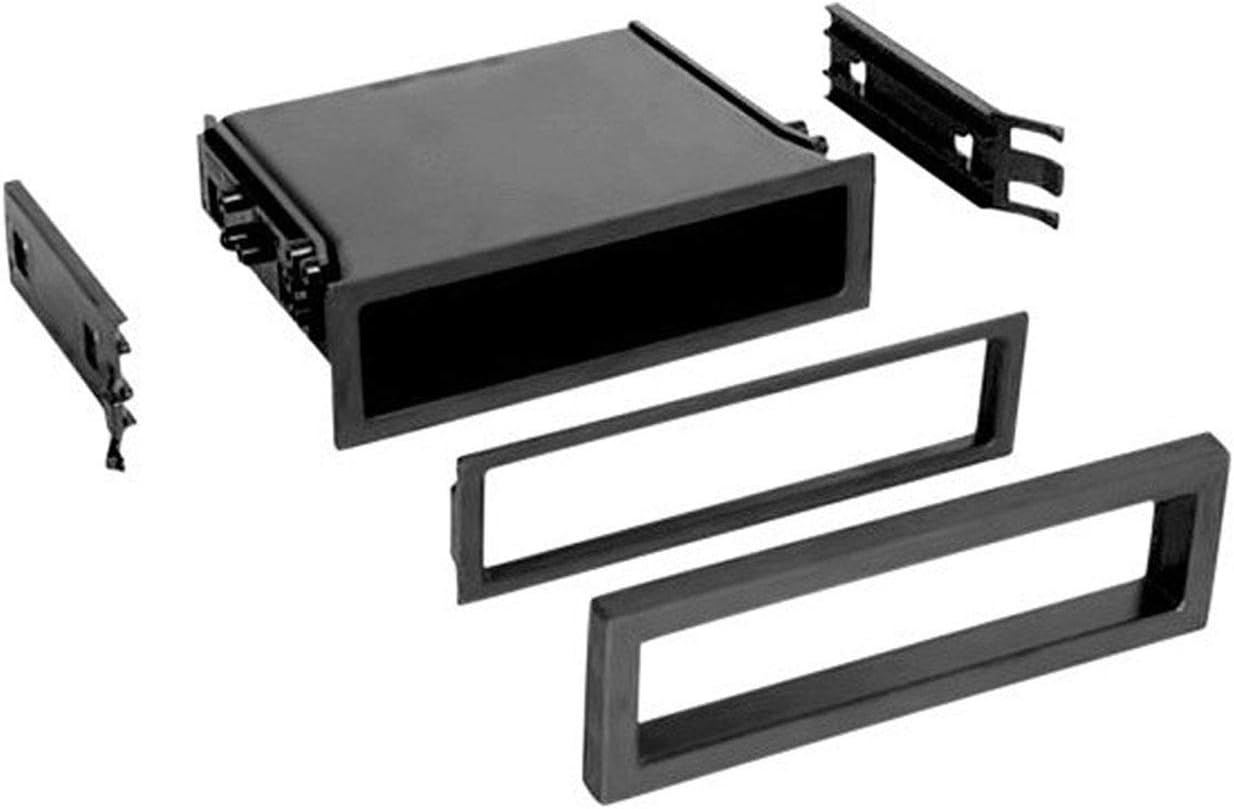
Image 1: Overview of the Ai Multi-Application Pocket, showcasing the main pocket unit and various included trim bezels and mounting brackets. These components allow for a customized fit in different dash configurations.

Image 2: An alternative perspective of the Ai Multi-Application Pocket and its accompanying parts, highlighting the different sizes of trim rings and the side mounting clips designed for secure installation.
Setup and Installation
The Ai Multi-Application Pocket is designed for straightforward installation, aiming for a factory-installed appearance. While specific steps may vary based on your vehicle's make and model, the general process involves securing the pocket into a standard single-DIN opening in your vehicle's dashboard.
- Preparation: Ensure the dash opening is clean and free of debris. Identify the appropriate trim bezel and mounting brackets from the included hardware that best fit your vehicle's dash opening.
- Assembly: Attach the selected mounting brackets to the sides of the pocket unit. These brackets are designed to slide into the dash opening and secure the pocket in place.
- Insertion: Carefully slide the assembled pocket into the dash opening. Apply gentle, even pressure until it sits flush with the dashboard.
- Securing: The mounting brackets are designed to create a snug fit. Some installations may benefit from additional securing methods, such as adhesive or screws, if the fit feels loose.
- Finishing: Snap the appropriate trim bezel onto the front of the pocket to complete the factory look.
Note: For optimal fit and stability, ensure all components are properly aligned before final securing. While designed for universal application, minor adjustments may be necessary for certain vehicle models.
Operating Instructions
The Ai Multi-Application Pocket serves as a convenient storage compartment within your vehicle's dashboard. Once installed, it provides an easily accessible space for small items such as keys, mobile phones, wallets, or other personal belongings. Simply place items into the pocket for secure storage while driving.
Maintenance
To maintain the appearance and functionality of your Ai Multi-Application Pocket, follow these simple maintenance guidelines:
- Cleaning: Wipe the interior and exterior surfaces with a soft, damp cloth. For stubborn dirt, a mild automotive interior cleaner can be used. Avoid abrasive cleaners or solvents, as these may damage the acrylic material.
- Inspection: Periodically check the pocket's fit within the dash to ensure it remains secure. If it becomes loose, re-secure the mounting brackets as needed.
Troubleshooting
While the Ai Multi-Application Pocket is designed for universal fit, some installation challenges may arise. Here are common issues and potential solutions:
- Loose Fit in Dash: If the pocket feels loose after installation, ensure the correct mounting brackets are used and fully engaged. For some applications, additional securing methods like automotive-grade adhesive or small screws (if appropriate for your vehicle's dash) may be necessary to achieve a more stable fit.
- Pocket Not Sitting Flush: Verify that no wires or obstructions are behind the dash opening preventing the pocket from fully seating. Ensure the trim bezel is correctly aligned and snapped into place.
- Components Not Locking Together: The pocket consists of upper and lower halves that snap together. If they separate, ensure the internal clips are properly aligned and apply firm, even pressure until they click into place.
Specifications
| Feature | Detail |
|---|---|
| Model Number | UPK750-Parent |
| Manufacturer | Ai |
| Outer Material | Acrylic |
| Inner Material | Acrylic |
| Closure Type | Buckle |
| Origin | Made in the USA and Imported |
Warranty Information
No specific warranty information is provided within the product details. For details regarding potential warranties or guarantees, please refer to the product packaging or contact the manufacturer directly.
Support
For technical assistance, installation queries, or any other support needs related to your Ai Multi-Application Pocket, please contact the manufacturer, Ai, through their official customer service channels. Refer to the product packaging or the manufacturer's official website for contact information.
Related documentsUPK750-Parent


Ask a question about this manual
Ask about setup, troubleshooting, compatibility, parts, safety, or missing instructions. Manuals+ will review the question and use this page’s manual context to help answer it.