
1. Introduction
The MINELAB GO-FIND20 is a lightweight and collapsible metal detector designed for ease of use and portability. It is suitable for beginners and experienced users alike, offering features to detect various metallic objects such as coins, jewelry, and other treasures. Its compact design allows for easy transport and storage.
Key features include an 8-inch waterproof search coil, multiple sensitivity levels, and volume controls, along with a clear display for target identification.
2. Product Overview
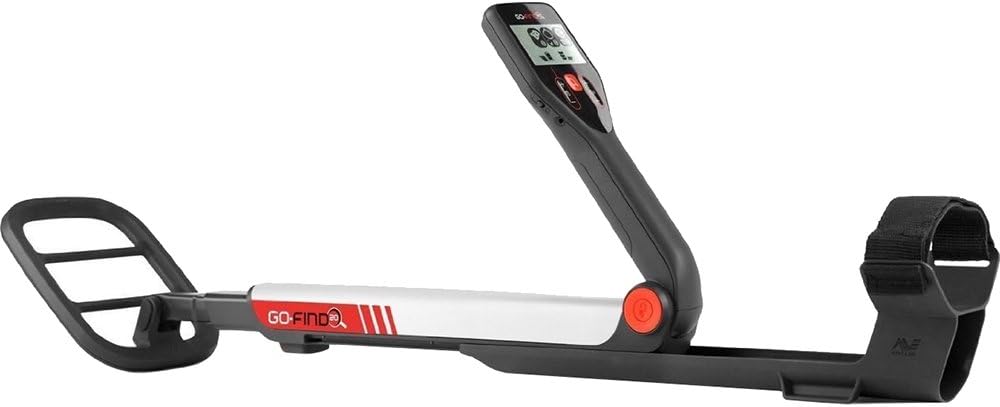
Figure 1: The MINELAB GO-FIND20 Metal Detector. This image displays the detector in a partially folded configuration, highlighting its compact design. The control panel with its display and buttons is visible, along with the main shaft and the circular search coil at the end. An armrest with a strap is also shown.
Components:
- Control Panel: Houses the display, power button, sensitivity controls, volume controls, and target identification indicators.
- Adjustable Shaft: Allows for length adjustment to suit different user heights and folds for compact storage.
- Search Coil: An 8-inch waterproof coil for detecting metallic objects.
- Armrest with Strap: Provides support and stability during operation.
- Battery Compartment: Located within the handle or armrest area.
3. Setup and Assembly
- Unfold the Detector: Gently unfold the detector from its compact state. Ensure all locking mechanisms click into place to secure the shaft and control panel.
- Install Batteries: Locate the battery compartment, typically near the handle or armrest. Insert 4 AA batteries, ensuring correct polarity (+/-). Close the compartment securely.
- Adjust Length: Extend the adjustable shaft to a comfortable length. The search coil should be parallel to the ground when you are standing upright and holding the detector. Secure the shaft at the desired length.
- Secure Armrest: Place your forearm into the armrest and secure it with the strap for comfortable and stable operation.
4. Operating Instructions
4.1 Powering On/Off
- To Power On: Press and hold the Power button on the control panel until the display illuminates.
- To Power Off: Press and hold the Power button until the display turns off.
4.2 Basic Detection
- Ground Balance: The GO-FIND20 features automatic ground tracking. Simply power on the detector and begin searching.
- Sweeping: Hold the detector with the search coil parallel to the ground, approximately 1-2 inches above the surface. Sweep the coil from side to side in a slow, steady motion, overlapping each sweep by about half the coil's width.
- Target Indication: When a metallic object is detected, the detector will emit an audible tone, and the display will show an icon indicating the type of metal (e.g., iron, foil, jewelry, coin).
4.3 Adjusting Settings
- Sensitivity: Use the Sensitivity buttons (usually marked with '+' and '-') to adjust the detector's sensitivity. Higher sensitivity increases detection depth but may also increase false signals in mineralized ground. The GO-FIND20 offers 3 levels of sensitivity.
- Volume: Use the Volume buttons to adjust the audio output. The GO-FIND20 offers 5 volume levels.
- FIND Modes: The detector has 2 FIND Modes. These modes help discriminate between different types of targets. Refer to the on-screen icons for guidance on which mode is active and what it indicates.
4.4 Waterproof Search Coil
The 8-inch search coil is waterproof, allowing for detection in shallow water. Ensure the control panel and battery compartment remain dry, as they are not waterproof.
5. Maintenance and Care
- Cleaning: After each use, wipe down the detector with a damp cloth to remove dirt and debris. Avoid using harsh chemicals or abrasive cleaners.
- Storage: Store the detector in a cool, dry place. When storing for extended periods, remove the batteries to prevent leakage. The collapsible design allows for compact storage.
- Battery Replacement: Replace batteries when the low battery indicator appears on the display or when performance degrades. Always use fresh, high-quality AA batteries.
- Coil Protection: While the search coil is waterproof, avoid unnecessary impacts or dragging it over sharp objects.
6. Troubleshooting
| Problem | Possible Cause | Solution |
|---|---|---|
| No power | Dead or incorrectly installed batteries. | Check battery polarity. Replace with new AA batteries. |
| False signals / Chatter | High sensitivity, electromagnetic interference, or highly mineralized ground. | Reduce sensitivity. Move away from power lines or other electronic devices. |
| Poor detection depth | Low sensitivity, low battery, or incorrect sweeping technique. | Increase sensitivity. Replace batteries. Ensure slow, steady, overlapping sweeps. |
| No audio | Volume too low or headphones not connected properly (if applicable). | Increase volume. Check headphone connection. |
7. Specifications
- Model: GO-FIND20
- Brand: MINELAB
- Operating Frequency: 7.8 kHz
- Search Coil: 8-inch Waterproof (Newshape)
- FIND Modes: 2
- Sensitivity Levels: 3
- Volume Levels: 5
- Batteries: 4 x AA (not included)
- Battery Life: Approximately 4 hours
- Weight: 2.2 lbs (1.0 kg)
- Collapsed Dimensions: Approximately 22.3 x 5.75 x 4 inches
- Adjustable Length: Yes
- International Protection Rating: IP54 (Control panel not waterproof)
- Material: Metal, Plastic
8. Warranty Information
The MINELAB GO-FIND20 Metal Detector comes with a 2-Year Limited Warranty. This warranty covers defects in materials and workmanship under normal use. Please retain your proof of purchase for warranty claims. For full terms and conditions, refer to the official MINELAB website or contact customer support.
9. Customer Support
For technical assistance, troubleshooting beyond this manual, or warranty inquiries, please contact MINELAB customer support. Visit the official MINELAB website for contact details and additional resources.
MINELAB Official Website: www.minelab.com


