
Bajaj Majesty HX18
Contents
Bajaj Majesty HX-18 188-Watt Auto Clean Cooker Hood User Manual
Model: Majesty HX18 | Brand: Bajaj
Important Safety Instructions
Please read all instructions carefully before installing and operating this appliance. Retain this manual for future reference.
- Ensure the electrical supply matches the voltage specified on the rating label (230 Volts, 50 Hz).
- This appliance is intended for domestic use only. Do not use it for commercial or industrial purposes.
- Installation must be performed by a qualified technician in accordance with all local codes and regulations.
- Always disconnect the power supply before cleaning or performing any maintenance.
- Do not flambé under the cooker hood.
- Ensure adequate ventilation in the room when the cooker hood is used simultaneously with appliances burning gas or other fuels.
- The exhaust air must not be discharged into a flue which is used for exhausting fumes from appliances burning gas or other fuels.
- Keep children away from the appliance during operation and cleaning.
- Regular cleaning of the grease filters is essential to prevent fire hazards.
Product Overview
The Bajaj Majesty HX-18 Cooker Hood is designed to effectively remove smoke, steam, and cooking odors from your kitchen. It features an auto-clean function for convenient maintenance and a powerful twin motor for efficient extraction.
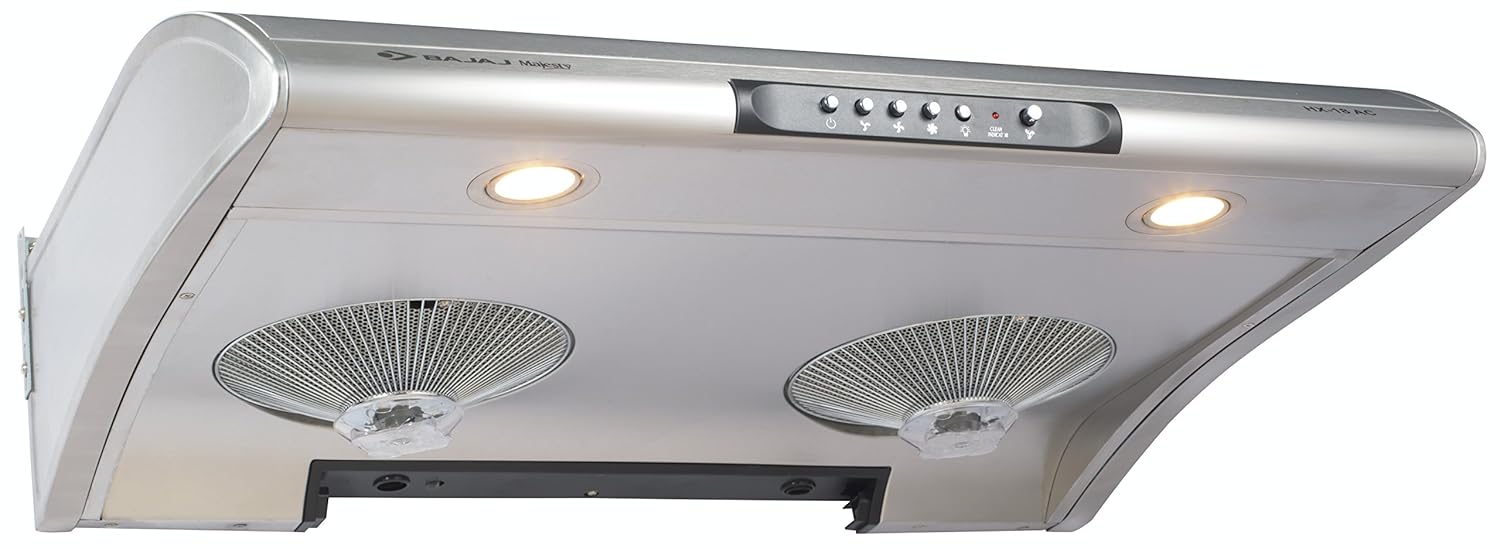
This image displays the Bajaj Majesty HX-18 Cooker Hood. It features a sleek stainless steel body, a control panel with push buttons for power, fan speed, and lighting, and two integrated LED lights. Below the lights, two circular mesh filters are visible, designed to capture grease and impurities.
Key Features:
- Stainless Steel Body: Durable and easy to clean.
- Auto Clean and Twin Motor: Efficient cleaning and powerful suction.
- Chrome Push Button Control: User-friendly interface for various functions.
- Aluminium Filter: Effectively traps grease and can be cleaned.
- LED Lights: Illuminates the cooking area.
Installation and Setup
The Bajaj Majesty HX-18 is a wall-mounted canopy hood. Professional installation is highly recommended to ensure proper functioning and safety.
Pre-Installation Checklist:
- Verify that all components are present: Cooker Hood, Warranty card, and Instruction manual.
- Ensure the wall structure is strong enough to support the hood's weight (approx. 16.5 kg).
- Confirm availability of a suitable electrical outlet (230V, 50Hz) within reach of the power cord.
- Determine the appropriate mounting height above your cooking surface, typically 65-75 cm for electric cooktops and 70-80 cm for gas cooktops. Refer to local building codes.
Mounting Steps (General Guide - Consult Professional):
- Mark the drilling points on the wall according to the hood's mounting template (not provided in this manual, typically found in the physical product manual).
- Drill holes and insert wall plugs suitable for your wall type.
- Secure the mounting bracket to the wall.
- Carefully lift and attach the cooker hood to the mounting bracket.
- Connect the hood to the electrical supply.
- Test all functions (lights, fan speeds).
Operation
The Bajaj Majesty HX-18 features a chrome push button control panel for easy operation.
Control Panel Functions:
- Power Button (⏻): Press to turn the hood ON or OFF.
- Fan Speed Buttons (☰, ☱, ☲): Select desired fan speed (low, medium, high) for different cooking needs. Higher speeds provide stronger suction.
- Light Button (💡): Press to turn the LED lights ON or OFF, illuminating your cooking area.
- Auto Clean Button (♻): Activates the auto-clean function. Refer to the Maintenance section for details.
- Clean Indicator: A light or display that indicates when the auto-clean cycle is in progress or when cleaning is recommended.
For best results, turn on the cooker hood a few minutes before you start cooking and leave it on for a few minutes after you finish to ensure all odors and steam are cleared.
Maintenance and Cleaning
Regular maintenance ensures optimal performance and extends the life of your cooker hood. Always disconnect power before cleaning.
1. Auto Clean Function:
- The auto-clean feature helps to liquefy accumulated oil and grease inside the hood.
- To activate, press the Auto Clean button on the control panel.
- The hood will run a cycle where it heats the internal components, causing oil to drip into a collection tray.
- Empty and clean the oil collection tray regularly after the auto-clean cycle.
- Frequency of auto-clean depends on cooking habits, but generally recommended once every 2-4 weeks.
2. Aluminium Filter Cleaning:
- The mesh filters should be cleaned regularly (e.g., monthly) depending on usage.
- To remove filters: Locate the release latches or clips on the filters and gently pull them down.
- Clean the filters using warm soapy water or in a dishwasher. Ensure they are completely dry before re-installing.
- To re-install filters: Align the filters with their slots and push them up until they click into place.
3. Exterior Cleaning:
- Wipe the stainless steel exterior with a soft cloth dampened with mild detergent and water.
- Do not use abrasive cleaners, steel wool, or harsh chemicals, as these can damage the finish.
- Dry thoroughly with a clean, soft cloth to prevent water spots.
Troubleshooting
Before contacting customer service, please refer to the following common issues and their solutions.
| Problem | Possible Cause | Solution |
|---|---|---|
| Hood does not operate. | No power supply. | Check if the power cord is properly plugged in. Check the circuit breaker/fuse. |
| Poor suction performance. | Grease filters are clogged. | Clean the aluminium filters as described in the Maintenance section. |
| Poor suction performance. | Internal components are oily. | Run the auto-clean function. Empty and clean the oil collection tray. |
| Lights are not working. | LED bulb failure. | Contact customer service for replacement or service. |
| Excessive noise during operation. | Loose parts or improper installation. | Ensure all mounting screws are tight. If noise persists, contact customer service. |
Specifications
| Feature | Detail |
|---|---|
| Model Number | Majesty HX18 |
| Mounting Type | Wall Mount |
| Controls Type | Push Button |
| Wattage | 188 Watts |
| Operating Voltage | 230 Volts |
| Frequency | 50 Hz |
| Light Source Type | LED |
| Filter Type | Mesh (Aluminium) |
| Material | Stainless Steel |
| Noise Level | 60 dB |
| Item Weight | 16 kg 500 g |
| Included Components | Cooker Hood, Warranty card, Instruction manual |
Warranty and Customer Support
Your Bajaj Majesty HX-18 Cooker Hood comes with a comprehensive warranty and dedicated customer support.
Warranty Information:
This product is covered by a 2-year warranty from the date of purchase. Please retain your purchase receipt and warranty card for any claims. The warranty covers manufacturing defects and malfunctions under normal use conditions.
Customer Service:
For any queries, technical assistance, or warranty claims, please contact Bajaj Customer Service:
Customer Service Number: 18001025963
Please have your product model number (Majesty HX18) and purchase details ready when contacting support.
Ask a question about this manual
Ask about setup, troubleshooting, compatibility, parts, safety, or missing instructions. Manuals+ will review the question and use this page’s manual context to help answer it.