
1. Introduction
The Novastar CVT320 is an advanced EO (Electrical-Optical) converter device designed for reliable signal transmission. It utilizes single-mode dual-core optical fiber with an LC interface, enabling a transmission distance of up to 15 kilometers. This manual provides essential information for the proper setup, operation, and maintenance of your CVT320 converter.

Figure 1: Novastar CVT320 Single-Mode Fiber Converter, showing its compact design.
2. Product Features
- Equipped with one cable interface and one fiber interface for versatile connectivity.
- Supports a wide power supply range of 100~240V AC at 50/60HZ.
- Plug-and-play functionality: No driver installation required, ready for immediate use after connection.
3. Safety Information
Please read and follow these safety guidelines to prevent damage to the device or personal injury:
- Ensure the power supply voltage matches the device's requirements (100-240V AC).
- Do not expose the device to moisture, extreme temperatures, or direct sunlight.
- Avoid blocking ventilation openings to prevent overheating.
- Do not attempt to open or repair the device yourself. Refer all servicing to qualified personnel.
- Handle fiber optic cables with care to avoid damage to the connectors and fibers.
4. Setup
Follow these steps to set up your Novastar CVT320 converter:
- Unpack the Device: Carefully remove the CVT320 from its packaging.
- Mounting (Optional): The device supports surface mount/integration. Use appropriate screws and mounting hardware if permanent installation is desired.
- Connect Fiber Optic Cable: Insert the single-mode dual-core optical fiber cable with an LC interface into the fiber port on the converter. Ensure a secure connection.
- Connect Ethernet Cable: Connect your Ethernet cable to the Ethernet port on the converter.
- Connect Power: Plug the power cable into the AC inlet on the converter, then connect the other end to a compatible 100-240V AC power outlet.
- Power On: Flip the power switch to the "ON" position. The device will power on automatically without requiring driver installation.

Figure 2: Front panel of the CVT320, showing power input, switch, Ethernet port, and fiber port.
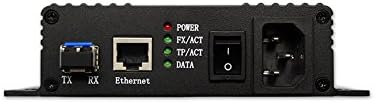
Figure 3: Detailed view of the CVT320's ports and LED indicators.
5. Operating Instructions
Once the CVT320 is powered on and connected, observe the indicator lights for operational status:
- POWER: This indicator illuminates when the device is receiving power.
- FX/ACT: This indicator shows the status of the fiber optic link. A steady light indicates a stable fiber connection, while blinking indicates data activity.
- TP/ACT: This indicator shows the status of the Ethernet (Twisted Pair) link. A steady light indicates a stable Ethernet connection, while blinking indicates data activity.
- DATA: This indicator blinks to show general data transmission activity through the converter.
For optimal performance, ensure all indicator lights are functioning as expected for active connections.
6. Maintenance
To ensure the longevity and reliable operation of your CVT320 converter, follow these maintenance guidelines:
- Cleaning: Use a soft, dry cloth to clean the exterior of the device. Do not use liquid cleaners or aerosols.
- Environment: Keep the device in a clean, dry environment, away from dust and direct heat sources.
- Cable Management: Ensure all cables are properly routed and not under strain, especially fiber optic cables which are sensitive to bending.
- Ventilation: Periodically check that the ventilation fins are clear of obstructions to allow for proper heat dissipation.
7. Troubleshooting
If you encounter issues with your CVT320, refer to the following common problems and solutions:
| Problem | Possible Cause | Solution |
|---|---|---|
| No Power (POWER LED off) | Power cable disconnected; Power outlet faulty; Device power switch off. | Check power cable connection; Try a different power outlet; Ensure power switch is ON. |
| No Fiber Link (FX/ACT LED off) | Fiber cable damaged or disconnected; Incorrect fiber type; Remote device off or faulty. | Verify fiber cable connection; Ensure single-mode dual-core fiber is used; Check the remote device's status. |
| No Ethernet Link (TP/ACT LED off) | Ethernet cable damaged or disconnected; Connected device off or faulty. | Verify Ethernet cable connection; Check the connected device's status. |
| Data Transmission Issues (DATA LED not blinking) | No data being sent; Network configuration issue; Cable issues. | Confirm data source is active; Check network settings; Inspect all cables for damage. |
8. Specifications
| Brand | Novastar |
| Model | CVT320 |
| Maximum Supply Voltage | 240 Volts (AC) |
| Minimum Supply Voltage | 100 Volts (AC) |
| Mounting Type | Surface Mount/Integration |
| Number of Channels | 1 |
| Interface Type | Optical (LC) |
| Upper Temperature Rating | 70 Degrees Celsius |
| Product Dimensions | 13.2 x 7.5 x 2.5 inches |
| Item Weight | 1.9 pounds |
| UPC | 760488877630, 712971786295 |
| ASIN | B00X6JVO20 |
| Date First Available | May 5, 2015 |
9. Warranty and Support
For warranty information, technical support, or service inquiries regarding your Novastar CVT320, please contact Novastar customer support directly. Refer to the official Novastar website or your purchase documentation for contact details.
You can visit the official Novastar store for more information: Novastar Store


