
1. Introduction
The Roland TD-25K-S V-Drum Set offers high-performance electronic drumming capabilities suitable for both home practice and studio recording environments. This kit features a sound engine derived from the flagship TD-30, ensuring expressive and dynamic playability. It includes a streamlined interface designed for easy customization of drum kits and a built-in audio recording function to capture performances.
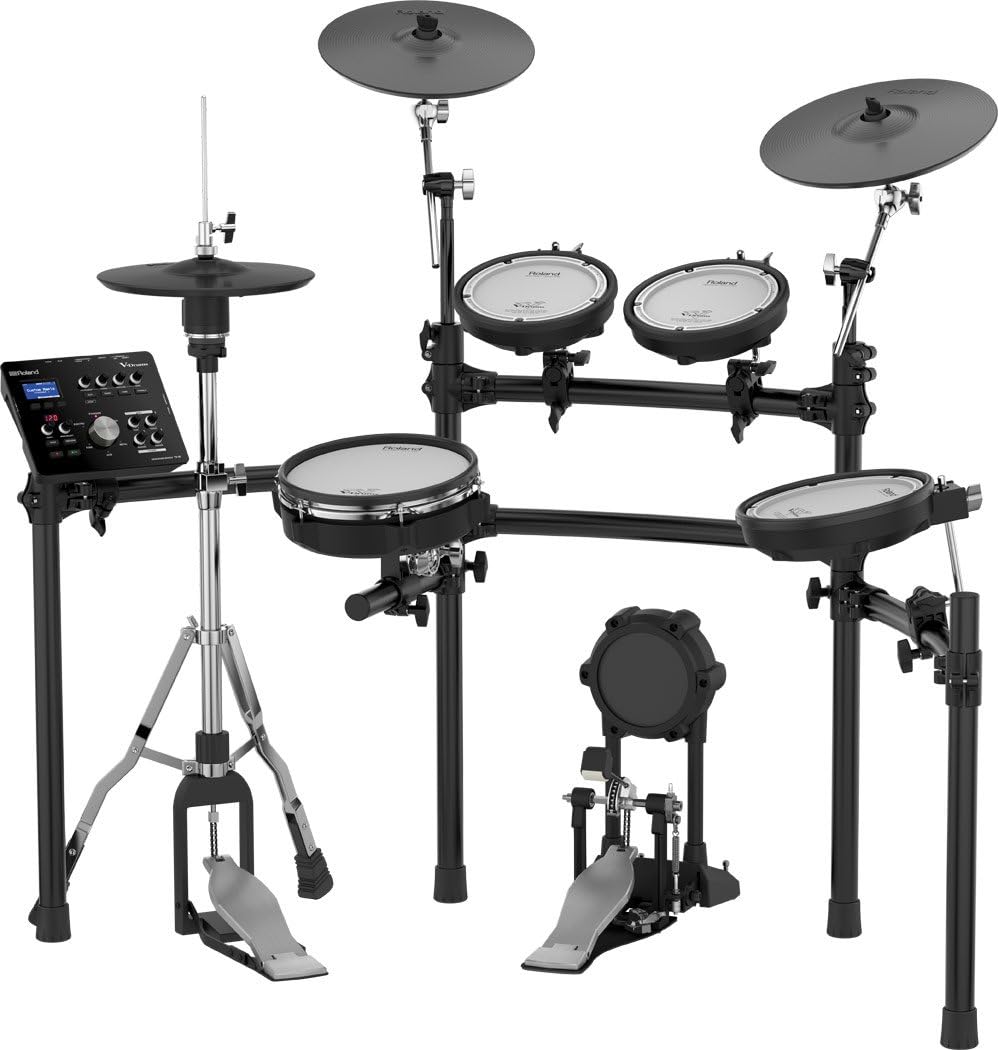
Key components of the TD-25K-S set include mesh-head pads for a natural playing feel, positional snare sensing for enhanced expression, and the VH-11 V-Hi-Hat for authentic hi-hat techniques. The set comprises a 10-inch snare pad (PDX-100), three 8-inch tom pads (PDX-6/PDX-8), a 12-inch crash V-Cymbal, a KD-9 kick pad, and the MDS-9V drum stand.
2. Setup
Follow these general steps for setting up your Roland TD-25K-S V-Drum Set:
- Unpacking and Verification: Carefully unpack all components and verify them against the packing list to ensure all parts are present.
- Stand Assembly: Assemble the MDS-9V drum stand according to the detailed instructions provided in the separate Quick Start Guide. Ensure all joints and clamps are securely tightened.
- Mounting Pads and Cymbals: Mount the PDX-100 snare pad, the three tom pads, and the 12-inch crash V-Cymbal onto the assembled stand. Adjust their positions for comfortable playing.
- Kick Pad Placement: Position the KD-9 kick pad and attach your kick pedal (not included). Ensure the kick pad is stable and does not slide during use.
- Module and Cable Connections: Connect all pads and cymbals to the TD-25 sound module using the provided cables. Refer to the connection diagram in the Quick Start Guide for correct port assignments.
- Power Connection: Connect the AC adapter to the TD-25 module and then to a power outlet.
3. Operating
The TD-25 sound module is the core of your V-Drum set, offering extensive control over your drumming experience.
- Sound Engine: The module features an advanced SuperNATURAL sound engine, providing a wide range of realistic and expressive drum sounds.
- Kit Selection and Customization: Use the streamlined interface to browse and select pre-set drum kits. You can also customize individual drums and cymbals within a kit, adjusting parameters such as tuning, muffling, and volume.
- Positional Sensing: The PDX-100 snare pad supports positional sensing, allowing for subtle tonal changes depending on where the pad is struck, enhancing realism.
- VH-11 V-Hi-Hat: The VH-11 V-Hi-Hat accurately reproduces open, closed, half-open, and foot splash sounds, responding to your footwork and stick technique.
- Audio Recording: Utilize the built-in audio recording function to capture your drum performances. This feature is useful for self-evaluation, sharing, or creating backing tracks.
- Connectivity: Connect headphones for private practice or output the audio to an amplifier, PA system, or recording interface for live performance or studio work.
4. Maintenance
Proper maintenance ensures the longevity and optimal performance of your Roland TD-25K-S V-Drum Set:
- Cleaning: Regularly wipe down all pads, cymbals, and the sound module with a soft, dry cloth. For light dirt, a slightly damp cloth can be used, followed immediately by drying. Avoid using abrasive cleaners, solvents, or alcohol, as these can damage surfaces.
- Pad Care: While mesh-head pads are durable, avoid striking them with excessive force or using sharp objects, which can cause damage. Ensure drumsticks are in good condition to prevent splintering.
- Cable Management: Keep all connection cables organized and free from kinks or excessive tension. This prevents internal wire damage and ensures reliable signal transmission.
- Environmental Conditions: Store and operate the kit in a cool, dry environment, away from direct sunlight, extreme temperatures, and high humidity.
5. Troubleshooting
This section addresses common issues you might encounter with your TD-25K-S V-Drum Set.
- No Sound from a Pad/Cymbal:
- Ensure all cable connections from the affected pad/cymbal to the TD-25 module are secure.
- Verify that the pad/cymbal is correctly assigned and enabled in the module's settings.
- If possible, test with a different cable or swap with a working pad to isolate the issue.
- Cymbal Sensor Malfunction (e.g., no edge sound, no choke):
- Confirm the cymbal is mounted correctly and its cable is fully inserted into the module.
- For cymbal choking, ensure you are grabbing the edge firmly and at the correct location immediately after striking.
- If the issue persists, it may indicate a sensor problem requiring professional service.
- Kick Pad Wobbling:
- Place the kick pad on a stable, non-slip surface.
- Extend the kick pad's spurs (spikes) for enhanced grip, especially on carpeted floors.
- Consider using a drum mat or securing the kick pedal/pad with Velcro to prevent movement during intense playing.
- Unresponsive or Inconsistent Pad/Cymbal Triggering:
- Adjust the sensitivity settings for the affected pad/cymbal within the TD-25 module.
- Ensure the pad surface is clean and free from debris.
- Verify that the drumsticks used are appropriate for electronic drums and are not excessively worn.
6. Specifications
| Feature | Specification |
|---|---|
| Brand | Roland |
| Model Name | TD-25K-S |
| Body Material | Metal |
| Included Components | Snare pad, Tom pads (x3), Crash V-Cymbal, Kick pad, Drum stand |
| Item Weight | 39.7 pounds (18000 Grams) |
| Product Dimensions (L x W x H) | 47.25 x 51.5 x 49.25 inches |
| Connector Type | Auxiliary |
| Color | Black |
| UPC | 700315935966, 761294507230, 761294214787 |
| Date First Available | April 15, 2015 |
7. Warranty and Support
For detailed warranty information, technical assistance, or service inquiries related to your Roland TD-25K-S V-Drum Set, please visit the official Roland website. It is recommended to retain your proof of purchase, such as a receipt or invoice, as it may be required for warranty claims. Roland's customer support can provide guidance on product registration, troubleshooting beyond this manual, and authorized service centers.
You can typically find support resources, FAQs, and contact information on the official Roland website: www.roland.com/global/support/