
TRACEABLE B00X3DG8ZM
Traceable Calibrated Thermocouple Thermometer with Memory User Manual
Model: B00X3DG8ZM
1. Introduction
This manual provides comprehensive instructions for the proper use, setup, operation, and maintenance of the Traceable Calibrated Thermocouple Thermometer with Memory. This precision instrument is designed for accurate temperature measurements in various scientific and industrial applications.
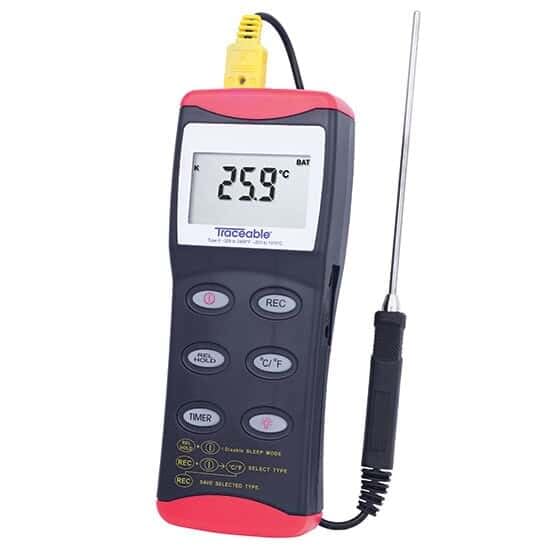
Figure 1: Traceable Calibrated Thermocouple Thermometer with Memory.
Key Features:
- Includes NIST-Traceable certificate from our A2LA accredited (1750.01) calibration laboratory.
- Reads °F or °C at the touch of a button.
- Max/min temperature memory.
- Uses all Type K probes.
- Compact size: 2-3/4 x 7 x 1-1/4 inches.
2. Setup
2.1 Battery Installation
The thermometer is powered by batteries. To install or replace batteries:
- Locate the battery compartment cover on the back of the unit.
- Remove the cover by sliding or unscrewing it.
- Insert new batteries, ensuring correct polarity (+/-).
- Replace the battery compartment cover securely.
2.2 Probe Connection
This thermometer is designed to work with Type K thermocouple probes. To connect a probe:
- Identify the thermocouple input jacks on the top of the thermometer.
- Align the Type K probe connector with the input jacks, observing polarity (usually indicated by color coding or symbols).
- Gently push the probe connector firmly into the jacks until it is fully seated.
3. Operating Instructions
3.1 Power On/Off
Press the POWER button to turn the unit on or off. The display will illuminate upon activation.
3.2 Temperature Measurement
Once the probe is connected and the unit is powered on, the current temperature will be displayed on the LCD screen. Ensure the probe tip is in full contact with the substance or environment being measured.
3.3 Changing Temperature Units (°F/°C)
To switch between Fahrenheit (°F) and Celsius (°C), press the °C/°F button. The display will update to reflect the selected unit.
3.4 Max/Min Memory Function
The thermometer records the maximum and minimum temperatures measured since the last reset. To view these values:
- Press the MAX/MIN button once to display the maximum temperature recorded.
- Press the MAX/MIN button again to display the minimum temperature recorded.
- To clear the recorded Max/Min values, press and hold the CLEAR button while viewing the Max or Min display.

Figure 2: Proper placement and adjustment of the thermometer for accurate readings.
4. Maintenance
4.1 Cleaning
To clean the thermometer, wipe the exterior surfaces with a soft, damp cloth. Do not immerse the unit in water or use abrasive cleaners. Ensure the unit is dry before storage or next use.
4.2 Battery Replacement
When the battery indicator appears on the display, replace the batteries as described in Section 2.1. Prompt battery replacement ensures continued accurate operation.
4.3 Calibration
The thermometer includes a NIST-Traceable certificate, indicating it has been calibrated to national standards. For continued accuracy, periodic recalibration by a qualified laboratory is recommended, especially in critical applications. Refer to your facility's quality assurance procedures for calibration intervals.
5. Troubleshooting
| Problem | Possible Cause | Solution |
|---|---|---|
| No display or faint display | Low or dead batteries; incorrect battery installation. | Replace batteries, ensuring correct polarity. |
| "OPEN" or "---" on display | Probe not connected or faulty probe. | Ensure probe is securely connected. Test with a known good probe if available. Replace probe if faulty. |
| Inaccurate readings | Probe not properly immersed/contacting; probe damage; unit requires recalibration. | Ensure proper probe placement. Inspect probe for damage. Consider professional recalibration. |
6. Specifications
| Parameter | Value |
|---|---|
| Brand | TRACEABLE |
| Model | B00X3DG8ZM |
| Display Type | LCD |
| Power Source | Battery Powered |
| Item Length | 7 Inches |
| Outer Material | Stainless Steel |
| Reusability | Reusable |
| Special Feature | High Accuracy |
| Specification Met | ISO 9001 |
| Manufacturer | COLE-PARMER |
| Date First Available | January 15, 2020 |
7. Warranty Information
Specific warranty details for the Traceable Calibrated Thermocouple Thermometer with Memory are not available in the provided product information. Please refer to the product packaging or contact the manufacturer, TRACEABLE (Cole-Parmer), directly for warranty terms and conditions.
8. Customer Support
For technical assistance, service, or inquiries regarding your Traceable Calibrated Thermocouple Thermometer with Memory, please contact the manufacturer, Cole-Parmer. Contact information is typically available on the manufacturer's official website or product documentation.

Figure 3: Traceable products are designed for precision in laboratory environments.
Related documentsB00X3DG8ZM


Ask a question about this manual
Ask about setup, troubleshooting, compatibility, parts, safety, or missing instructions. Manuals+ will review the question and use this page’s manual context to help answer it.