
Introduction
This manual provides essential instructions for the proper setup, operation, and maintenance of your Yamaha RAV519 Remote Control. Please read this manual thoroughly before using the product to ensure optimal performance and longevity.
Setup
1. Battery Installation
The Yamaha RAV519 remote control requires two AAA batteries (not included). Ensure correct polarity (+/-) when inserting batteries into the battery compartment located on the back of the remote.
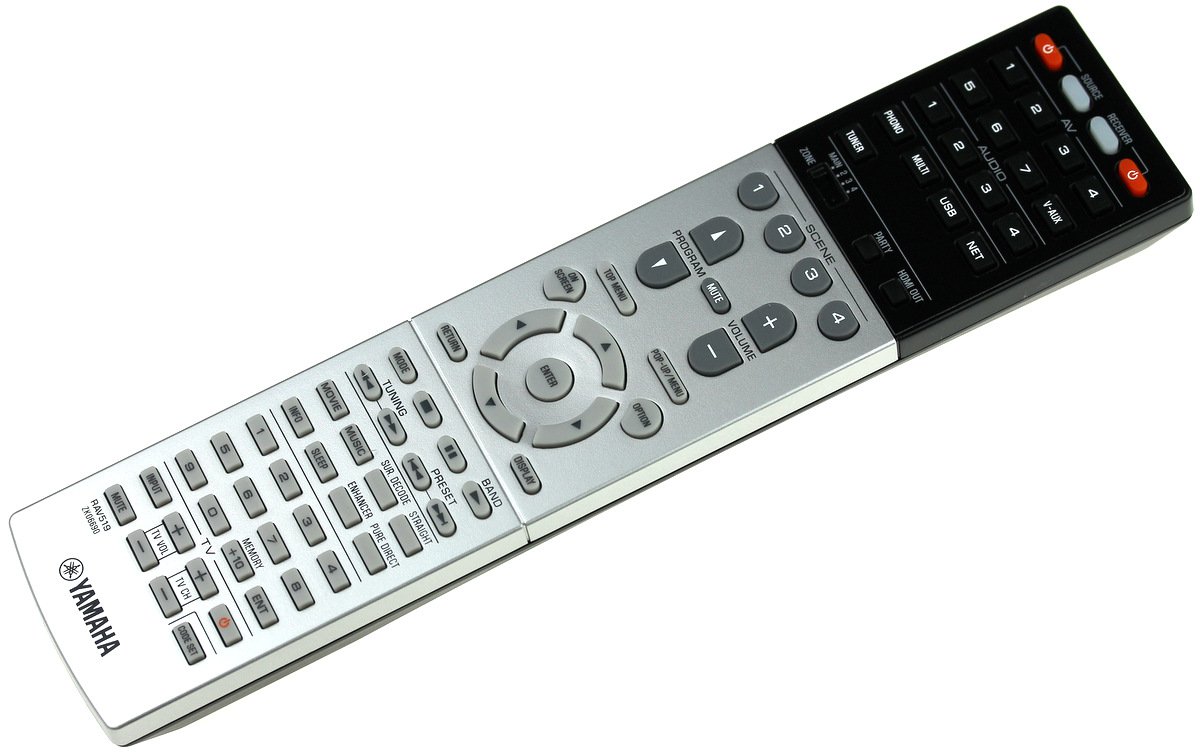
Image of the Yamaha RAV519 remote control. The back panel is visible, indicating the location for battery insertion. The remote is black with various control buttons.
2. Initial Use
The RAV519 is an infrared (IR) remote control. No pairing is typically required. Point the remote directly at your compatible Yamaha audio/video receiver or component. Ensure there are no obstructions between the remote and the device's IR sensor.
Operating Instructions
Button Functions
The remote features various buttons for controlling your Yamaha audio/video equipment. Common functions include power on/off, input selection, volume control, mute, and navigation for menus. Refer to your specific Yamaha component's manual for detailed button assignments and their corresponding functions.
Operating Range
The maximum effective operating range for the RAV519 remote control is approximately 10 meters (33 feet) under optimal conditions. Performance may vary depending on battery level, ambient light, and physical obstructions between the remote and the controlled device.
Maintenance
Cleaning
To clean the remote control, use a soft, dry cloth. Do not use liquid cleaners, solvents, or abrasive materials, as these can damage the surface or internal components of the remote.
Battery Replacement
If the remote control's performance degrades or it stops responding, replace both AAA batteries with new ones. Always replace both batteries at the same time and dispose of old batteries according to local environmental regulations.
Troubleshooting
Remote Not Responding
Symptom: The remote control does not operate the device.
Possible Causes & Solutions:
- Batteries: Check if batteries are inserted correctly with the correct polarity. Replace old batteries with new ones.
- Line of Sight: Ensure there are no obstructions between the remote control and the device's IR sensor. Point the remote directly at the device.
- Distance: Make sure you are within the effective operating range (approximately 10 meters).
- Device Power: Confirm that the Yamaha device you are trying to control is powered on.
Short Operating Range
Symptom: The remote only works when very close to the device.
Possible Causes & Solutions:
- Low Batteries: Replace batteries with new ones.
- Interference: Strong ambient light or other IR devices might cause interference. Try using the remote in a different environment.
Specifications
| Model Number | RAV519 |
| Connectivity Technology | Infrared |
| Maximum Range | 10 Meters |
| Power Source | AAA Batteries (x2, not included) |
Warranty Information
Warranty information for the Yamaha RAV519 Remote Control is typically provided with the product packaging or can be found on the official Yamaha website. Please retain your proof of purchase for warranty claims.
Support
For further assistance, technical support, or service inquiries, please visit the official Yamaha support website or contact your local Yamaha dealer.


