1. Introduction
This manual provides essential instructions for the safe and effective installation, operation, and maintenance of your BulbAmerica replacement projector lamp for the Panasonic PT-LX26H projector. This lamp assembly includes a genuine Original Equipment Manufacturer (OEM) bulb, ensuring optimal performance, brightness, and longevity for your projector.
Please read this manual thoroughly before attempting to install or replace the lamp. Keep it for future reference.
2. Safety Information
- High Voltage: Projector lamps operate at high voltage. Always disconnect the projector from the power outlet and allow it to cool down completely before attempting any lamp replacement.
- High Temperature: The lamp becomes extremely hot during operation. Allow at least 60 minutes for the lamp to cool down after turning off the projector before handling.
- Lamp Breakage: Handle the lamp assembly with care. Avoid touching the glass bulb directly, as oils from your skin can reduce lamp life. If the lamp breaks, ventilate the room and carefully clean up any glass fragments without direct contact.
- Eye Protection: Never look directly into the projector lens or at the bare lamp when it is illuminated, as this can cause severe eye damage.
- Proper Disposal: Dispose of used lamps according to local regulations. Lamps may contain mercury.
3. Package Contents
Verify that your package contains the following items:
- 1 x BulbAmerica Projector Lamp Assembly for Panasonic PT-LX26H (Model ET-LAL100)
- (Includes genuine OEM bulb and high-quality compatible housing)
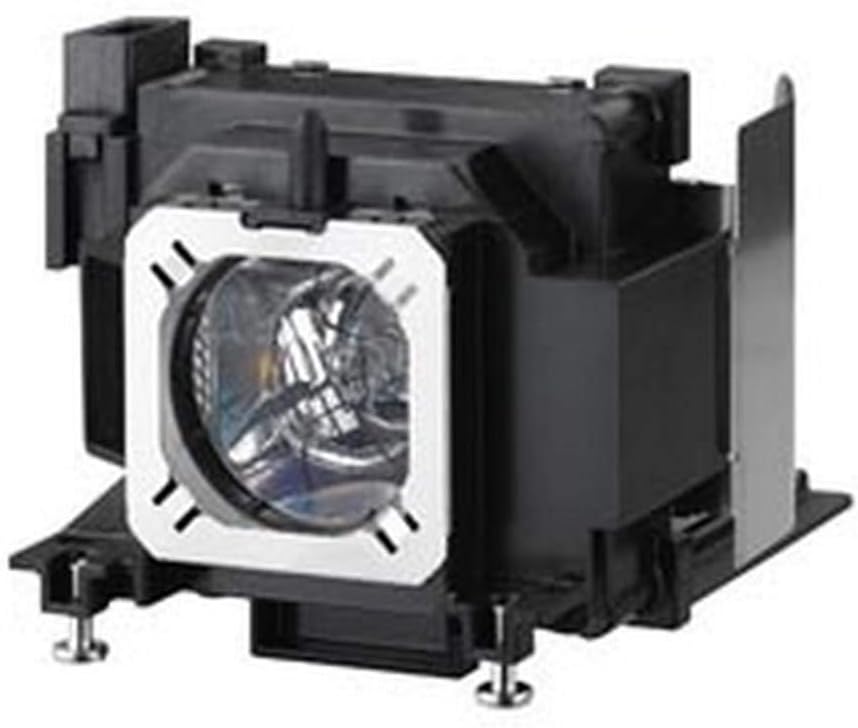
Image: BulbAmerica Projector Lamp Assembly for Panasonic PT-LX26H. This image shows the complete lamp unit, consisting of the bulb housed within a black plastic casing, ready for installation into the projector.
4. Installation Instructions
Follow these steps to safely replace the projector lamp:
- Power Off and Disconnect: Turn off your Panasonic PT-LX26H projector and unplug the power cord from the electrical outlet.
- Cool Down: Allow the projector to cool down for at least 60 minutes. The lamp operates at very high temperatures and can cause burns if handled too soon.
- Locate Lamp Cover: Refer to your Panasonic PT-LX26H projector's user manual to locate the lamp cover. This is typically secured by one or more screws.
- Remove Lamp Cover: Use a screwdriver to loosen the screw(s) holding the lamp cover in place. Carefully remove the cover.
- Unscrew Old Lamp: The old lamp assembly will be secured by screws. Loosen these screws (do not remove them completely unless specified by your projector manual).
- Remove Old Lamp: Gently grasp the handle or designated area on the old lamp assembly and pull it straight out of the projector. Avoid tilting or forcing it.
- Insert New Lamp: Carefully insert the new BulbAmerica lamp assembly into the projector slot. Ensure it is seated firmly and correctly. Do not force it.
- Secure New Lamp: Tighten the screws to secure the new lamp assembly in place.
- Replace Lamp Cover: Reattach the lamp cover and secure it with its screw(s).
- Reconnect Power: Plug the projector's power cord back into the electrical outlet.
- Reset Lamp Timer: Turn on the projector. You will likely need to reset the lamp timer in the projector's menu system. Refer to your Panasonic PT-LX26H projector's user manual for specific instructions on how to reset the lamp timer. This step is crucial for accurate lamp life tracking.
5. Operation
Once the new lamp is installed and the lamp timer is reset, your projector is ready for use. The BulbAmerica lamp with its genuine OEM bulb is designed to provide bright, sharp, and high-quality images consistent with the original manufacturer's specifications.
- Allow the projector to warm up for a few minutes after turning it on for optimal performance.
- Avoid frequently turning the projector on and off, as this can reduce lamp life.
- Ensure adequate ventilation around the projector to prevent overheating, which can also impact lamp longevity.
6. Maintenance
Proper maintenance helps extend the life of your projector and its lamp:
- Air Filter Cleaning: Regularly clean or replace the projector's air filter as recommended by the projector manufacturer. A clogged filter can lead to overheating and premature lamp failure.
- Ventilation: Ensure the projector's ventilation openings are not blocked.
- Cool Down Cycle: Always allow the projector to complete its cool-down cycle after turning it off before unplugging it or moving it.
- Lamp Life Monitoring: Pay attention to your projector's lamp hour counter. Replace the lamp when it reaches its recommended lifespan or if you notice a significant decrease in brightness or image quality.
7. Troubleshooting
If you encounter issues after lamp replacement, consider the following:
- Projector Not Turning On:
- Ensure the lamp assembly is fully seated and secured.
- Check that the lamp cover is correctly installed and its screws are tightened.
- Verify the power cord is securely plugged into both the projector and the outlet.
- Image is Dim or Poor Quality:
- Confirm the lamp timer has been reset.
- Check projector settings for brightness or picture modes.
- Ensure the projector lens is clean.
- Lamp Indicator Light On:
- This usually indicates the lamp has reached its end of life or there's an issue. If a new lamp, ensure it's installed correctly and the timer is reset.
- Consult your projector's user manual for specific error codes or indicator light meanings.
For further assistance, please contact BulbAmerica customer support.
8. Specifications
| Feature | Detail |
|---|---|
| Brand | BulbAmerica |
| Compatible Projector Model | Panasonic PT-LX26H |
| Lamp Model Number | ET-LAL100 |
| Bulb Type | Genuine Original OEM (UHP, P-VIP, SHP, NSH) |
| Assembly Type | Lamp Housing with Original OEM Bulb Inside |
| Item Weight | 1.5 Pounds (approx. 0.68 kg) |
| Package Dimensions | 10 x 10 x 10 inches (approx. 25.4 x 25.4 x 25.4 cm) |
| UPC | 675650329704 |
9. Warranty and Support
Warranty: The BulbAmerica Replacement Lamp for Panasonic PT-LX26H projector is covered by a 180-day warranty from the date of purchase. This warranty protects against any manufacturing defects. Please retain your proof of purchase for warranty claims.
Return Policy: A 30-day return policy is also offered, allowing for returns within 30 days of purchase.
Customer Support: For technical assistance, warranty claims, or any questions regarding your BulbAmerica projector lamp, please contact BulbAmerica customer support. Refer to the contact information provided with your purchase or visit the official BulbAmerica website for support details.