
Product Overview
This 30 Inch Induction Cooktop features 4 Cooking Zones, SyncBurners, Digital Red LED Touch Controls, a Kitchen Timer, Control Lock, All-Off Feature, Hot Surface Indicator Light, and is ADA Compliant. It also includes GE Fits! Guarantee for seamless integration into your kitchen.
Key Features
- 4 Induction Cooking Zones: Efficiently cook multiple dishes simultaneously with precise heat control.
- SyncBurners: Combine two cooking zones to create a larger cooking surface, ideal for griddles or oversized pots.
- Digital Red LED Touch Controls: Intuitive and easy-to-use touch controls for adjusting heat settings and managing features.
- Kitchen Timer: Conveniently set cooking times for precise results.
- Control Lock Capability: Prevents accidental activation of controls, enhancing safety, especially with children around.
- All-Off Feature: Quickly turn off all cooking zones with a single touch.
- Hot Surface Indicator Light: Alerts you when the cooktop surface is hot, even after the burner is turned off, for added safety.
- Auto-Pan Size Detection & Worry-Free Pan Detection: Automatically adjusts heating to the size of your cookware and detects if a pan is present, preventing energy waste.
- ADA Compliant: Designed to meet accessibility standards.
Setup and Installation
The GE Profile Induction Cooktop is designed for slide-in installation. Ensure proper electrical connection (240 Volts, Electric Fuel Type) as per local electrical codes. The unit comes with a corded electric connection. Professional installation is recommended to ensure safety and optimal performance.

Image: Underside view of the cooktop, highlighting the electrical wiring and the sleek, thin profile.
Operating Instructions
This induction cooktop offers intuitive touch controls for all cooking functions.
- Power On/Off: Press the "On/Off" button for the desired cooking zone to activate or deactivate it.
- Adjusting Temperature: Use the "+" and "-" touch controls next to each burner to increase or decrease the heat level. The digital LED display will show the current setting.
- Control Lock: To prevent accidental changes or activation, press and hold the "Lock Controls" button for 3 seconds. The controls will be disabled until unlocked by holding the button again.
- All Off: Press the "All Off" button to quickly turn off all active cooking zones.
- Kitchen Timer: Use the "Start Timer" button to set a countdown timer for your cooking.
- Pan Detection: The cooktop automatically detects if a compatible pot or pan is placed on the burner. If no pan is detected after a few seconds of activation, the burner will automatically turn off.

Image: The cooktop surface with its four induction zones and the central touch control panel.
Maintenance and Cleaning
The glass-ceramic surface of the GE Profile Induction Cooktop is designed for easy cleaning. For best results, clean the cooktop regularly after each use.
- Daily Cleaning: Wipe the surface with a damp cloth and mild dish soap. Rinse thoroughly and dry with a clean, soft cloth to prevent streaks.
- Stubborn Stains: For baked-on food or stubborn stains, use a ceramic cooktop cleaner and a non-abrasive cleaning pad. Follow the cleaner's instructions carefully.
- Avoid Abrasives: Do not use abrasive cleaners, scouring pads, or harsh chemicals, as these can scratch or damage the glass surface.
- Cool Surface: Always ensure the cooktop is cool before cleaning to avoid burns and to prevent cleaner from baking onto the hot surface.
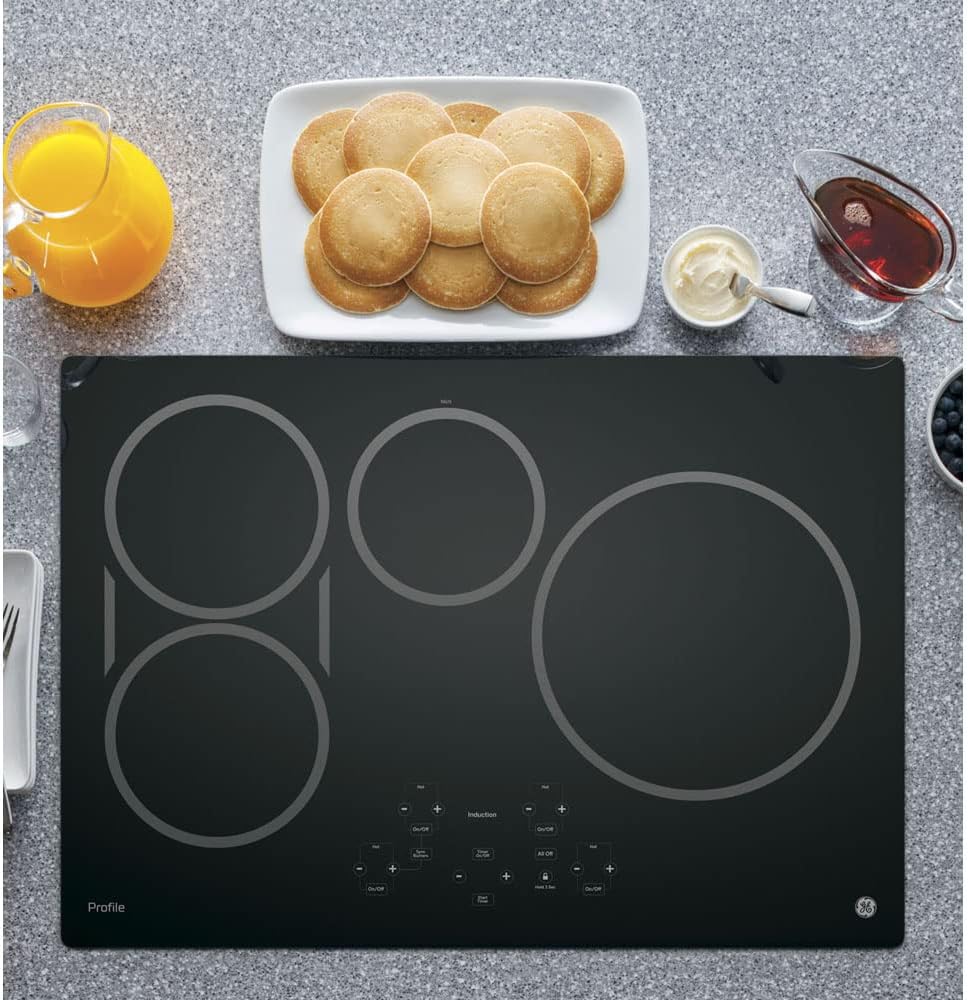
Image: The cooktop seamlessly integrated into a kitchen countertop, showcasing its clean and modern aesthetic.
Troubleshooting
If you encounter issues with your GE Profile Induction Cooktop, refer to the following common troubleshooting tips:
- Cooktop Not Turning On:
- Ensure the cooktop is properly connected to the power supply.
- Check if the Control Lock feature is activated. Deactivate it by holding the lock button for 3 seconds.
- Verify that a compatible pot or pan is placed on the cooking zone.
- No Heat/Inconsistent Heating:
- Confirm that your cookware is induction-compatible (magnetic bottom).
- Ensure the cookware fully covers the cooking zone.
- Check for any error codes on the digital display and consult the full user manual for specific code meanings.
- Unusual Noises:
- A slight humming or buzzing sound is normal during induction cooking, especially at higher power settings or with certain types of cookware. This is due to the magnetic field.
- If loud or persistent noises occur, ensure the cooktop is properly installed and level.
- Digital Display Issues:
- If a segment of the display is not working, try resetting the cooktop by turning off the power at the circuit breaker for a few minutes, then turning it back on.
- If the issue persists, contact GE customer support.
For more detailed troubleshooting or if issues persist, please refer to the complete user manual or contact GE customer support.
Product Specifications
| Brand Name | GE |
| Model Info | PHP9030DJBB |
| Item Weight | 38 pounds |
| Product Dimensions | 21.38 x 29.75 x 4.63 inches |
| Installation Type | Slide-In |
| Special Features | SyncBurners, Control Lock Capability, Kitchen Timer, Auto-Pan Size Detection, Worry-Free Pan Detection, Hot Surface Indicator Lights |
| Burner Type | Induction |
| Heating Elements | 4 |
| Color | Black |
| Control Console | Touch |
| Voltage | 240 Volts |
| Wattage | 1500 watts |
| Fuel Type | Electric |
| Certification | UL Listed |
| Material Type | Glass, Ceramic |
Warranty and Support
For warranty information, service requests, or technical support, please refer to the documentation included with your product or visit the official GE Appliances website. It is recommended to register your product upon purchase to facilitate any future support needs.