
1. Introduction and Overview
Thank you for choosing the WELCARE Motorized Treadmill WC3600. This manual provides essential information for the safe and effective use, setup, operation, and maintenance of your new fitness equipment. Please read this manual thoroughly before operating the treadmill and retain it for future reference.
The WELCARE WC3600 is designed to provide a straightforward and efficient aerobic workout in a home environment. It features a motorized belt, allowing users to control speed and monitor workout metrics.
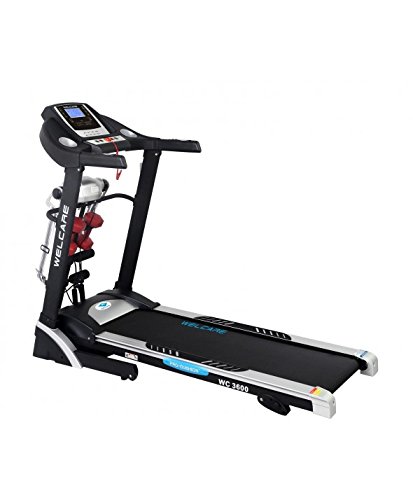
Image 1.1: The WELCARE Motorized Treadmill WC3600. This image displays the full treadmill unit, including the console, handrails, running belt, and base frame, highlighting its compact design suitable for home use.
2. Important Safety Instructions
To reduce the risk of serious injury, always follow basic precautions when using this equipment. Read all instructions before using the WELCARE WC3600 treadmill.
- Consult a physician before beginning any exercise program.
- Keep children and pets away from the treadmill during operation.
- Place the treadmill on a solid, level surface with adequate clearance around it.
- Wear appropriate exercise clothing and athletic shoes. Avoid loose clothing.
- Do not operate the treadmill if it has a damaged cord or plug, or if it is not working properly.
- Always hold the handrails when starting or stopping the treadmill.
- Do not step on or off the treadmill while the belt is moving.
- Use the safety key/clip. Attach it to your clothing before starting your workout.
- Unplug the treadmill from the power outlet when not in use or before cleaning/maintenance.
- Do not use outdoors or in damp environments.
3. Setup
The WELCARE WC3600 treadmill is designed for minimal assembly. Follow these steps for initial setup:
- Unpacking: Carefully remove all components from the packaging. Retain packaging materials for potential future transport or storage.
- Placement: Position the treadmill on a flat, stable surface. Ensure there is at least 2 meters (6.5 feet) of clear space behind the treadmill and 0.6 meters (2 feet) on each side.
- Power Connection: Plug the power cord into a grounded electrical outlet. Ensure the power switch on the treadmill is in the "OFF" position before plugging it in.
- Safety Key: Locate the safety key. This is a crucial safety feature that must be in place for the treadmill to operate.
4. Operating Instructions
Familiarize yourself with the control console before starting your workout.
4.1 Console Overview
The WC3600 features an LCD display that shows key workout metrics. The console includes buttons for starting, stopping, adjusting speed, and selecting programs.
- LCD Display: Shows time, distance, calories burned, and speed.
- Start Button: Initiates the treadmill belt movement.
- Stop Button: Halts the treadmill belt movement.
- Speed +/- Buttons: Adjusts the running belt speed. The treadmill also features a hand speed control for convenient adjustments during your workout.
- Program Buttons: Selects pre-set workout programs. Refer to the full user manual for detailed program descriptions.
4.2 Starting a Workout
- Ensure the treadmill is plugged in and the power switch is "ON".
- Attach the safety key clip to your clothing and place the safety key securely in its designated slot on the console.
- Stand on the side rails of the treadmill, not on the belt.
- Press the "Start" button. The belt will begin to move at a low speed after a short countdown.
- Carefully step onto the moving belt and begin walking.
- Adjust the speed using the "Speed +/-" buttons on the console or the hand speed control.
4.3 Ending a Workout
- Gradually decrease the speed using the "Speed -" button until the belt comes to a complete stop.
- Alternatively, press the "Stop" button to bring the belt to a quick stop.
- For an emergency stop, pull the safety key from the console. The treadmill will stop immediately.
- Once the belt has stopped, step off the treadmill.
5. Maintenance
Regular maintenance ensures the longevity and optimal performance of your WELCARE WC3600 treadmill. Always unplug the treadmill before performing any maintenance.
- Cleaning: Wipe down the console and other surfaces with a damp cloth after each use. Avoid abrasive cleaners or solvents.
- Belt Lubrication: The running belt requires periodic lubrication to reduce friction. Refer to the full user manual for specific lubrication intervals and instructions. Use only approved silicone lubricant.
- Belt Tension and Alignment: Check the running belt tension and alignment regularly. If the belt slips or drifts to one side, adjust it according to the instructions in the comprehensive user manual.
- Motor Cover: Periodically vacuum dust and debris from under the motor cover to ensure proper ventilation.
6. Troubleshooting
This section addresses common issues you might encounter with your treadmill. For more complex problems, contact customer support.
| Problem | Possible Cause | Solution |
|---|---|---|
| Treadmill does not start. |
|
|
| Running belt slips or hesitates. |
|
|
| Unusual noise during operation. |
|
|
7. Specifications
The following are the technical specifications for the WELCARE Motorized Treadmill WC3600:
| Feature | Detail |
|---|---|
| Brand | WELCARE |
| Model Number | WC3600 |
| Product Grade | Home |
| Material | Alloy Steel |
| Special Feature | Portable |
| Target Audience | Adult, Youth |
| Assembly Required | No |
| Display Type | LCD |
| Power Source | Corded Electric |
| Connectivity Technology | Power Cord |
| Metrics Measured | Distance, Calories Burned |
| Item Weight | 73 kg |
| Manufacturer | WELCARE Healthy Living |