1. Important Safety Instructions
Please read all instructions carefully before using the Daewoo DI-9471 Multi Grill. Retain this manual for future reference. Failure to follow these instructions may result in electric shock, fire, or serious injury.
- Always ensure the appliance is unplugged from the power outlet before cleaning or when not in use.
- Do not immerse the appliance, cord, or plug in water or any other liquid.
- Keep the appliance out of reach of children.
- Do not operate the appliance with a damaged cord or plug, or after the appliance malfunctions or has been damaged in any manner.
- Use the appliance on a stable, heat-resistant surface.
- Do not touch hot surfaces. Use handles or knobs.
- Ensure adequate ventilation around the appliance during use.
2. Product Overview
The Daewoo DI-9471 Multi Grill is designed for versatile cooking, featuring adjustable temperature control and a 180° opening for various food types. Its non-stick plates ensure easy cooking and cleaning.

Image 2.1: The Daewoo DI-9471 Multi Grill in its closed position, highlighting the stainless steel lid and integrated handle.
Key Features:
- Fixed Plate with Non-stick Coating: Ensures food does not stick and simplifies cleaning.
- Adjustable Upper Grill Plate: Adapts to various food thicknesses, preventing overflow.
- Power/Ready Indicator Lights: Clearly shows when the grill is powered on and when it has reached the set temperature.
- Non-slip Base: Provides stability during operation.
- 1400W Power: For rapid and efficient cooking.

Image 2.2: The grill opened to 90 degrees, revealing the ribbed non-stick cooking surfaces on both the upper and lower plates.

Image 2.3: The included plastic spatula and drip cup, essential tools for cooking and cleaning.
3. Setup
3.1 Unpacking
- Carefully remove the grill and all accessories from the packaging.
- Check for any damage during transit. If damaged, do not use and contact customer support.
- Remove all packaging materials, stickers, and labels from the appliance.

Image 3.1: The Daewoo DI-9471 Multi Grill as it appears in its retail box.
3.2 Placement
- Place the grill on a flat, stable, and heat-resistant surface.
- Ensure there is sufficient space around the grill for proper ventilation. Do not place it near walls or under cabinets.
- Keep the grill away from flammable materials.
3.3 Initial Cleaning
- Before first use, wipe the cooking plates with a damp cloth or sponge.
- Dry thoroughly.
- It is recommended to lightly grease the non-stick plates with a small amount of cooking oil for the first use to season them.
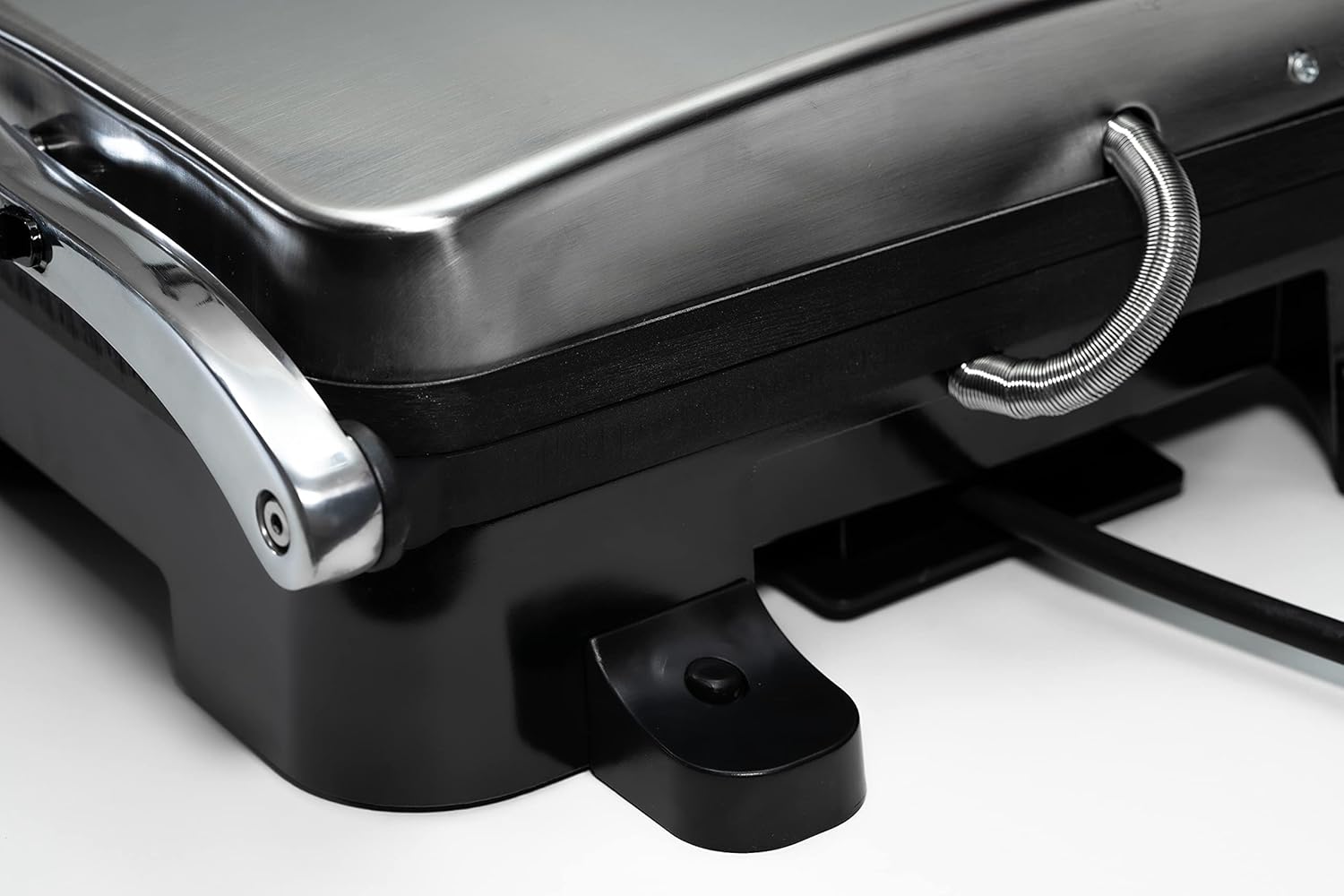
Image 3.2: Detail of the power cord management system at the rear of the grill, showing how it can be stored.
4. Operating Instructions
4.1 Powering On and Preheating
- Plug the power cord into a suitable electrical outlet (127V AC). The red indicator light will illuminate, indicating the grill is powered on.
- Turn the temperature control knob to your desired setting. For most grilling, a medium to high setting is appropriate.
- Allow the grill to preheat with the lid closed. The green indicator light will illuminate when the grill has reached the set temperature and is ready for cooking. This typically takes 3-5 minutes.
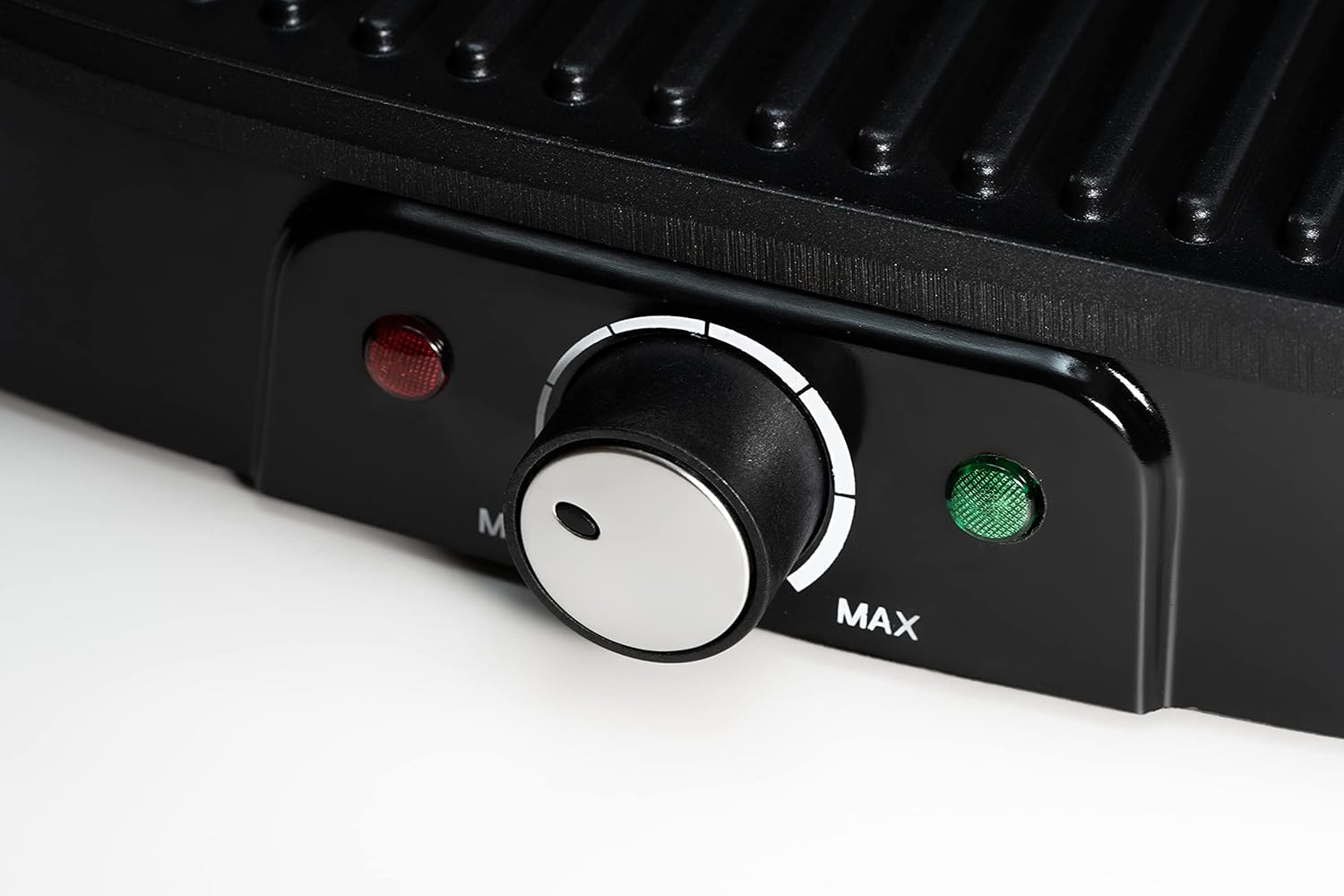
Image 4.1: The temperature control knob, ranging from MIN to MAX, with the red power indicator and green ready indicator lights.
4.2 Grilling Food
- Once the green indicator light is on, carefully open the grill using the handle.
- Place your food onto the lower cooking plate.
- Close the lid. The adjustable upper plate will adapt to the thickness of your food. For thicker items, the grill can be opened 180 degrees to use both plates as a flat grill surface.
- Cook for the recommended time or until desired doneness is achieved. Cooking times will vary based on food type and thickness.
- Use heat-resistant, non-metallic utensils to remove food to avoid damaging the non-stick coating.

Image 4.2: A clear view of the open grill plates, ready for food placement.
4.3 Using the 180° Open Feature
The Daewoo DI-9471 can be fully opened to a 180° flat position, transforming it into a larger grilling surface. This is ideal for cooking multiple items simultaneously or for foods that do not require pressing.
- Ensure the grill is on a stable, level surface.
- Carefully open the lid beyond the 90° position until it lies flat, creating two separate grilling surfaces.
- Use both surfaces to cook food as desired.

Image 4.3: Detail of the robust hinge design that enables the grill to open fully to 180 degrees.
5. Maintenance and Cleaning
Proper maintenance ensures the longevity and optimal performance of your Daewoo DI-9471 Multi Grill.
5.1 Cleaning the Cooking Plates
- Always unplug the grill and allow it to cool completely before cleaning.
- Wipe the non-stick cooking plates with a damp cloth or sponge. For stubborn food residue, use a small amount of mild dish soap.
- Do not use abrasive cleaners, scouring pads, or metal utensils, as these can damage the non-stick coating.
- Ensure the plates are thoroughly dry before storing or reusing the grill.
5.2 Cleaning the Exterior
- Wipe the exterior surfaces with a soft, damp cloth.
- Do not use harsh chemicals or abrasive materials.
5.3 Storage
- Ensure the grill is clean and completely dry before storing.
- Wrap the power cord around the designated storage area on the base of the unit.
- Store the grill in a cool, dry place.
6. Troubleshooting
If you encounter issues with your Daewoo DI-9471 Multi Grill, refer to the following common problems and solutions:
| Problem | Possible Cause | Solution |
|---|---|---|
| Grill does not heat up. | Not plugged in; power outlet malfunction; appliance malfunction. | Ensure the grill is securely plugged into a working outlet. Check the circuit breaker. If the issue persists, contact customer support. |
| Food sticks to the plates. | Plates not properly seasoned; excessive residue; damaged non-stick coating. | Lightly grease plates before use. Clean plates thoroughly after each use. Avoid using metal utensils. |
| Smoke or unusual odor during first use. | Residual manufacturing oils burning off. | This is normal for the first use. Ensure good ventilation. If smoke persists after initial use, unplug and contact support. |
| Green 'Ready' light does not illuminate. | Grill not preheated sufficiently; faulty sensor. | Allow more time for preheating. If the red power light is on but green never illuminates after 5-7 minutes, contact customer support. |
7. Specifications
Technical details for the Daewoo DI-9471 Multi Grill:
| Feature | Detail |
|---|---|
| Brand | Daewoo |
| Model Number | DI-9471 |
| Color | Black |
| Product Dimensions | 34 x 35 x 11.5 cm |
| Weight | 2.92 kg |
| Power | 1400 Watts |
| Voltage | 127 Volts (AC) |
| Material | Metal |
| Special Features | Digital temperature control, Non-stick coating |

Image 7.1: Visual representation of the grill's dimensions.
8. Warranty and Support
8.1 Warranty Information
This Daewoo DI-9471 Multi Grill comes with a standard manufacturer's warranty against defects in materials and workmanship. The specific terms and duration of the warranty may vary by region. Please refer to the warranty card included with your product or contact your local Daewoo distributor for detailed information.
8.2 Customer Support
For technical assistance, service, or to inquire about replacement parts, please contact Daewoo customer support. Contact details can typically be found on the official Daewoo website or on the product packaging.
Online Resources: Visit the official Daewoo website for FAQs, product registration, and additional support materials.


