1. Product Overview
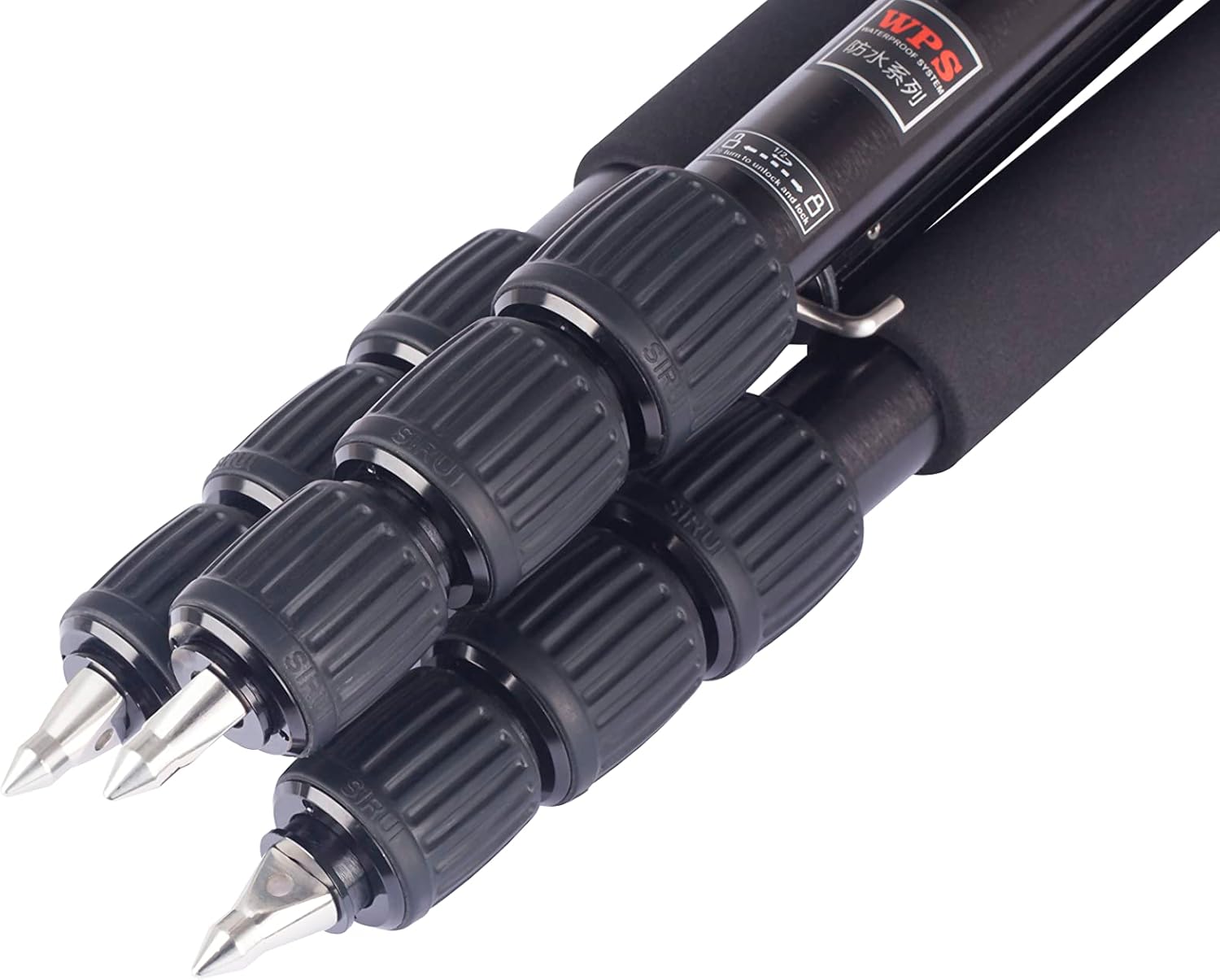
The Sirui W-2004 is a waterproof aluminum alloy tripod designed for stability and versatility in various environmental conditions. Its leg locks incorporate waterproof and leak-proof materials, preventing water, dust, or small particles from entering the leg sections. This system allows for reliable operation in wet or challenging environments. The tripod features a unique leg mechanism that allows for 180-degree inversion for compact storage and includes a split center column for easy height adjustments. One of the tripod legs can also be converted into a monopod for increased flexibility.

2. Safety Information
- Ensure all leg locks and adjustments are securely tightened before mounting equipment.
- Do not exceed the maximum load capacity of the tripod. Refer to the specifications section for details.
- Avoid exposing the tripod to extreme temperatures or corrosive substances.
- When carrying the tripod with a camera attached, ensure the camera is securely fastened and balanced.
- Be cautious when extending or retracting legs to avoid pinching fingers.
- Clean the tripod after use in wet or sandy conditions to maintain its waterproof integrity and smooth operation.
3. Package Contents
Verify that all items are present in the package:
- Sirui W-2004 Tripod
- Padded Case
- Shoulder Strap
- Tool Kit
- 3 x Stainless Steel Spikes
- Monopod Wrist Strap
4. Setup and Assembly
4.1 Unfolding the Tripod
- Release the leg angle locks on each leg.
- Extend the legs to the desired angle. The ergonomic leg angle locks allow for quick and easy adjustment, staying open until a position is selected.
- Ensure the leg angle locks click into place to secure the leg position.

4.2 Adjusting Leg Length
- To extend a leg section, twist the rubber locking collar approximately ½ turn counter-clockwise to loosen.
- Pull the leg section outwards to the desired length.
- Twist the locking collar clockwise to tighten and secure the leg section. Ensure it is firmly tightened to prevent slippage.

4.3 Center Column Operation
- Extending/Retracting: Loosen the center column locking knob, adjust the column to the desired height, and then tighten the knob securely.
- Splitting the Center Column: The center column is split into two sections. This allows for quick conversion to a short center column for low-angle shooting. Unscrew the lower section of the center column to remove it.
4.4 Monopod Conversion
One of the tripod legs can be detached and converted into a monopod. This is useful in situations where a full tripod is not permitted or space is limited.
- Identify the leg with the foam grip. This is the convertible monopod leg.
- Unscrew this leg from the tripod chassis.
- Remove the center column from the tripod chassis.
- Attach the center column to the top of the detached leg to increase the monopod's height.
- Attach your camera or ball head to the top of the monopod.

4.5 Attaching a Camera or Head
The tripod features a standard mounting screw for attaching a camera or a tripod head. Ensure the mounting screw is compatible with your equipment and tighten it securely to prevent accidental detachment.
5. Operation
5.1 Using in Various Environments
The Sirui W-2004 tripod is designed with waterproof leg locks, making it suitable for use in challenging conditions such as rain, snow, or near water bodies. The waterproof system prevents ingress of water, dust, and small particles into the leg sections and locking mechanisms. After use in wet or dirty conditions, it is recommended to clean the tripod as described in the maintenance section.
5.2 Changing Feet
The tripod comes with slip-resistant rubber feet installed, which can be replaced with the included stainless steel spikes for enhanced grip and stability on soft or uneven terrain.
- To remove the rubber feet, unscrew them from the bottom of each leg.
- Screw the stainless steel spikes into the threaded inserts at the bottom of each leg until secure.

6. Maintenance
6.1 Cleaning
- After use, especially in wet, sandy, or dusty conditions, wipe down the tripod with a clean, damp cloth.
- For stubborn dirt, use a mild soap solution. Avoid harsh chemicals or abrasive cleaners.
- Ensure all leg sections and locking mechanisms are thoroughly dried before storage to prevent corrosion.
- Periodically check and clean the threads of the leg locks and feet.
6.2 Storage
Store the tripod in its padded case in a cool, dry place away from direct sunlight and extreme temperatures. Ensure the legs are fully retracted and all locks are lightly tightened for compact storage.
7. Troubleshooting
- Legs not extending/retracting smoothly: Check for dirt or debris in the leg sections or locking mechanisms. Clean as per maintenance instructions. Ensure the twist locks are fully loosened.
- Tripod instability: Verify that all leg angle locks are engaged and leg section twist locks are fully tightened. Ensure the tripod is placed on a stable, level surface.
- Center column movement: Ensure the center column locking knob is fully tightened.
8. Specifications
| Feature | Detail |
|---|---|
| Model Name | SUW2004 (78170) |
| Material | Aluminum, Rubber, Stainless Steel |
| Product Dimensions | 20.47 x 3.94 x 7.48 inches (Folded) |
| Item Weight | 3.75 pounds (approx. 1.7 kg) |
| Maximum Height | 63 Inches (approx. 160 cm) |
| Folded Size | 17.7 inches (L) x 5.1 inches (W) x 5.1 inches (H) |
| Tripod Head Type | Ball Heads (compatible) |
| Special Feature | Waterproof Leg Locks, Monopod Conversion |
| Compatible Devices | Camera |


