
XTRONS HD101
Contents
XTRONS 10.1 Inch HD Digital Screen Car Headrest DVD Player
Model: HD101
Product Overview
The XTRONS HD101 is a versatile 10.1-inch HD digital screen car headrest DVD player designed to provide high-quality entertainment on the go. Featuring an ultra-thin design with touch buttons, it seamlessly blends elegance with functionality. This unit supports various media formats and offers multiple connectivity options for an enhanced in-car entertainment experience.

Front view of the XTRONS 10.1 Inch HD Digital Screen Car Headrest DVD Player, showcasing its sleek design and large display.
Key Features:
- 10.1 Inch HD Screen: Offers an ultra-clear wide screen with 1024x600 resolution for sharper images and amazing graphics.
- Region Free DVD Player: Compatible with most DVDs and CDs available on the market.
- 32-Bit Games Support: Enjoy exciting games on your journey. Note: Not all game discs are compatible.
- Multi-media Choices: Expand media options via USB & SD card (max 32GB, files within 4GB), AUX IN & AV OUT.
- Built-in HDMI Port: Easily integrate mobile entertainment and share content from your phone.
- Ultra-thin Design with Touch Button: Combines elegance and functionality.
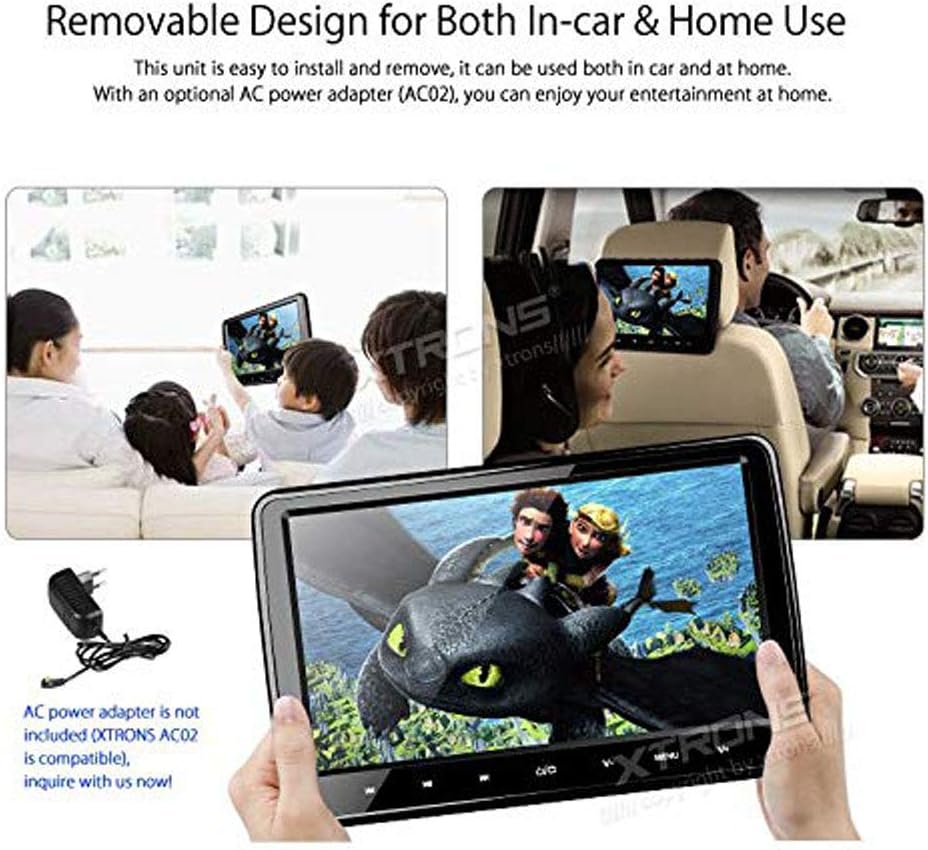
- Removable Design: Can be used both in-car and at home with an optional AC power adapter.
Official XTRONS product overview video, demonstrating the key features and design of the HD101 headrest DVD player.
Setup and Installation
The HD101 is designed for easy installation and removal, allowing for flexible use in your vehicle or at home.
In-Car Installation:
- Attach the mounting bracket to the headrest posts. Ensure a secure fit.
- Slide the headrest DVD player onto the mounting bracket until it clicks into place.
- Connect the power cable. Two options are provided:
- Use the cigarette lighter adapter for simple plug-and-play power.
- Hardwire the unit to a 12V power source using the provided ISO wiring harness for a more permanent installation.
- Adjust the viewing angle for optimal comfort.

Visual guide demonstrating the steps for easy and safe installation of the headrest DVD player onto car headrest posts.
Home Use:
For home use, the unit can be easily removed from the car and powered using an optional AC power adapter (not included). This allows you to enjoy your media content in any room.

The headrest DVD player shown in both in-car and home environments, highlighting its removable design for versatile use.
Operating Instructions
Playing DVDs/CDs:
The HD101 features a region-free DVD player. To insert a disc, gently open the disc cover on the back of the unit and place the disc with the label facing up. Close the cover securely. The unit will automatically begin playing the disc.

Image illustrating the region-free DVD player and the USB/SD card slots for various media inputs.
Multimedia Playback (USB & SD):
Insert your USB stick or SD card into the designated slots on the side of the unit. The maximum capacity supported is 32GB, with individual files not exceeding 4GB. The unit will detect the media and allow you to browse and play music, videos, or view photos.
HDMI Connectivity:
Connect your mobile phone or other HDMI-enabled devices to the built-in HDMI port for seamless video sharing and gaming. This allows you to mirror your device's screen directly onto the HD101 display.
Demonstration of connecting a smartphone to the headrest player via HDMI for screen mirroring, supporting both wired and wireless options.
Audio Output Options:
- Built-in Speakers: Play audio directly from the unit for personal listening.
- Built-in IR Transmitter: Connect wireless infrared headphones (not included, XTRONS DWH002, DWH003, DWH004 are compatible) for private listening. Supports dual channel (A: 2.3-2.8MHz, B: 3.2-3.8MHz).
- Built-in FM Transmitter: Send the audio signal from the headrest to your car's radio receiver (car stereo) to share audio with other passengers.

Diagram showing various audio output methods: built-in IR transmitter for headphones, built-in speakers, and FM transmitter for car stereo integration.
Playing Games:
The unit supports 32-bit games. Insert the provided game disc into the DVD player. Use the included remote control, which doubles as a gamepad, to navigate and play games.
Maintenance
To ensure the longevity and optimal performance of your XTRONS HD101 headrest DVD player, follow these maintenance guidelines:
- Cleaning: Use a soft, dry cloth to clean the screen and exterior. Avoid abrasive cleaners or solvents that may damage the surface.
- Disc Care: Handle discs by their edges to prevent fingerprints and scratches. Store discs in their cases when not in use.
- Ventilation: Ensure the unit's ventilation openings are not blocked to prevent overheating.
- Temperature: Avoid exposing the unit to extreme temperatures, both hot and cold, for extended periods.
Troubleshooting
If you encounter issues with your XTRONS HD101, please refer to the following common troubleshooting steps:
| Problem | Possible Cause | Solution |
|---|---|---|
| No Power | Loose power connection; Blown fuse; Vehicle power issue. | Check all power connections. Ensure cigarette lighter socket is working. Check vehicle's fuse box. |
| No Picture/Sound | Incorrect input source selected; Loose AV cables; Disc/USB/SD card issue. | Verify correct input source (DVD, HDMI, USB, SD). Check AV cable connections. Try a different disc/media. |
| Disc Ejection Difficulty | Disc not properly seated; Mechanism jam. | Gently try to re-seat the disc. If persistent, contact customer support. |
| Remote Not Working | Dead batteries; Obstruction between remote and unit. | Replace remote batteries. Ensure clear line of sight to the unit's IR receiver. |
For further assistance, please contact XTRONS customer support.
Specifications
| Feature | Detail |
|---|---|
| Screen Size | 10.1 Inches |
| Display Resolution | 1024x600 |
| Connectivity Technology | Auxiliary, IR, USB |
| Media Type Supported | DVD, CD, USB (up to 32GB), SD (up to 32GB) |
| Item Model Number | HD101 |
| Item Weight | 0.01 ounces |
| Package Dimensions | 14.4 x 11 x 7.7 inches |
| Color | Black |
What's in the Box
The following items are included with your XTRONS HD101 headrest DVD player:
- 1 x ISO Wiring Harness
- 1 x ISO Adapter Cable
- 1 x User Manual
- 1 x Cigarette Lighter Adapter
- 1 x Plastic Drivepipe
- 1 x Fixing Screw
- 1 x Mounting Bracket
- 1 x Remote Control
- 1 x Game Disc

An overview of all included accessories and the physical dimensions of the XTRONS HD101 unit.
Warranty and Support
XTRONS products are backed by a commitment to quality and customer satisfaction. For specific warranty details and to register your product, please visit the official XTRONS website or refer to the warranty card included in your package.
For technical support, troubleshooting assistance, or any inquiries regarding your HD101 headrest DVD player, please contact XTRONS customer service through their official channels. Keep your purchase receipt and product model number (HD101) handy when contacting support.
XTRONS is dedicated to providing excellent customer service and support for their products.
Ask a question about this manual
Ask about setup, troubleshooting, compatibility, parts, safety, or missing instructions. Manuals+ will review the question and use this page’s manual context to help answer it.