
1. Introduction
The LG Tone Pro 760 Bluetooth Wireless Stereo Headphones offer a convenient and high-quality audio experience. Designed for comfort and ease of use, these headphones allow you to enjoy music and manage calls wirelessly. This manual will guide you through the setup, operation, and maintenance of your device.
2. Package Contents
Please check the box for the following items:
- LG Tone Pro 760 Bluetooth Wireless Stereo Headphones (Model: 60-5938-05-XP)
- USB Charging Cable
- Ear Gels (various sizes)
- User Manual (this document)
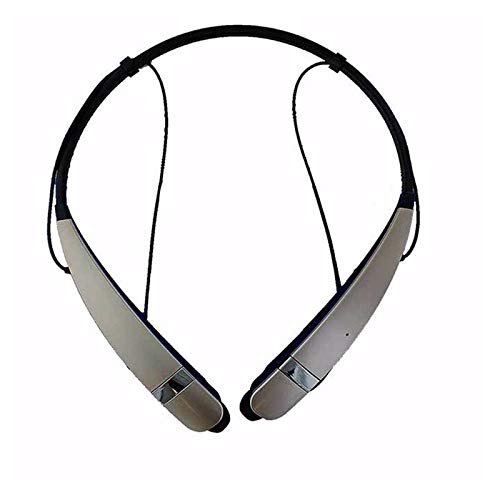
Image: LG Tone Pro 760 Bluetooth Wireless Stereo Headphones. The headphones feature a neckband design with retractable earbuds.
3. Product Overview
3.1. Components and Controls
Familiarize yourself with the main components and controls of your LG Tone Pro 760 headphones.
- Power Button: Used to turn the headphones on or off.
- Call Button: For answering, ending, or rejecting calls.
- Play/Pause Button: Controls music playback.
- Volume Jog Buttons: Adjusts the listening volume.
- Music Control Jog Buttons: Skips tracks forward or backward.
- Microphone: Integrated for hands-free calling.
- Charging Port: For connecting the USB charging cable.
- LED Indicator: Shows power status, pairing status, and charging status.
4. Setup
4.1. Charging the Battery
- Connect the small end of the USB charging cable to the charging port on your headphones.
- Connect the other end of the USB charging cable to a USB power adapter or a computer's USB port.
- The LED indicator will show the charging status. A full charge typically takes approximately 2 hours.
- Once fully charged, disconnect the charging cable.
Note: Ensure the headphones are fully charged before first use for optimal battery performance.
4.2. Pairing with a Bluetooth Device
- Ensure your headphones are turned off.
- Press and hold the Power button until the LED indicator flashes blue and red alternately. This indicates the headphones are in pairing mode.
- On your Bluetooth-enabled device (e.g., smartphone, tablet), go to the Bluetooth settings and turn Bluetooth on.
- Search for available devices. Select "LG HBS760" or "LG Tone Pro" from the list.
- If prompted for a passcode, enter "0000".
- Once paired, the LED indicator will flash blue periodically, and you may hear a confirmation tone.
Tip: The headphones can typically remember multiple paired devices, but can only connect to one at a time.
5. Operating Instructions
5.1. Power On/Off
- To Power On: Press and hold the Power button for approximately 2 seconds. The LED indicator will flash blue.
- To Power Off: Press and hold the Power button for approximately 4 seconds. The LED indicator will flash red and then turn off.
5.2. Making and Receiving Calls
- Answering a Call: Press the Call button once.
- Ending a Call: Press the Call button once during a call.
- Rejecting a Call: Press and hold the Call button for 2 seconds.
- Redialing Last Number: Double-press the Call button.
- Voice Dialing (if supported by device): Press and hold the Call button for 1 second when not on a call.
5.3. Music Playback
- Play/Pause: Press the Play/Pause button once.
- Volume Up/Down: Use the Volume Jog buttons.
- Next Track: Push the Music Control Jog button forward.
- Previous Track: Push the Music Control Jog button backward.
6. Maintenance
- Cleaning: Wipe the headphones with a soft, dry cloth. Do not use abrasive cleaners or solvents.
- Storage: Store the headphones in a cool, dry place away from direct sunlight and extreme temperatures.
- Battery Care: To preserve battery life, charge the headphones regularly, even if not used frequently. Avoid fully discharging the battery for extended periods.
- Water Resistance: These headphones are not waterproof. Avoid exposure to liquids.
7. Troubleshooting
| Problem | Possible Solution |
|---|---|
| Headphones do not power on. | Ensure the battery is charged. Connect to a power source and try again. |
| Cannot pair with a device. |
|
| No sound or poor sound quality. |
|
| Calls are not clear. |
|
8. Specifications
| Feature | Detail |
|---|---|
| Model Number | 60-5938-05-XP |
| Connectivity Technology | Bluetooth 4.1 |
| Form Factor | Two-ear, Neckband Style |
| Microphone | Included |
| Control Method | Jog Buttons, Touch (for call/play/pause) |
| Battery Type | 1 Lithium Ion battery (required) |
| Battery Life (Standby) | Up to 540 Hours (Note: Actual usage time may vary) |
| Item Weight | 1.28 ounces (approx. 36 grams) |
| Product Dimensions | 8.4 x 6.7 x 1.6 inches |
| UPC | 874305007596 |
9. Warranty and Support
For detailed warranty information, product registration, or technical support, please visit the official LG Electronics website or contact LG customer service in your region. Keep your proof of purchase for warranty claims.
Official LG Website: www.lg.com