
Introduction
Thank you for choosing the Peakeep Twin Bell Analog Alarm Clock. This classic-style alarm clock is designed to provide a loud, effective alarm for heavy sleepers, while also featuring a silent sweeping second hand for undisturbed rest. Its vintage design and clear 3D dial make it a functional and attractive addition to any room.

Image: Front view of the Peakeep 4 Inches Twin Bell Loud Alarm Clock in pink, showcasing its classic design and clear 3D dial.
Setup
1. Battery Installation
Your Peakeep alarm clock requires one (1) AA 1.5V battery (not included).
- Locate the battery compartment on the back of the clock.
- Open the battery compartment cover.
- Insert one AA battery, ensuring the polarity (+ and -) matches the indicators inside the compartment.
- Close the battery compartment cover securely.
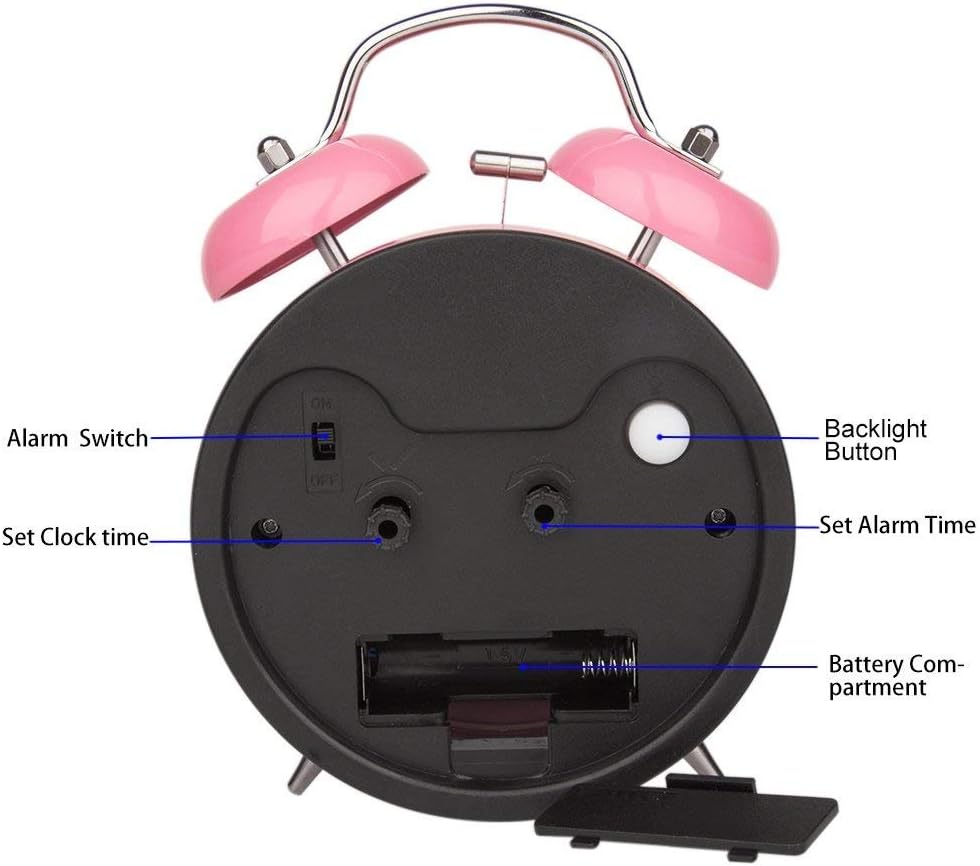
Image: Rear view of the alarm clock, highlighting the battery compartment for easy access and replacement.
2. Setting the Time
To set the current time:
- Locate the "Set Clock Time" knob on the back of the clock.
- Rotate this knob in the direction of the arrow until the hour and minute hands display the correct time.

Image: Detailed view of the back of the alarm clock, showing the "Set Clock Time" and "Set Alarm Time" knobs, and the "Alarm Switch".
3. Setting the Alarm
To set your desired alarm time:
- Locate the "Set Alarm Time" knob on the back of the clock.
- Rotate this knob in the direction of the arrow until the alarm hand points to your desired wake-up time.
- Ensure the "Alarm Switch" (ON/OFF toggle) is in the "ON" position for the alarm to activate.
Operating Instructions
1. Alarm Function
When the set alarm time is reached, the twin bells will ring loudly. This clock does not feature a snooze button. To turn off the alarm, simply move the "Alarm Switch" on the back of the clock to the "OFF" position.
2. Backlight Function
For visibility in low-light conditions or at night, press the "Backlight Button" located on the back of the clock. The dial will illuminate, allowing you to easily read the time. Release the button to turn off the backlight.

Image: The alarm clock's face illuminated by the backlight, demonstrating its visibility in the dark.
3. Silent Operation
The clock features a silent sweeping second hand, ensuring no distracting "tick-tock" noise, promoting a peaceful sleeping environment.
Maintenance
1. Cleaning
To maintain the appearance and functionality of your alarm clock, keep it away from damp environments. Wipe the exterior with a soft, dry cloth as needed. Avoid using harsh chemicals or abrasive cleaners.
2. Battery Care
If the clock will not be used for an extended period, remove the AA battery to prevent potential leakage and damage to the clock's mechanism.
Troubleshooting
- Clock not keeping accurate time: Ensure the battery is fresh and correctly installed. Replace the battery if necessary.
- Alarm not sounding: Verify that the "Alarm Switch" on the back of the clock is in the "ON" position. Check if the alarm time is correctly set. Ensure the battery is not depleted.
- Backlight not working: Press the "Backlight Button" firmly. If it still doesn't work, replace the battery.
Specifications
| Feature | Detail |
|---|---|
| Brand | Peakeep |
| Model Number | MHP3122 |
| Color | Pink |
| Display Type | Analog (3D Dial) |
| Style | Vintage |
| Special Features | Loud Alarm, Silent Sweeping Second Hand, Backlight |
| Product Dimensions | 4.5"W x 6.5"H |
| Power Source | Battery Powered (1 AA battery required, not included) |
| Material | Metal (Iron Frame) |
| Item Weight | 5.1 ounces |
| UPC | 700355113478 |

Image: The Peakeep alarm clock with its dimensions (4.5" W x 6.5" H) clearly indicated.
Warranty and Support
This Peakeep alarm clock comes with a manufacturer's warranty for 90 days from the date of purchase. For any product-related inquiries or support, please refer to the contact information provided in your product packaging or visit the official Peakeep website.
A detailed user manual is included in the product packaging for further assistance.
Image: The product packaging, illustrating the included user manual and warranty card.