
1. Important Safety Information
Please read all instructions carefully before using this appliance to ensure safe operation and to prevent damage. Keep this manual for future reference.
General Safety Precautions:
- Electrical Safety: Ensure the appliance is connected to a properly grounded outlet. Do not use extension cords.
- Ventilation: Maintain adequate ventilation around the unit to prevent overheating.
- Outdoor Use: This appliance is designed for outdoor use. Ensure it is installed in a location protected from direct weather exposure if possible, and on a stable, level surface.
- Children Safety: Keep children away from the appliance. Do not allow them to play with or inside the unit.
- Flammable Materials: Do not store explosive substances such as aerosol cans with a flammable propellant in this appliance.
- Proposition 65 Warning: This product can expose you to chemicals including Lead, which is known to the State of California to cause cancer and birth defects or other reproductive harm. For more information go to www.P65Warnings.ca.gov.
2. Setup and Installation
Proper installation is crucial for the performance and longevity of your DCS RF24RE3 refrigerator.
Unpacking:
- Carefully remove all packaging materials.
- Inspect the appliance for any shipping damage. Report any damage immediately to your dealer.
- Retain packaging materials for future transport if needed.
Location Requirements:
- This unit is designed for outdoor, countertop installation.
- Ensure the installation area is level and can support the weight of the refrigerator when fully loaded.
- Allow sufficient clearance around the unit for proper air circulation, especially at the rear and bottom vents.
- Avoid direct sunlight exposure to optimize energy efficiency.
Leveling the Appliance:
The refrigerator is equipped with adjustable leveling legs. Use a spirit level to ensure the unit is perfectly level before operation. Adjust the legs by turning them clockwise to raise and counter-clockwise to lower.
Electrical Connection:
Connect the appliance to a dedicated, grounded 115V AC, 60Hz electrical outlet. Consult a qualified electrician if you are unsure about your electrical supply.
3. Operating Instructions
Familiarize yourself with the controls and features of your DCS RF24RE3 refrigerator.
Initial Startup:
- After installation, wait at least 2-4 hours before plugging in the unit to allow refrigerants to settle.
- Plug the refrigerator into the grounded electrical outlet.
- The interior light will illuminate when the door is opened.
- Allow the unit to operate for several hours to reach the desired temperature before loading with contents.
Temperature Control:
The refrigerator features a digital temperature display and controls, typically located inside the unit near the top. Adjust the temperature setting using the control buttons to achieve your desired cooling level. The display shows the current internal temperature (e.g., '31' degrees Fahrenheit).
Loading the Refrigerator:
The 6.1 Cu. Ft. capacity allows for ample storage. Arrange items to allow for proper air circulation. Avoid blocking the internal air vents.
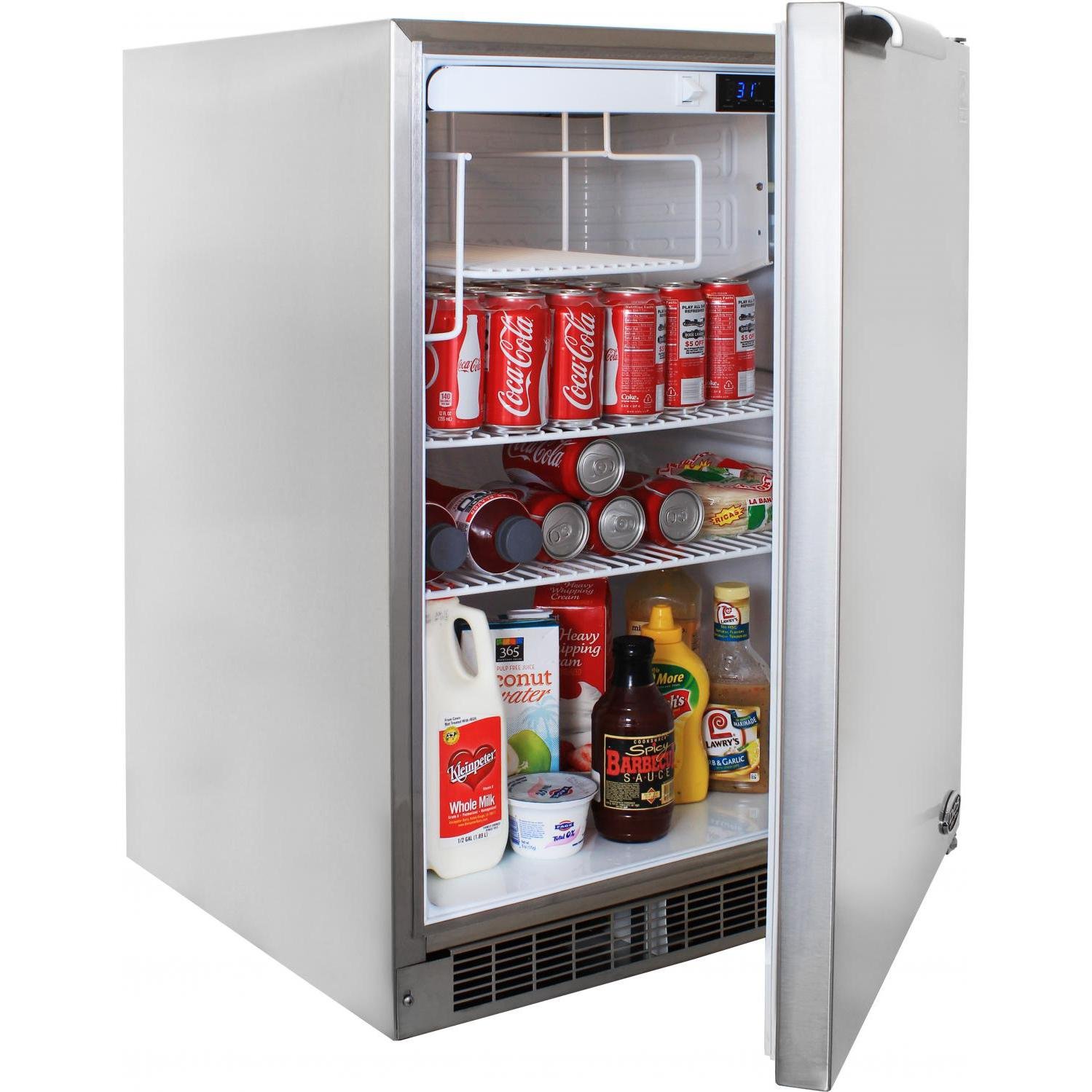
Figure 1: Interior view of the DCS RF24RE3 refrigerator. This image displays the DCS RF24RE3 outdoor refrigerator with its right-hand hinged door open. The interior features adjustable shelves, currently stocked with various beverages like soda cans and milk, along with condiments. A digital temperature display showing '31' is visible at the top right of the interior.
4. Maintenance and Care
Regular maintenance ensures optimal performance and extends the life of your appliance.
Cleaning the Interior:
- Unplug the unit before cleaning.
- Use a mild detergent and warm water solution to clean interior surfaces and shelves.
- Wipe dry thoroughly to prevent water spots.
- Do not use abrasive cleaners or sharp objects.
Cleaning the Exterior:
- For the brushed stainless steel exterior, use a soft cloth and a stainless steel cleaner.
- Always wipe in the direction of the grain to avoid scratching.
- Clean the condenser coils (located at the back or bottom) periodically to ensure efficient operation.
Defrosting:
This refrigerator may feature an automatic defrost system. If manual defrosting is required due to excessive ice buildup, unplug the unit and allow ice to melt naturally. Do not use sharp objects to remove ice.
5. Troubleshooting Guide
Before contacting service, review this section for common issues and their solutions.
| Problem | Possible Cause | Solution |
|---|---|---|
| Refrigerator does not operate. | No power supply; circuit breaker tripped; power cord unplugged. | Check power connection; reset circuit breaker; ensure plug is secure. |
| Unit is not cold enough. | Temperature setting too high; door not closed properly; excessive door openings; warm items added; poor ventilation. | Adjust temperature setting; ensure door seals tightly; minimize door openings; allow warm items to cool before placing inside; ensure proper air flow around unit. |
| Excessive noise. | Unit not level; items rattling inside; fan obstruction. | Level the unit using adjustable legs; rearrange items; check for obstructions near fan. |
| Water on floor. | Drain tube clogged; excessive humidity. | Clear drain tube; ensure proper ventilation and avoid excessive humidity. |
If the problem persists after attempting these solutions, please contact DCS customer support.
6. Product Specifications
Detailed specifications for the DCS RF24RE3 Outdoor Refrigerator.
- Model: RF24RE3
- Brand: DCS
- Type: Outdoor Refrigerator
- Capacity: 6.1 Cu. Ft. (or 5.1 Cubic Feet as per some specifications)
- Dimensions (D x W x H): 24.12"D x 23.87"W x 34"H
- Installation Type: Countertop, Outdoor
- Color: Stainless Steel
- Door Material Type: Metal
- Hinge: Right Hand Hinge
- Special Features: Interior Lighting, Adjustable Leveling Legs, Compact Form Factor
- Certification: UL
- Power: 115V AC, 60Hz (Standard)
- Item Weight: Approximately 0.01 Ounces (Note: This weight seems incorrect from source data, typical refrigerator weight is much higher. User should refer to official product documentation for accurate weight.)
7. Warranty and Customer Support
For warranty information, please refer to the warranty card included with your product or visit the official DCS website. For technical assistance, parts, or service inquiries, please contact DCS customer support directly.
DCS Customer Support:
- Refer to your product documentation for specific contact details.
- Visit the official DCS website for the most up-to-date support information.


