
1. Introduction
This manual provides essential information for the safe and effective installation, operation, and maintenance of your Viqua 650652 H PLUS Commercial UV System. This system is designed for commercial applications requiring high flow water disinfection, such as restaurants, large office buildings, hotels, and schools. It utilizes ultraviolet (UV) light to disinfect water without the use of chemicals, ensuring safe water for various uses.
2. Safety Information
Read all instructions carefully before installation and operation. Failure to follow these instructions may result in injury or damage to the system. Keep this manual for future reference.
- Electrical Hazard: Always disconnect power before servicing the unit. Ensure proper grounding.
- UV Radiation: Do not look directly at the illuminated UV lamp. UV light can cause severe eye and skin irritation.
- Water Pressure: Ensure the system is installed in a location with appropriate water pressure.
- Water Leaks: Inspect all connections for leaks after installation and during maintenance.
- Professional Installation: Installation should be performed by a qualified professional to ensure compliance with local codes and proper system function.
3. Product Overview
The Viqua 650652 H PLUS system is a robust commercial UV water disinfection unit designed for high-flow applications up to 45 GPM. It features an amalgam UV lamp for extended life and enhanced performance, along with an integrated sensor for monitoring UV light intensity.
Key Features:
- Amalgam UV lamp with up to 2 years of operational life.
- Integrated sensor for continuous UV light monitoring, ensuring proper UV exposure.
- Digital display for UV lamp life countdown.
- Compatibility with 100-240V, 50-60Hz electrical systems.
- Optional integration with a solenoid valve for automatic water shut-off in case of system errors.
System Components:
The system typically consists of a stainless steel UV chamber, a UV lamp, a quartz sleeve, a UV sensor, and a controller unit.
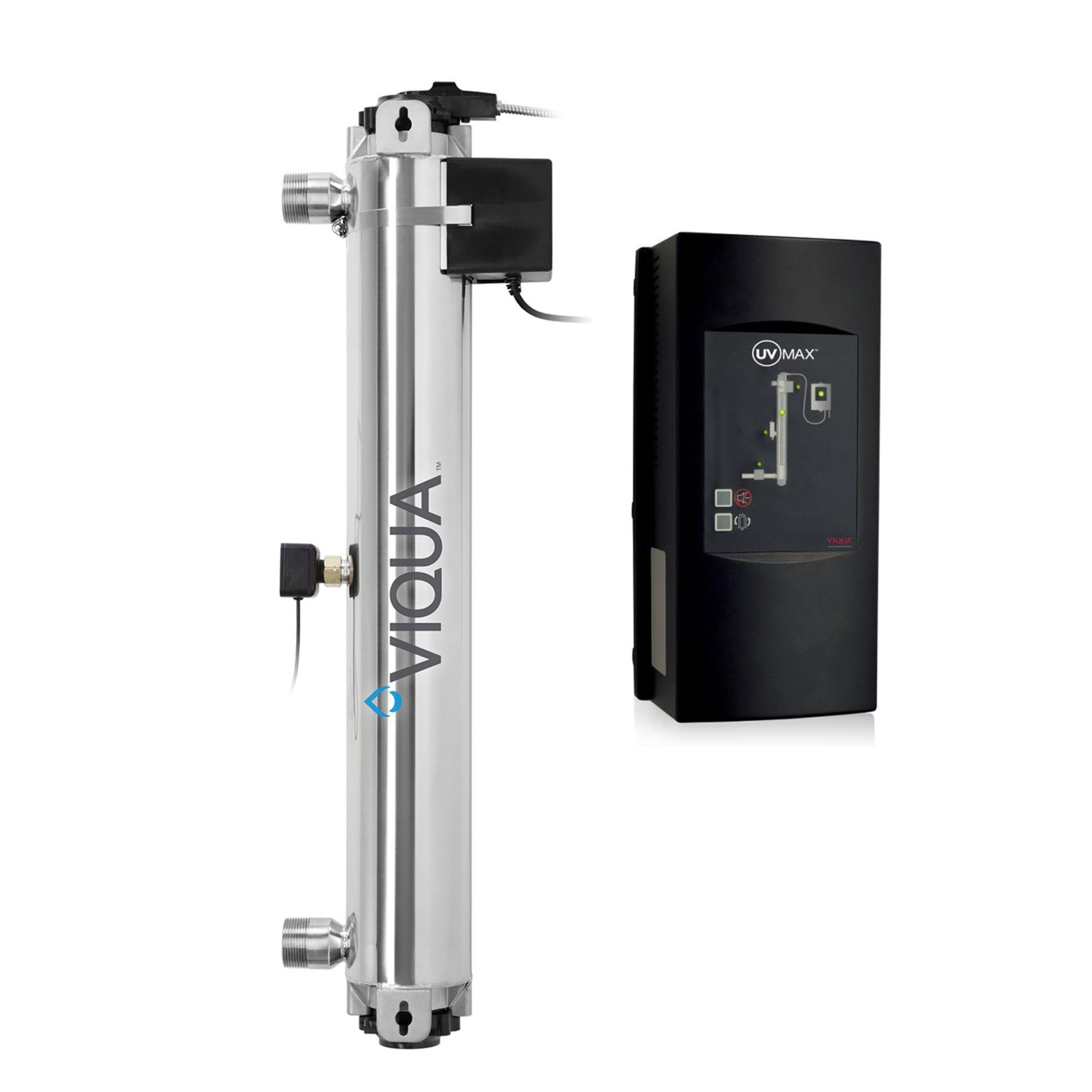
Image 3.1: The Viqua 650652 H PLUS Commercial UV System, showing the main unit with its controller and chamber.
4. Setup and Installation
Proper installation is critical for the effective operation of your UV system. It is highly recommended that installation be performed by a certified plumber or qualified professional.
4.1 Pre-Installation Checks:
- Ensure all components are present and undamaged.
- Verify water quality parameters (e.g., hardness, iron, manganese) meet system requirements. Pre-filtration may be necessary.
- Select a suitable mounting location that is protected from the elements, allows for easy access for maintenance, and is close to a power outlet.
4.2 Installation Steps:
- Mounting: Securely mount the UV chamber horizontally or vertically using the provided mounting brackets.
- Plumbing Connections: Connect the water inlet and outlet to the UV chamber. Ensure all connections are watertight.
- Quartz Sleeve Installation: Carefully insert the quartz sleeve into the UV chamber, ensuring it is centered and sealed with O-rings.
- UV Lamp Installation: Insert the UV lamp into the quartz sleeve. Connect the lamp connector to the controller.
- Sensor Installation: Install the UV sensor into its designated port on the chamber. Connect the sensor cable to the controller.
- Electrical Connection: Connect the controller to a grounded electrical outlet (100-240V, 50-60Hz).
- Leak Check: Slowly turn on the water supply and check for any leaks.
5. Operating Instructions
Once installed, the Viqua H PLUS system operates automatically to disinfect your water supply.
5.1 Initial Startup:
- After completing installation and leak checks, plug in the controller.
- The system will perform a self-diagnostic test. The display will show the remaining lamp life countdown.
- Allow water to flow through the system for several minutes to purge any air.
5.2 Normal Operation:
- The controller display will continuously show the number of days remaining until the UV lamp requires replacement.
- The integrated UV sensor monitors the UV intensity. If the intensity drops below a safe level, an alarm will sound, and an error message will be displayed.
- If an optional solenoid valve is connected, it will automatically shut off the water flow upon detection of a system error (e.g., low UV intensity, lamp failure) to prevent untreated water from passing through.
6. Maintenance
Regular maintenance ensures the continued effectiveness and longevity of your Viqua UV system. Always disconnect power before performing any maintenance.
6.1 UV Lamp Replacement:
- The amalgam UV lamp has a life expectancy of up to 2 years (approximately 17,520 hours).
- Replace the lamp when the controller indicates the end of its operational life or when an alarm signals low UV intensity.
- Refer to the specific lamp replacement instructions provided with your replacement lamp or on the Viqua website.
6.2 Quartz Sleeve Cleaning and Replacement:
- The quartz sleeve should be cleaned annually or more frequently if water quality dictates (e.g., high hardness leading to scaling).
- Use a soft cloth and a mild acid (e.g., citric acid or vinegar) to remove any mineral deposits.
- Replace the quartz sleeve if it is cracked, scratched, or cannot be cleaned effectively.
6.3 Sensor Maintenance:
- Periodically inspect the UV sensor for any buildup or damage. Clean as necessary following manufacturer guidelines.
7. Troubleshooting
This section provides solutions to common issues. For problems not listed here or if issues persist, contact Viqua customer support or a qualified service technician.
| Problem | Possible Cause | Solution |
|---|---|---|
| No UV light/Lamp not illuminating |
|
|
| Low UV intensity alarm |
|
|
| Water shut-off (with optional solenoid) |
|
|
| Water leaks |
|
|
8. Specifications
| Model Number | 650652 |
| System Type | Commercial UV Water Disinfection System |
| Flow Rate | Up to 45 GPM (Gallons Per Minute) |
| UV Lamp Type | Amalgam Lamp |
| Lamp Life | Up to 2 years (17,520 hours) |
| Electrical Requirements | 100-240V, 50-60Hz |
| Item Weight | 28 pounds |
9. Warranty and Support
For warranty information, technical support, or to purchase replacement parts, please contact Viqua customer service. Ensure you have your model number (650652) and date of purchase available when contacting support.
Viqua Contact Information: Refer to the official Viqua website or your purchase documentation for the most current contact details.