
Introduction
The Soniclean Soft Carpet Upright Vacuum Cleaner, Model SFC-7000, is specifically engineered to provide effective and gentle cleaning for all types of soft-style carpets with pile lengths less than 1 inch. This manual provides essential information for the safe and efficient operation, maintenance, and troubleshooting of your Soniclean vacuum cleaner.
Utilizing patented Sonic Carpet Cleaning Technology, the vacuum's sonic bar generates 200 vibrations per second, dislodging deeply embedded dirt. Its ultra-soft bristle brushroll ensures gentle care for carpet fibers, while the EZ-Push adjustable vent system and lightweight design (10.5 lbs) facilitate easy maneuverability across thick carpets. The hospital-grade H13 HEPA filtration system captures 99.97% of particles down to 0.3 microns, making it ideal for allergy sufferers.
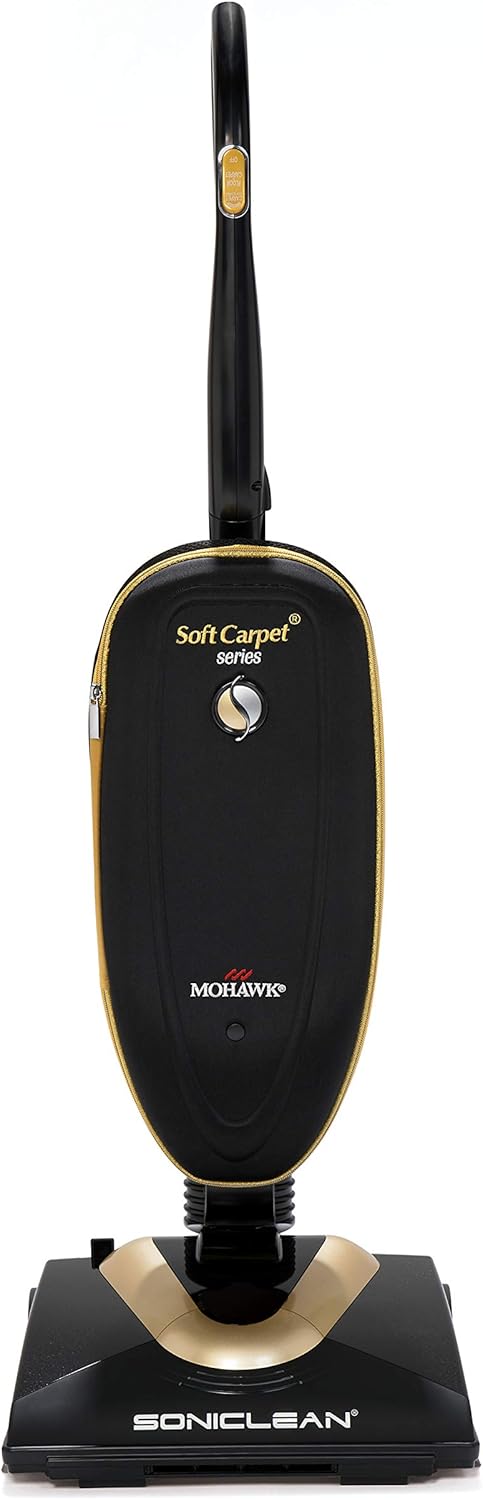
Figure 1: Soniclean Soft Carpet Upright Vacuum Cleaner
This image shows the Soniclean Soft Carpet Upright Vacuum Cleaner from the front, highlighting its sleek black and gold design and compact form factor.
Important Safety Information
Please read all instructions carefully before using this appliance. Failure to follow these instructions may result in electric shock, fire, or serious injury.
- This vacuum cleaner is designed for residential use only in North America.
- Do not use outdoors or on wet surfaces.
- Unplug from outlet when not in use and before servicing.
- Do not allow to be used as a toy. Close attention is necessary when used by or near children.
- Use only as described in this manual. Use only manufacturer's recommended attachments.
- Do not use with damaged cord or plug. If appliance is not working as it should, has been dropped, damaged, left outdoors, or dropped into water, return it to a service center.
- Do not pull or carry by cord, use cord as a handle, close a door on cord, or pull cord around sharp edges or corners. Do not run appliance over cord. Keep cord away from heated surfaces.
- Do not unplug by pulling on cord. To unplug, grasp the plug, not the cord.
- Do not handle plug or appliance with wet hands.
- Do not put any object into openings. Do not use with any opening blocked; keep free of dust, lint, hair, and anything that may reduce air flow.
- Keep hair, loose clothing, fingers, and all parts of body away from openings and moving parts.
- Do not pick up anything that is burning or smoking, such as cigarettes, matches, or hot ashes.
- Do not use without dust bag and/or filters in place.
- Turn off all controls before unplugging.
- Use extra care when cleaning on stairs.
- Do not use to pick up flammable or combustible liquids, such as gasoline, or use in areas where they may be present.
Setup and Assembly
Your Soniclean vacuum cleaner requires minimal assembly before first use. Please follow these steps:
- Unpack Components: Carefully remove all parts from the packaging. Ensure all components listed in the packing list are present.
- Attach Handle: Insert the handle assembly into the main body of the vacuum until it clicks securely into place. Ensure the handle is firmly seated and does not wobble.
- Install Filter Bag: Open the front cover of the vacuum. Align and insert a new Hospital-Grade H13 HEPA Filter Bag into the bag compartment, ensuring it is properly seated and sealed. Refer to the "Maintenance" section for detailed bag installation instructions.
- Power Cord: Unwind the power cord and plug it into a standard electrical outlet.
Once assembled, your Soniclean vacuum is ready for operation.
Operating Instructions
The Soniclean Soft Carpet Upright Vacuum Cleaner is designed for optimal performance on soft-style carpets. Follow these steps for effective cleaning:
- Power On: Plug the vacuum into a suitable electrical outlet. Press the power button located on the handle to turn the vacuum on.
- Carpet Cleaning:

Figure 2: Vacuuming Soft Carpet
This image shows a person operating the Soniclean vacuum cleaner on a light-colored, soft carpet, demonstrating its ease of use on such surfaces.
Gently push and pull the vacuum across your soft carpet. The patented EZ-Push adjustable vent system allows the vacuum to glide smoothly without excessive effort, even on thick pile carpets. This system automatically adjusts to prevent the vacuum from sinking too deeply into the carpet, ensuring easy maneuverability.

Figure 3: EZ-Push Adjustable Vent System
This diagram illustrates the Soniclean's patented EZ-Push™ adjustable vent system, showing arrows indicating airflow that allows the vacuum to be easily pushed and pulled across soft-style carpets. Note: Not for use on shag carpets with pile lengths greater than 1 inch long.
- Sonic Cleaning Technology: The integrated sonic bar produces 200 vibrations per second. This high-frequency sonic energy works to dislodge deeply embedded dirt and particulate matter from the carpet pile, enhancing cleaning effectiveness.
- Ultra-Soft Bristle Brushroll: The brushroll is designed with ultra-soft bristles to be gentle on delicate carpet fibers while effectively sweeping up debris.
- Cleaning Performance:

Figure 4: Effective Dirt Pickup
This image demonstrates the Soniclean vacuum's ability to effectively pick up dirt and debris from a light-colored carpet surface.

Figure 5: Side View of Cleaning Action
This image provides a side view of the Soniclean vacuum in action, showing it effectively collecting dirt from a carpeted surface.
- Power Off: When finished, press the power button again to turn off the vacuum, then unplug the power cord from the outlet.
Maintenance
Regular maintenance ensures optimal performance and extends the life of your Soniclean vacuum cleaner.
1. HEPA Filter Bag Replacement
The Soniclean vacuum uses Hospital-Grade H13 HEPA Filter Bags, which capture 99.97% of particles down to 0.3 microns. Replace the bag when it is full or when suction power decreases significantly.
- Power Off and Unplug: Always ensure the vacuum is turned off and unplugged from the wall outlet before performing any maintenance.
- Open Bag Compartment: Locate and open the front cover of the vacuum to access the filter bag compartment.
- Remove Full Bag: Carefully pull the handle of the full bag all the way up until it clicks, sealing the bag opening. Remove the bag from the receiver.
- Install New Bag: Align and seat a new HEPA filter bag into the receiver until it stops. Push the handle all the way down to lock the bag in place. Ensure the bag is properly aligned for optimal fit and filtration.

Figure 6: HEPA Filter Bag Replacement
This image illustrates the step-by-step process for replacing the HEPA filter bag in the Soniclean vacuum, showing how to remove the old bag and properly install a new one.
2. Brushroll Cleaning
Periodically inspect the ultra-soft bristle brushroll for tangled hair, threads, or debris. Clean as needed to maintain effective cleaning performance.

Figure 7: Ultra-Soft Brush Roll and Sonic Technology
This image provides a detailed view of the Soniclean's ultra-soft brush roll, designed for gentle cleaning, alongside a diagram illustrating the sonic cleaning technology at work.
- Power Off and Unplug: Ensure the vacuum is off and unplugged.
- Access Brushroll: Carefully turn the vacuum over to access the brushroll area.
- Remove Debris: Use scissors or a brush to cut and remove any tangled hair or debris from the brushroll. Ensure the bristles are free to rotate.
- Inspect Sonic Bar: While the vacuum is inverted, check the sonic bar for any obstructions.
3. Sonicfresh Fragrance Pods (Optional)
For a fresh scent during vacuuming, you can insert Sonicfresh Fragrance Pods into the designated slot.

Figure 8: Sonicfresh Fragrance Pod
This image shows a hand holding a white Sonicfresh Fragrance Pod with green beads visible inside, ready for insertion into the vacuum.
Refer to the fragrance pod packaging for specific instructions on insertion and replacement.
Troubleshooting
This section addresses common issues you might encounter with your Soniclean vacuum cleaner. For problems not listed here, please contact customer support.
| Problem | Possible Cause | Solution |
|---|---|---|
| Vacuum does not turn on. | No power to the unit; Power button not pressed; Thermal protector activated. | Check if the power cord is securely plugged into a working outlet. Press the power button firmly. If the vacuum overheats, it may shut off automatically. Unplug, wait 30 minutes for it to cool down, then plug back in. |
| Loss of suction or poor cleaning performance. | Full filter bag; Clog in hose or nozzle; Brushroll obstructed. | Replace the HEPA filter bag if full. Check for and remove any clogs in the hose, nozzle, or brushroll area. Clean the brushroll of tangled hair or debris. |
| Vacuum is difficult to push on carpet. | EZ-Push vent system not functioning optimally; Carpet pile too high. | Ensure the EZ-Push vent system is clear of debris. This vacuum is designed for soft carpets with pile lengths less than 1 inch. It may be difficult to push on shag carpets with pile lengths greater than 1 inch. |
| Unusual noise during operation. | Obstruction in brushroll or fan; Worn belt (though lifetime warranty suggests this is rare). | Turn off and unplug the vacuum. Inspect the brushroll and fan area for any foreign objects. If noise persists, contact customer support. |
Specifications
| Feature | Detail |
|---|---|
| Brand | Soniclean |
| Model Number | SFC-7000 |
| Special Features | Bagged, Corded, HEPA Filtration, Sonic Cleaning Technology |
| Filter Type | Hospital-Grade H13 HEPA Filter Bag |
| Included Components | Brush, HEPA Filter |
| Cordless? | No |
| Wattage | 1200 watts |
| Runtime | 30 minutes (continuous operation) |
| Recommended Uses | Carpet (specifically soft-style carpets) |
| Form Factor | Upright |
| Color | Black, Gold |
| Product Dimensions (L x W x H) | 14" x 11.5" x 43.5" |
| Noise Level | 43 Sones |
| Manufacturer | Zenith Technologies, LLC |
| Item Weight | 10.5 pounds |
| UPC | 793573920072 |
| Assembly Required | Yes |
| Indoor/Outdoor Usage | Indoor |
Warranty and Support
Warranty Information
The Soniclean Soft Carpet Upright Vacuum Cleaner comes with the following warranty:
- Five-year motor warranty.
- One-year parts warranty.
- Lifetime belt warranty.
For more detailed warranty information and terms, please visit the official Soniclean website: www.sonicleanusa.com/warranty.
Customer Support
If you have any questions, require assistance, or need to report an issue with your Soniclean vacuum cleaner, please contact Soniclean customer support. Contact information can typically be found on the manufacturer's website or within your product packaging.
For general inquiries or to explore other Soniclean products, you may visit the Soniclean store on Amazon: Soniclean Amazon Store.


