
Benro MoveOver8 Dual Carbon Rail Slider (C08D6) Instruction Manual
Model: C08D6
1. Product Overview
The Benro MoveOver8 is an advanced portable camera slider designed to facilitate cinematic camera movements. This model, the C08D6, offers up to 23.6 inches (600mm) of actual camera travel. It supports camera setups weighing up to 17.6 lb (8kg), ensuring smooth and quiet operation through its dual carbon fiber rails.
Key features include:
- Smooth Motion: Utilizes two 18mm carbon fiber rails for fluid and silent camera slides.
- High Load Capacity: Supports camera rigs up to 17.6 lbs (8 kg).
- Versatile Mounting: Features a cheese plate with multiple 3/8"-16 and 1/4"-20 threaded holes for center mounting on tripods or camera plates.
- Adjustable Legs: Equipped with all-terrain legs that offer micro-leveling capabilities and positive locking rosette connectors for stability on various surfaces.
- Light Stand Compatibility: Each end block includes a removable 3/8"-16 female adapter, converting to a 5/8" port for mounting on C-stands and light stands.
- Portability: Includes a deluxe carrying case for easy storage and transport.
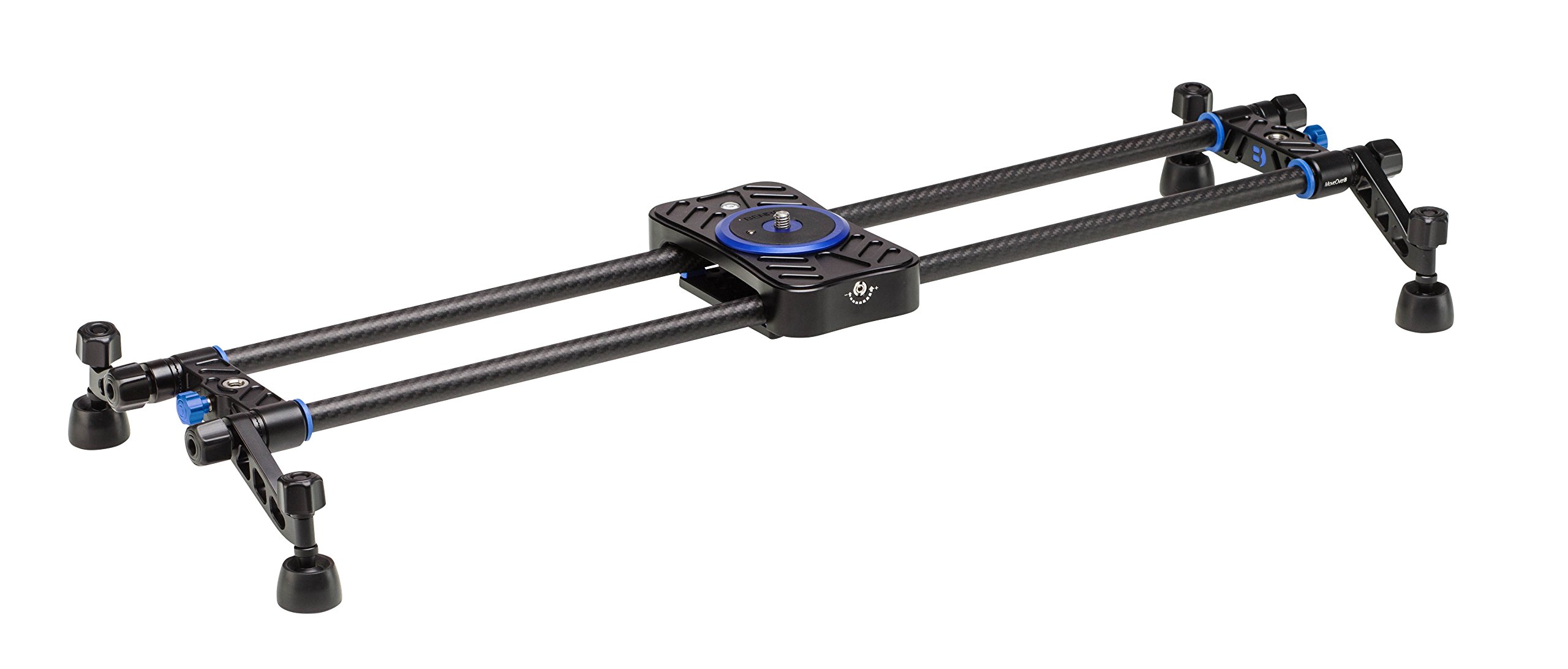
Figure 1: Top-down view of the Benro MoveOver8 Dual Carbon Rail Slider.

Figure 2: Side view of the Benro MoveOver8 Dual Carbon Rail Slider with adjustable legs extended.
2. Setup and Assembly
2.1 Attaching the Legs
- Unfold the all-terrain legs located at each end of the slider.
- Tighten the rosette connectors to secure the legs in position.
- Adjust the micro-leveling feet by rotating them to achieve a stable and level setup on uneven surfaces. The integrated bubble level on the carriage can assist with precise leveling.
2.2 Mounting the Camera
- Ensure the slider carriage is locked in place using the blue locking knob.
- Attach your camera or a flat base tripod head to the 3/8"-16 screw on the slider carriage. Ensure it is securely fastened.
2.3 Mounting the Slider (Optional)
The MoveOver8 slider can be mounted on a tripod or light stands for elevated shots or increased stability.
- Tripod Mounting: Utilize the included cheese plate located underneath the carbon rails. This plate features multiple 3/8"-16 and 1/4"-20 threaded holes, allowing you to attach the slider to a tripod or other camera support.
- Light Stand Mounting: Each end block of the slider includes a 3/8"-16 female adapter. This adapter can be removed to reveal a 5/8" port, enabling direct mounting onto C-stands or light stands.
Video 1: Official Benro video demonstrating the setup and features of the MoveOver8 slider.
3. Operating Instructions
Once your camera is securely mounted and the slider is level, you can begin capturing smooth, cinematic movements.
- Unlock the Carriage: Rotate the blue locking knob on the slider carriage to the unlocked position.
- Smooth Movement: Gently push or pull the camera carriage along the carbon fiber rails. Maintain a consistent speed for the smoothest results. Practice different speeds and movements to achieve desired effects.
- Adjusting Friction: If available, use any friction adjustment knobs on your fluid head (not included) to control the resistance of the camera movement.
- Locking Position: To hold the camera in a static position, rotate the blue locking knob on the carriage to the locked position.
4. Maintenance
Proper maintenance ensures the longevity and optimal performance of your Benro MoveOver8 slider.
- Cleaning: Regularly wipe down the carbon fiber rails with a soft, dry cloth to remove dust, dirt, and debris. Avoid using abrasive cleaners or solvents.
- Inspection: Periodically check all screws, knobs, and connectors to ensure they are tight and secure.
- Storage: When not in use, store the slider in its deluxe carrying case to protect it from damage and environmental elements.
5. Troubleshooting
If you encounter issues with your Benro MoveOver8 slider, consider the following:
- Rough Movement: Ensure the carbon fiber rails are clean and free of obstructions. Check that the carriage locking knob is fully disengaged.
- Instability: Verify that all leg rosette connectors are securely tightened and the micro-leveling feet are properly adjusted to create a stable base. Use the integrated bubble level to confirm the slider is level.
- Camera Slipping: Confirm that your camera or tripod head is firmly attached to the 3/8"-16 screw on the carriage. Ensure the camera's weight does not exceed the maximum load capacity of 17.6 lbs (8kg).
6. Specifications
| Feature | Specification |
|---|---|
| Model Number | C08D6 |
| Brand | Benro |
| Item Weight | 4.74 Pounds |
| Maximum Weight Recommendation | 8 Kilograms (17.6 lbs) |
| Compatible Devices | Camera |
| Color | Black |
| Manufacturer | MacGroup |
7. Warranty and Support
The Benro MoveOver8 Dual Carbon Rail Slider (C08D6) comes with a Limited 3-Year Warranty. This warranty can be extended to 5-Years with Online Registration. Please refer to the official Benro website for detailed warranty terms and conditions and registration instructions.
For technical support, service, or further inquiries, please visit the official Benro support page or contact their customer service department. Keep your purchase receipt and product model number (C08D6) handy for faster assistance.