
ZAGG UNIPOC-BK0
ZAGG Pocket Foldable Wireless Keyboard User Manual
Model: UNIPOC-BK0 | Brand: ZAGG
1. Product Overview
The ZAGG Pocket Foldable Wireless Keyboard is designed for seamless integration with smartphones and small tablets, offering a comfortable and efficient typing experience on the go. Its compact, foldable design ensures portability while providing a spacious keyboard layout.

Image 1.1: The ZAGG Pocket keyboard in its unfolded, ready-to-use state, featuring an integrated stand for mobile devices.
2. Setup and First Use
2.1 Charging the Keyboard
Before initial use, fully charge your ZAGG Pocket keyboard. The device is equipped with a powerful lithium polymer battery. Connect the provided charging cable to the keyboard's charging port and a suitable USB power source. A full charge can last up to two years with regular use.
2.2 Unfolding and Device Placement
Gently unfold the keyboard. The unique design allows it to open into a full-sized typing area. Once unfolded, the built-in stand will be accessible. Place your smartphone or small tablet securely into the stand for an optimal viewing angle.

Image 2.1: The ZAGG Pocket keyboard with an Apple iPhone positioned in its integrated stand, ready for use.

Image 2.2: The ZAGG Pocket keyboard supporting an Android smartphone in its built-in stand.
2.3 Bluetooth Pairing
- Ensure your ZAGG Pocket keyboard is charged and unfolded.
- On your smartphone or tablet, navigate to the Bluetooth settings.
- Turn on Bluetooth. Your device will begin searching for nearby Bluetooth devices.
- Select "ZAGG Pocket" from the list of available devices.
- Follow any on-screen prompts to complete the pairing process. Once paired, the keyboard will automatically connect to your device when unfolded and within range.
3. Operating the Keyboard
The ZAGG Pocket keyboard provides a comfortable and efficient typing experience, mimicking the feel of a desktop keyboard with over 85% of its typing space.
3.1 Automatic On/Off Functionality
The keyboard features smart magnets that automatically turn the device on when unfolded and off when folded. This helps conserve battery life and ensures the keyboard is ready for use as soon as you open it.
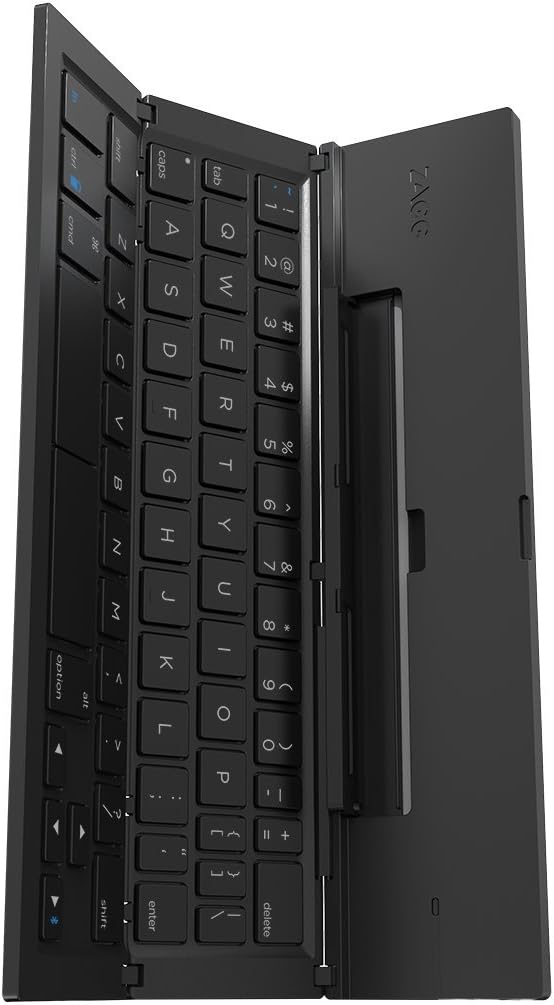
Image 3.1: A view of the ZAGG Pocket keyboard's key layout, highlighting its spacious design even when partially folded.
3.2 Compatibility
The ZAGG Pocket keyboard is universally compatible with both Apple (iOS) and Android smartphones and small tablets, offering versatile connectivity for a wide range of devices.
3.3 Using the Built-in Stand
The integrated stand is designed to hold your device at an ideal viewing angle, enhancing productivity and comfort whether you are typing emails, documents, or engaging in other tasks.
Video 3.1: An official demonstration of the ZAGG Pocket Foldable Wireless Keyboard, showcasing its features including Bluetooth connectivity, built-in stand, and compact design. This video highlights the ease of use and portability of the keyboard.
4. Maintenance
4.1 Battery Life and Recharging
The ZAGG Pocket keyboard boasts an impressive battery life of up to two years between charges under regular use. When the battery is low, connect the keyboard to a power source using the appropriate charging cable. The charging indicator light will provide status updates.
4.2 Cleaning and Storage
To clean your keyboard, use a soft, lint-free cloth. For stubborn marks, slightly dampen the cloth with water. Avoid using harsh chemicals or abrasive materials. When not in use, fold the keyboard into its compact, protective case. The strong magnets will keep it securely closed, protecting the keys and maintaining battery life.

Image 4.1: The ZAGG Pocket keyboard in its fully folded, compact state, ideal for portability and protection.
5. Troubleshooting
5.1 Keyboard Not Connecting via Bluetooth
- Ensure the keyboard is fully charged.
- Verify Bluetooth is enabled on your device and the keyboard is unfolded.
- Try unpairing and re-pairing the keyboard from your device's Bluetooth settings.
- Restart both your device and the keyboard.
5.2 Keys Not Responding or Sticking
- Ensure the keyboard is unfolded completely and lying on a flat, stable surface.
- Check for any debris under the keys and gently clean the keyboard surface.
- Verify the keyboard is properly connected via Bluetooth.
5.3 Keyboard Instability During Use
For optimal typing stability, ensure the ZAGG Pocket keyboard is placed on a firm, flat surface. The folding mechanism is designed for portability and requires a stable base for comfortable and consistent typing.
6. Specifications
| Feature | Detail |
|---|---|
| Brand | ZAGG |
| Model Number | UNIPOC-BK0 |
| Wireless Type | Bluetooth |
| Hardware Platform | Android; Apple iOS |
| Operating System Compatibility | Android, Apple iOS |
| Item Weight | 13.6 ounces |
| Product Dimensions (unfolded) | 10.2 x 4.37 x 0.75 inches |
| Product Dimensions (folded) | 9"L x 2.5"W x 0.5"H |
| Color | Black |
| Power Source | Rechargeable Battery (Lithium Ion) |
| Number of Keys | 85 |
| Date First Available | March 21, 2015 |
7. Warranty and Support
For detailed warranty information and customer support, please refer to the official ZAGG website or contact ZAGG customer service directly. Keep your proof of purchase for any warranty claims.
Online Support: Visit www.zagg.com for FAQs, troubleshooting guides, and contact options.
Ask a question about this manual
Ask about setup, troubleshooting, compatibility, parts, safety, or missing instructions. Manuals+ will review the question and use this page’s manual context to help answer it.