
Introduction
This manual provides detailed instructions for the installation, operation, maintenance, and troubleshooting of the Samsung DA92-00486A Refrigerator Control Board. This component is an authorized aftermarket part designed to fit various Samsung brand refrigerator models, ensuring proper functionality of your appliance. Please read all instructions carefully before proceeding with installation or any service.
Safety Information
WARNING: Failure to follow these safety instructions could result in fire, electric shock, personal injury, or property damage.
- Always disconnect power to the refrigerator before attempting any installation, repair, or maintenance. Locate the circuit breaker or unplug the appliance from the wall outlet.
- Wear appropriate personal protective equipment, such as gloves and safety glasses, during installation.
- If you are not comfortable performing this repair, it is highly recommended to seek assistance from a qualified appliance repair technician.
- Ensure all connections are secure and correct before restoring power to the appliance.
- Keep children and pets away from the work area.
Package Contents
Verify that your package contains the following item:
- 1 x Samsung DA92-00486A Refrigerator Control Board
Setup and Installation
This section outlines the general procedure for replacing a refrigerator control board. Specific steps may vary slightly depending on your refrigerator model. Refer to your refrigerator's service manual for model-specific instructions if available.
Before You Begin
- Disconnect Power: Unplug the refrigerator from the wall outlet or turn off the circuit breaker supplying power to the refrigerator. Verify that power is off before proceeding.
- Access the Control Board: The control board is typically located at the back of the refrigerator, behind a metal or plastic access panel. Use a screwdriver to remove the screws securing this panel.
- Document Connections: Before disconnecting any wires, take clear photos or make a diagram of all wire connections to the existing control board. This will be crucial for correct reassembly.
Removal of Old Control Board
- Disconnect Wires: Carefully disconnect all wire harnesses and connectors from the old control board. Pay attention to any locking tabs or clips.
- Remove Mounting Screws/Clips: Remove any screws, clips, or tabs that secure the old control board to its mounting bracket or housing.
- Extract Old Board: Gently remove the old control board from the refrigerator.
Installation of New Control Board
- Position New Board: Carefully place the new Samsung DA92-00486A control board into the mounting location. Ensure it aligns correctly with any mounting holes or slots.
- Secure New Board: Secure the new control board using the screws, clips, or tabs removed earlier. Ensure it is firmly in place.
- Reconnect Wires: Refer to your photos or diagram and carefully reconnect all wire harnesses and connectors to the new control board. Ensure each connector is fully seated and secured.
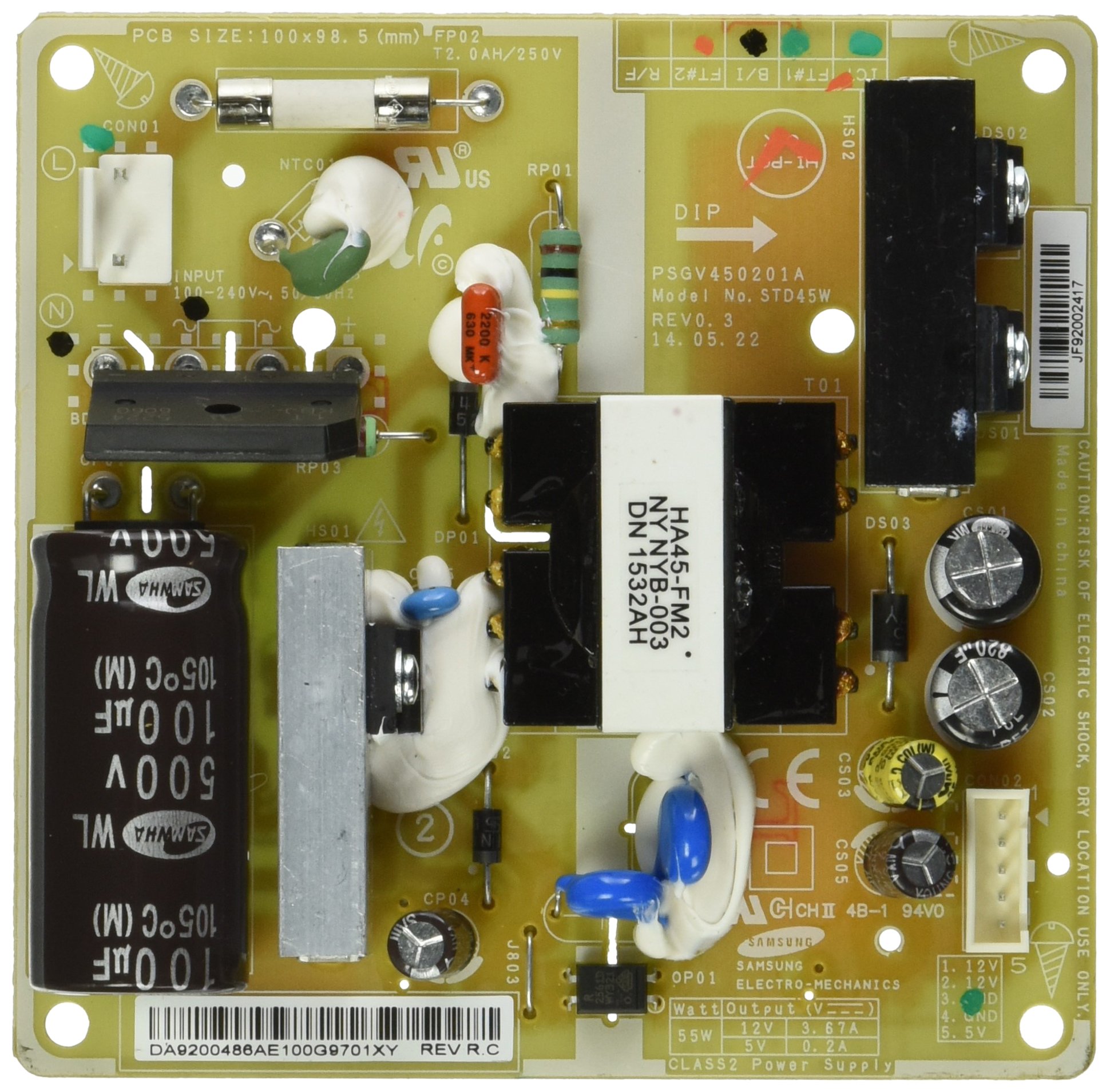
Image: The Samsung DA92-00486A Refrigerator Control Board, showing its various components and connection points. This image helps in identifying the part during installation.
Post-Installation Checks
- Replace Access Panel: Reattach the access panel at the back of the refrigerator, securing it with the screws.
- Restore Power: Plug the refrigerator back into the wall outlet or turn on the circuit breaker.
- Monitor Operation: Observe the refrigerator for proper operation. Listen for the compressor starting, check if the interior lights function, and monitor cooling performance over the next few hours.
Operating Instructions
The DA92-00486A is a control board, not a user-operable component. Its function is to manage the various systems of the refrigerator. Once correctly installed, the refrigerator should resume normal operation according to its original design. No direct user interaction with the control board is required or recommended.
- Verify that the refrigerator's display (if applicable) is functioning correctly.
- Check that the refrigerator and freezer compartments are cooling to their set temperatures.
- Ensure that the ice maker (if applicable) is producing ice.
Maintenance
The Samsung DA92-00486A Refrigerator Control Board requires no routine maintenance. To ensure the longevity of all refrigerator components, it is recommended to:
- Keep the refrigerator's condenser coils clean.
- Ensure proper ventilation around the appliance.
- Avoid exposing the control board area to excessive moisture or extreme temperatures.
Troubleshooting
If your refrigerator is not functioning correctly after installing the new control board, consider the following troubleshooting steps:
| Problem | Possible Cause | Solution |
|---|---|---|
| Refrigerator not turning on | Loose power connection, tripped circuit breaker, incorrect wiring. | Check power cord, reset breaker, re-verify all wire connections on the control board. |
| Refrigerator not cooling | Incorrect wiring, faulty temperature sensor (thermistors), compressor issue. | Ensure all connections are secure. Test thermistors if possible. If issues persist, consult a technician. |
| Error codes displayed | Specific component failure, wiring issue. | Refer to your refrigerator's user manual for error code definitions and troubleshooting steps. |
| Ice maker not working | Water supply issue, faulty ice maker assembly, control board not sending signal. | Check water line. Ensure ice maker is properly connected. If other functions work, the control board is likely fine. |
If these steps do not resolve the issue, it is recommended to contact a qualified service technician.
Specifications
| Feature | Detail |
|---|---|
| Brand | Samsung |
| Model Number | DA92-00486A (OEM Part #) |
| Item Model Number (Amazon) | 9819260 |
| Item Weight | 5.6 ounces |
| Product Dimensions | 6 x 6 x 4 inches |
| Batteries Required | No |
| Compatibility | Various Samsung brand refrigerator models |
Warranty and Support
This Samsung DA92-00486A Refrigerator Control Board is an authorized aftermarket product. For specific warranty information, please refer to the documentation provided with your purchase or contact the seller directly. For technical support or service inquiries, it is recommended to consult a qualified appliance repair professional or refer to Samsung's official support resources for your specific refrigerator model.