
1. Introduction and Overview
The Smartbitt SBAVR2200 is a 2200 VA automatic voltage regulator designed to protect your electronic devices from voltage fluctuations, surges, and spikes. It provides stable power to connected equipment, ensuring their longevity and reliable operation. This manual provides essential information for the safe and efficient use of your voltage regulator.
2. Safety Information
Please read all safety instructions before operating the device. Failure to follow these instructions may result in electric shock, fire, or damage to the product.
- Indoor Use Only: This device is designed for indoor use in a dry environment. Do not expose it to rain, moisture, or excessive humidity.
- Proper Ventilation: Ensure adequate ventilation around the unit. Do not block ventilation openings.
- Avoid Overloading: Do not exceed the maximum load capacity of 2200 VA / 2200 Watts. Overloading can cause the unit to shut down or be damaged.
- Grounding: Always connect the regulator to a properly grounded electrical outlet.
- No User Serviceable Parts: Do not attempt to open or repair the unit. Refer all servicing to qualified personnel.
- Keep Away from Children: Store the device out of reach of children.
3. Package Contents
Verify that all items are present in the package:
- Smartbitt SBAVR2200 Voltage Regulator Unit
- User Manual (this document)
- Warranty Card
4. Product Features
The Smartbitt SBAVR2200 Voltage Regulator offers the following key features:
- 8 Regulated Outlets: Provides stable power to multiple devices.
- Surge Suppression: Protects against power surges and spikes.
- LED Status Indicators: Clearly displays operational status (Power, Regulation, Protection).
- Resettable Circuit Breaker: Protects against overloads and short circuits.
- Modem/Telephone Line Protection: Safeguards connected communication lines.
- High Capacity: 2200 VA / 2200 Watts for robust protection.

Image: Top-down view of the Smartbitt SBAVR2200 Voltage Regulator, highlighting its 8 outlets and LED status indicators.
5. Setup
Follow these steps to set up your voltage regulator:
- Unpack the Unit: Carefully remove the voltage regulator from its packaging.
- Placement: Place the unit on a stable, flat surface in a well-ventilated area, away from direct sunlight, heat sources, and moisture. Ensure there is enough space for air circulation.
- Connect to Wall Outlet: Plug the voltage regulator's power cord directly into a standard, grounded 120V AC wall outlet. Avoid using extension cords or power strips with the regulator's input.
- Connect Devices: Plug your electronic devices (computers, monitors, TVs, etc.) into the 8 output receptacles on the regulator. Ensure the total power consumption of all connected devices does not exceed 2200 VA / 2200 Watts.
- Modem/Telephone Protection (Optional): If desired, connect your modem or telephone line to the designated input/output ports for surge protection.
- Power On: Press the power switch (usually located on the side or front) to the 'ON' position. The Power LED indicator should illuminate.
6. Operating Instructions
Once set up, the Smartbitt SBAVR2200 operates automatically. Understand the LED indicators for optimal use:
- Power LED (Green): Indicates that the unit is powered on and receiving input voltage.
- Regulation LED (Yellow/Orange): Illuminates when the regulator is actively adjusting the output voltage to compensate for input voltage fluctuations. This is normal operation during voltage sags or surges.
- Protection LED (Red): Indicates that the unit has detected an over-voltage or under-voltage condition beyond its regulation capabilities and is protecting the connected equipment by either shutting down or entering a protective mode.
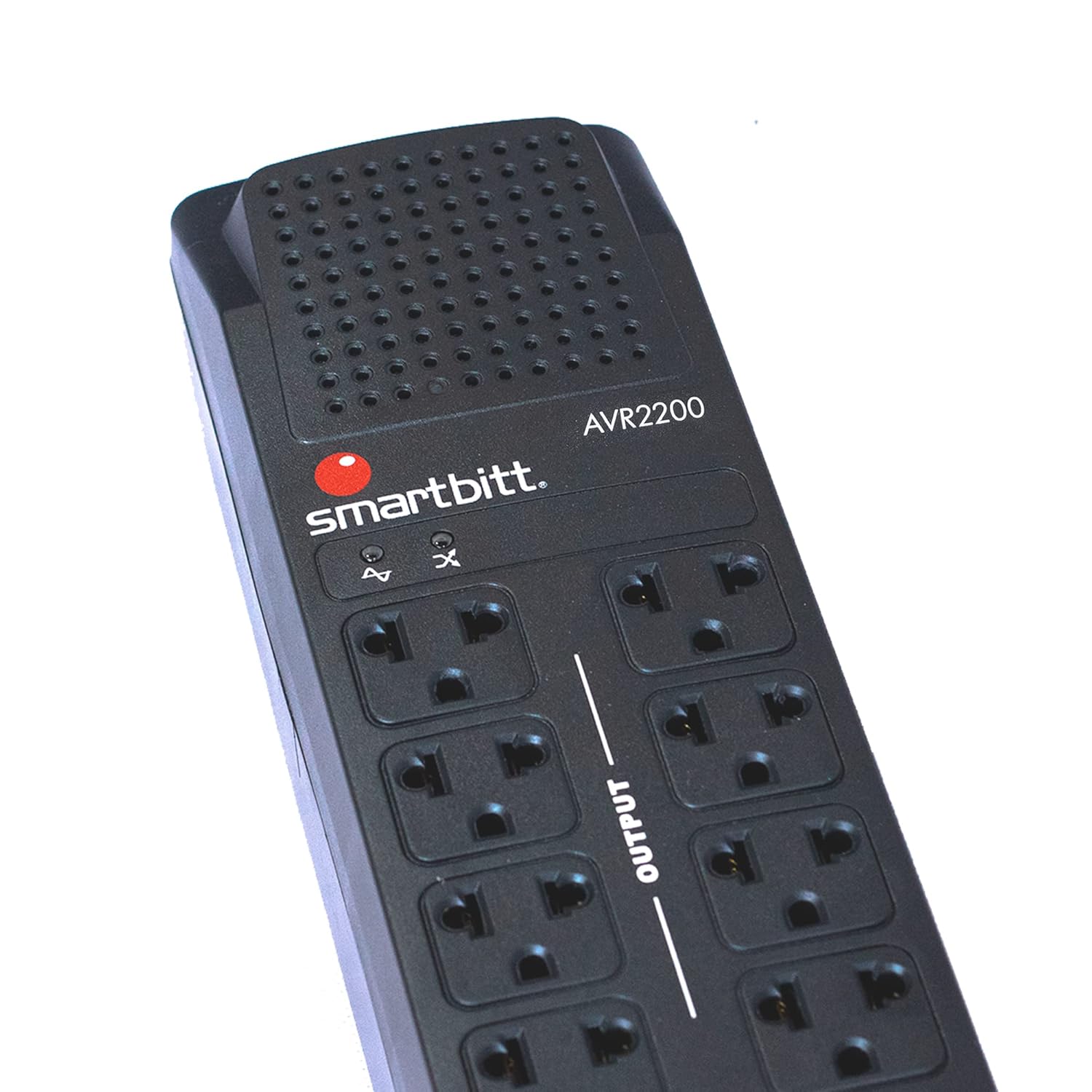
Image: Close-up of the Smartbitt SBAVR2200's top panel, displaying the brand logo and the LED status indicators.
Reset Switch: In case of an overload or short circuit, the built-in circuit breaker may trip, causing the unit to lose power. To restore power, disconnect some devices, then press the reset switch (often a red button) located on the side or back of the unit.

Image: The Smartbitt SBAVR2200 unit shown alongside a detailed view of its red reset switch.
7. Maintenance
The Smartbitt SBAVR2200 Voltage Regulator requires minimal maintenance:
- Cleaning: Periodically clean the exterior of the unit with a soft, dry cloth. Do not use liquid or aerosol cleaners.
- Ventilation: Ensure that the ventilation openings remain clear of dust and debris to prevent overheating.
- Connections: Regularly check all power cords and device connections to ensure they are secure.
- Storage: If storing the unit for an extended period, disconnect it from the power outlet and store it in a cool, dry place.
8. Troubleshooting
If you encounter issues with your Smartbitt SBAVR2200, refer to the following troubleshooting guide:
| Problem | Possible Cause | Solution |
|---|---|---|
| No power to connected devices. | Unit is off, power cord loose, wall outlet faulty, circuit breaker tripped. | Ensure unit is ON. Check power cord connection. Test wall outlet with another device. Press the reset switch. |
| Regulation LED is constantly on. | Input voltage is consistently unstable (too high or too low). | This indicates the unit is working as intended. If persistent, consider consulting an electrician about your home's wiring. |
| Protection LED is on, and unit is off. | Severe over-voltage or under-voltage detected, or unit is overloaded. | Disconnect devices. Wait a few minutes. Press the reset switch. If the problem persists, contact customer support. |
| Connected devices are still damaged by surges. | Extreme surge beyond unit's capacity, or faulty unit. | Ensure all devices are properly plugged into the regulated outlets. Contact customer support if issues persist. |
9. Specifications
Detailed technical specifications for the Smartbitt SBAVR2200 Voltage Regulator:
- Manufacturer: Smartbitt
- Model Number: SBAVR2200
- Capacity: 2200 VA / 2200 Watts
- Input/Output Voltage: 120 Volts
- Number of Outlets: 8
- Color: Black
- Material: Plastic
- Dimensions (L x W x H): 9 x 24.8 x 8.75 cm (3.54 x 9.76 x 3.44 inches)
- Weight: 1.6 kg (3.53 lbs)
- Components Included: Unit, Manual, Warranty
10. Warranty and Support
Your Smartbitt SBAVR2200 Voltage Regulator comes with a limited warranty. Please refer to the included warranty card for specific terms and conditions, including coverage period and claim procedures.
For technical assistance, troubleshooting beyond this manual, or warranty inquiries, please contact Smartbitt customer support. You may find additional resources and contact information on the official Smartbitt website.

Image: QR code for quick access to Smartbitt product information or support.
For detailed product datasheets and support, visit: smartbitt.com/Datasheets/SBAVR2200.pdf


