Hydra-Kool KFM-FG-60-S Refrigerated Service Case User Manual
Model: KFM-FG-60-S
Brand: Hydra-Kool
Introduction
This manual provides essential instructions for the safe and efficient installation, operation, and maintenance of your Hydra-Kool KFM-FG-60-S 60-inch Flat Glass Refrigerated Fresh Meats and Deli Service Case. Please read this manual thoroughly before operating the unit and retain it for future reference. Proper adherence to these guidelines will ensure optimal performance and longevity of your equipment.
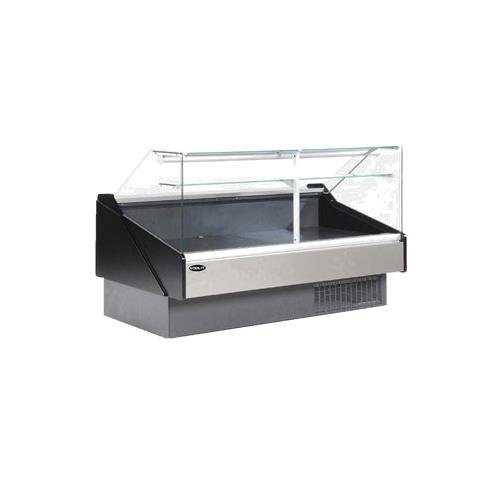
An image showing the Hydra-Kool KFM-FG-60-S refrigerated service case. This commercial display unit features a flat front tempered glass panel, tempered glass sides, and a stainless steel interior. It is designed for the display and preservation of fresh meats and deli items, featuring a self-contained refrigeration system and adjustable feet for stable placement.
Safety Instructions
Always follow basic safety precautions when using this appliance to reduce the risk of fire, electric shock, or injury.
- Ensure the unit is connected to a properly grounded electrical outlet.
- Do not operate the unit with a damaged power cord or plug.
- Keep ventilation openings clear of obstructions.
- Do not store explosive substances such as aerosol cans with a flammable propellant in this appliance.
- Only qualified personnel should perform repairs or maintenance.
- Disconnect power before cleaning or servicing the unit.
- Avoid placing heavy objects on the glass surfaces.
Setup
- Unpacking: Carefully remove all packaging materials. Inspect the unit for any shipping damage. Report any damage to the carrier immediately.
- Placement: Position the service case on a level, sturdy surface capable of supporting its weight (approximately 650 lbs). Ensure adequate clearance around the unit for proper ventilation, especially at the rear where the self-contained refrigeration system is located. Avoid direct sunlight or heat sources.
- Leveling: Use the adjustable feet to ensure the unit is perfectly level. This is crucial for proper drainage and door operation.
- Electrical Connection: Connect the unit to a dedicated, grounded electrical outlet that matches the voltage and amperage requirements specified on the unit's data plate. Do not use extension cords.
- Initial Cleaning: Before first use, clean the interior and exterior surfaces with a mild detergent and warm water. Rinse thoroughly and dry.
- Initial Power-Up: After cleaning, plug in the unit. Allow it to run for several hours empty to reach the desired operating temperature before loading any products.
Operating Instructions
Digital Controller
The unit is equipped with a digital controller for precise temperature management. Refer to the controller's specific manual for detailed programming instructions, if available. Generally, the controller allows you to:
- View the current internal temperature.
- Set the desired operating temperature.
- Initiate manual defrost cycles (if applicable).
Product Loading
- Ensure products are pre-chilled before placing them in the case to maintain stable internal temperatures.
- Do not overload the case. Allow for adequate air circulation around products for efficient cooling.
- Arrange products to ensure visibility through the flat front tempered glass and easy access via the rear tempered sliding glass doors.
- Utilize the LED interior lighting to enhance product presentation.
Rear Work Shelf and Top Sill
The 8-5/8"D rear work shelf and 10-1/2"D top sill provide convenient space for serving or preparing items. Keep these surfaces clean and clear of obstructions.
Maintenance
Daily Cleaning
- Wipe down all interior stainless steel surfaces and glass panels (front, sides, and sliding doors) with a mild, non-abrasive cleaner and a soft cloth.
- Clean the rear work shelf and top sill.
- Ensure no food debris or liquids accumulate in the bottom of the case.
Weekly/Monthly Cleaning
- Condenser Coil: Periodically clean the condenser coil located at the rear of the unit. Dust and debris can accumulate, reducing efficiency. Use a brush or vacuum cleaner to remove buildup. Always disconnect power before cleaning the condenser.
- Drain Pan: Check and clean the drain pan to prevent blockages and odors.
- Gaskets: Inspect door gaskets for tears or damage. Clean them to ensure a tight seal.
Defrosting
The unit features an automatic defrost system. However, if excessive ice buildup is observed, a manual defrost may be necessary. Consult the digital controller's instructions for initiating a manual defrost cycle. During defrost, remove all products and ensure proper drainage.
Troubleshooting
Before calling for service, review the following common issues and solutions:
| Problem | Possible Cause | Solution |
|---|---|---|
| Unit not cooling | Power supply issue, thermostat setting, dirty condenser coil, blocked airflow. | Check power plug and circuit breaker. Adjust thermostat. Clean condenser coil. Ensure proper product loading and ventilation. |
| Excessive noise | Loose components, fan obstruction, unit not level. | Check for loose parts. Ensure fan blades are clear. Level the unit using adjustable feet. |
| Excessive condensation/ice buildup | Door gaskets not sealing, frequent door opening, high ambient humidity, drain blockage. | Inspect and clean door gaskets. Minimize door openings. Check and clear drain. |
| LED lights not working | Bulb failure, electrical connection issue. | Check connections. Replace LED strip if necessary (contact service). |
If troubleshooting steps do not resolve the issue, contact a qualified service technician.
Specifications
- Model: KFM-FG-60-S
- Brand: Hydra-Kool
- Type: Fresh Meats/Deli Service Case, Multiplexible
- Dimensions (LWH): 60"W x 43-3/8"D x 47-1/4"H (43.4 x 60 x 47.25 inches)
- Item Weight: 650 Pounds
- Refrigeration: Self-contained, 1/2 HP
- Glass: Flat front tempered glass, tempered glass sides, rear tempered sliding glass doors
- Interior: Stainless steel
- Lighting: LED interior lighting
- Controller: Digital controller
- Shelving: 10-1/2"D top sill, 8-5/8"D rear work shelf
- Exterior Finish: Silver aluminum front panel, gray kick plate
- Certifications: ETL-Sanitation, cETLus
Warranty and Support
For warranty information and technical support, please refer to the documentation provided at the time of purchase or contact your authorized Hydra-Kool dealer or the manufacturer directly. Ensure you have your model number (KFM-FG-60-S) and serial number ready when contacting support.
For further assistance, you may visit the Hydra-Kool brand page or contact the seller, qualityimport, for product-specific inquiries.


