
1. Introduction
This manual provides essential instructions for the safe assembly, operation, and maintenance of your Razor A5 Lux Kick Scooter. The A5 Lux is designed for riders aged 8 and up, supporting weights up to 220 pounds (100 kg). It features extra-large urethane wheels for a smooth ride, a super-strong, height-adjustable aluminum T-tube, and a larger deck to accommodate taller riders. Please read this manual thoroughly before use to ensure proper function and safety.

2. Safety Information
Riding a scooter can be a hazardous activity. Certain conditions may cause the equipment to fail without fault of the manufacturer. The scooter is intended for use on flat, dry, paved surfaces free of loose debris. Always wear appropriate safety gear and follow these guidelines:
- Always wear a helmet, elbow pads, and knee pads.
- Wear athletic shoes with rubber soles.
- Do not ride at night or in low visibility conditions.
- Avoid water, sand, gravel, dirt, leaves, and other debris.
- Do not exceed the maximum weight limit of 220 lbs (100 kg).
- Always check the scooter before riding to ensure all components are secure and functioning correctly.
- Be aware of your surroundings and ride defensively.
3. Setup
3.1 Unfolding the Scooter
To unfold your Razor A5 Lux Kick Scooter:
- Place the scooter on a flat surface.
- Locate the patented folding mechanism near the front wheel.
- Press the release button or lever (specific mechanism may vary slightly by model year) and pull the handlebar stem upwards until it locks into place. Ensure it clicks securely.
- Unfold the handlebars by pulling them outwards until they lock into position.

3.2 Adjusting Handlebars
The handlebar height can be adjusted to suit the rider's preference:
- Locate the quick-release clamp on the handlebar stem.
- Open the quick-release clamp.
- Slide the handlebar T-bar up or down to the desired height.
- Close the quick-release clamp securely. Ensure there is no play in the handlebar.

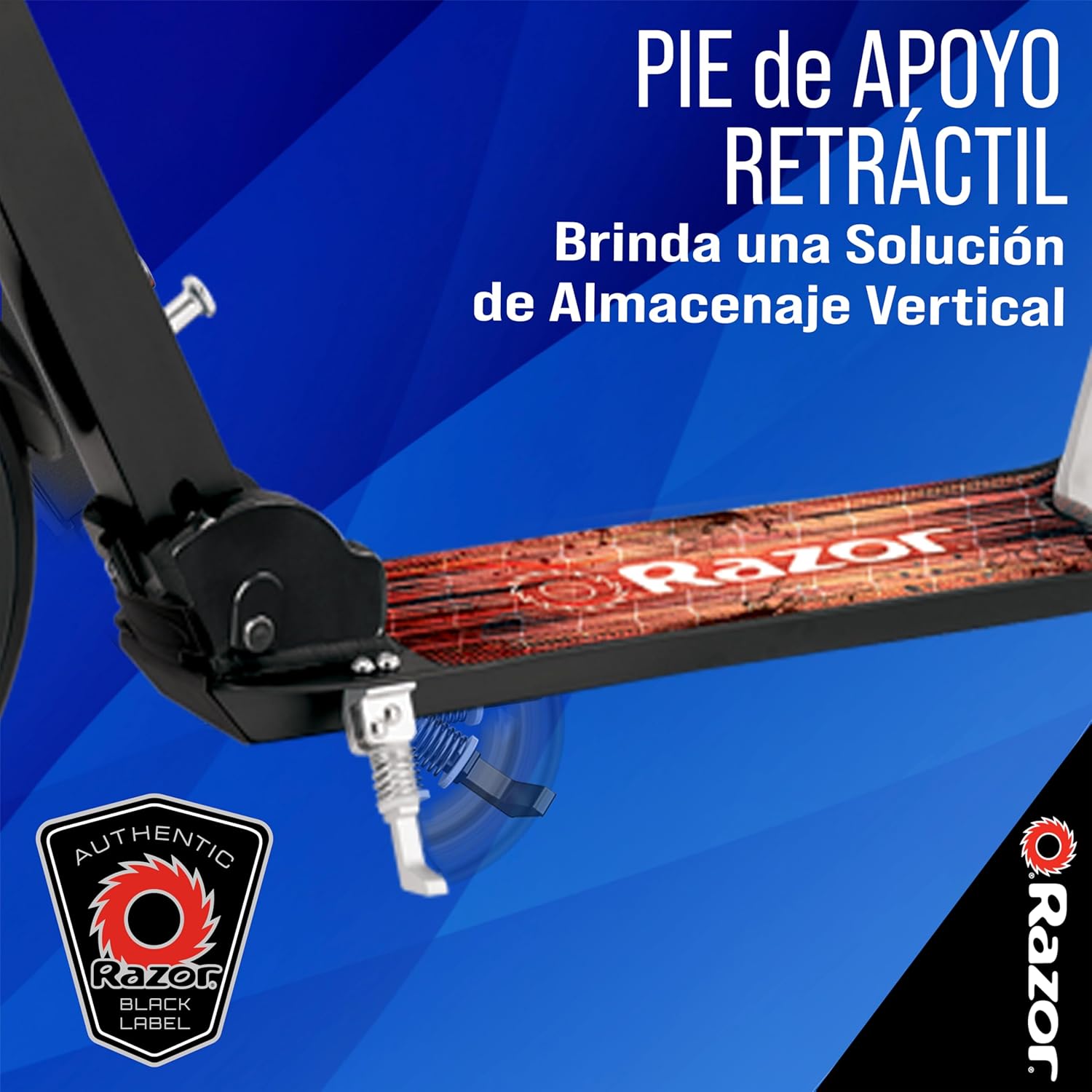
3.3 Kickstand Deployment
The scooter is equipped with a retractable kickstand for convenient parking and storage.
4. Operating Instructions
4.1 Riding the Scooter
To ride, place one foot firmly on the deck and push off with the other foot. Steer by leaning gently in the desired direction. The large 8-inch urethane wheels provide a smooth and comfortable ride over various surfaces.
4.2 Using the Brake
The Razor A5 Lux features a patented rear fender brake. To engage the brake, apply pressure to the rear fender with your heel. This will slow down and stop the scooter.

4.3 Product Overview and Ride Demonstration
5. Maintenance
Regular maintenance ensures the longevity and safe operation of your scooter.
5.1 Cleaning
Wipe the scooter with a damp cloth to remove dirt and debris. Avoid using harsh chemicals or abrasive cleaners. Do not use high-pressure washers.
5.2 Wheel and Bearing Inspection
Periodically check the wheels for wear and tear. Ensure the bearings spin freely. If wheels or bearings are worn, replace them with genuine Razor replacement parts.
5.3 Fastener Checks
Before each ride, inspect all fasteners, including the handlebar clamp, folding mechanism, and wheel axles, to ensure they are properly tightened. Loose fasteners can compromise safety.
6. Troubleshooting
This section addresses common issues you might encounter with your Razor A5 Lux Kick Scooter.
| Problem | Possible Cause | Solution |
|---|---|---|
| Handlebars feel loose or wobbly | Quick-release clamp is not tightened sufficiently. | Open the quick-release clamp, adjust the handlebar to the desired height, and close the clamp firmly. Ensure the clamp lever is fully engaged. |
| Scooter does not fold or unfold easily | Folding mechanism is stiff or obstructed. | Apply a small amount of lubricant to the folding mechanism. Ensure no debris is blocking the mechanism. Refer to the 'Unfolding the Scooter' section. |
| Wheels do not spin freely or make noise | Dirt or debris in bearings, or worn bearings. | Clean the wheels and bearings. If the issue persists, consider replacing the wheel bearings. |
| Brake is not effective | Rear fender brake is worn or misaligned. | Inspect the brake for wear. Ensure the fender is properly aligned to make contact with the wheel. Replace if significantly worn. |
7. Specifications
- Brand: Razor
- Model Name: A5 Lux
- Color: Black Label
- Age Range: Adult (Recommended for ages 8 and up)
- Weight Limit: 220 Pounds (100 kg)
- Product Dimensions (LxWxH): 33.9" x 18" x 38.6" (86.1 cm x 45.7 cm x 98 cm)
- Item Weight: 3.81 Kilograms (8.4 lbs)
- Number of Wheels: 2
- Wheel Material: Polyurethane
- Wheel Size: 200 Millimeters (8 inches)
- Wheel Type: Solid
- Frame Material: Aluminum
- Handlebar Type: Adjustable
- Handle Height: 38 Inches (96.5 cm)
- Grip Type: Contoured
- Brake Style: Rear Braking
- Suspension Type: Rigid
8. Warranty Information
The Razor A5 Lux Kick Scooter comes with a 90-day Limited Manufacturer's Warranty. This warranty covers manufacturing defects in materials and workmanship. It does not cover normal wear and tear, damage due to misuse, neglect, accident, or improper assembly/maintenance. Please retain your proof of purchase for warranty claims.
9. Customer Support
For further assistance, replacement parts, or warranty inquiries, please contact Razor customer service. Refer to the official Razor website for the most current contact information and support resources.
Manufacturer: Razor USA, LLC
Website: www.razor.com (Please check for regional variations)


