
1. Introduction
The Smartbitt SBNB750 Interactive Uninterruptible Power Supply (UPS) is designed to provide reliable power protection for your electronic devices. It offers battery backup during power outages, regulates voltage fluctuations, and suppresses harmful power surges. This manual provides essential information for the safe and efficient operation of your SBNB750 UPS.
2. Safety Instructions
WARNING:
- This product contains a sealed lead-acid battery. Handle with care.
- Do not open the UPS casing; there are no user-serviceable parts inside except for potential battery replacement by qualified personnel.
- Ensure adequate ventilation around the unit. Do not block ventilation openings.
- Do not expose the UPS to water, excessive humidity, or flammable liquids.
- This device is for indoor use only.
- In case of damage or malfunction, disconnect the UPS from all power sources and contact customer support.
- Hazardous materials are present; do not dispose of with regular waste. Follow local regulations for battery disposal.
3. Package Contents
Upon unpacking, verify that the following items are included:
- Smartbitt SBNB750 UPS Unit
- User Manual
4. Product Overview
4.1 Front Panel

The front panel features the power button and LED indicators for operational status. The power button controls the unit's on/off state. Indicator lights typically show power status, battery mode, and fault conditions.
4.2 Rear Panel
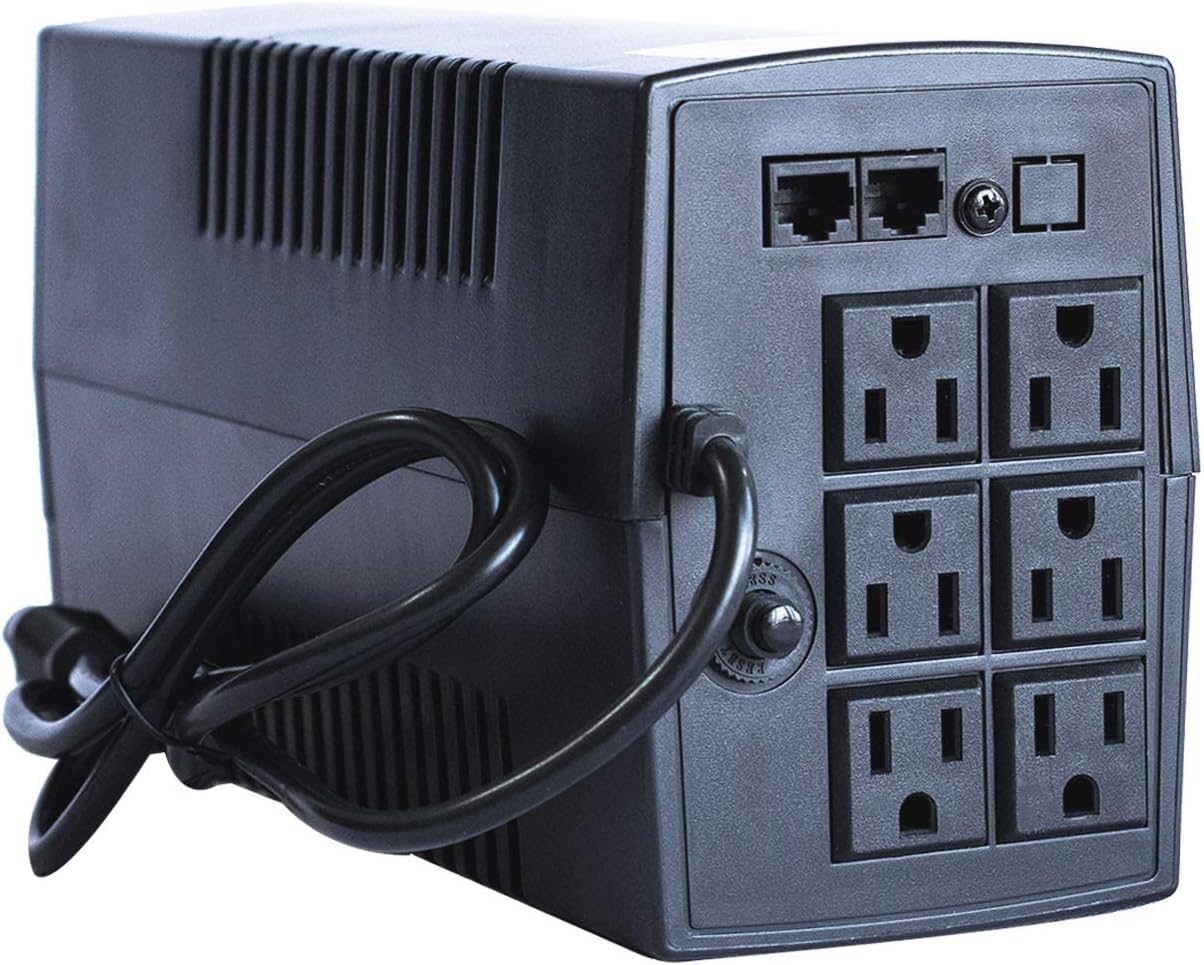
The rear panel provides six NEMA 5-15R outlets for connecting your equipment. These outlets offer both battery backup and surge protection. Additionally, RJ11/RJ45 ports are included for surge protection of telephone or network lines. A resettable circuit breaker is also located on the rear panel to protect against overloads.
5. Setup
- Unpacking: Carefully remove the UPS from its packaging. Inspect for any shipping damage.
- Placement: Position the UPS in a well-ventilated area, away from direct sunlight, heat sources, and excessive moisture. Ensure sufficient space around the unit for airflow.
- Initial Charging: Before initial use, connect the UPS to a standard wall outlet and allow it to charge for approximately 4 hours. This ensures the battery is fully conditioned.
- Connecting Equipment: Plug your critical electronic devices (computer, monitor, router, etc.) into the battery-backed outlets on the rear panel. Ensure the total load does not exceed the UPS's capacity (375W).
- Power On: Press and hold the power button on the front panel for a few seconds until the unit powers on and the indicator lights illuminate.
6. Operating Instructions
- Normal Operation: When connected to utility power, the UPS will regulate voltage and provide surge protection. The appropriate LED indicator will be lit.
- Battery Backup Mode: During a power outage, the UPS will automatically switch to battery power. An audible alarm will sound, and the battery indicator LED will illuminate. This provides up to 35 minutes of backup power, depending on the connected load.
- Voltage Regulation: The interactive design of the UPS automatically corrects minor voltage fluctuations without switching to battery power, protecting your devices from brownouts and overvoltages.
- Surge Protection: All connected outlets provide protection against power surges and spikes.
- Power Button: A short press typically silences alarms. A long press turns the unit on or off.
7. Maintenance
- Battery Replacement: The internal battery is a consumable component with a limited lifespan. While replacement is possible, it should ideally be performed by qualified personnel. Refer to the Smartbitt website or contact support for guidance on obtaining and replacing the battery.
- Cleaning: Disconnect the UPS from all power sources before cleaning. Use a dry, soft cloth to wipe the exterior. Do not use liquid or aerosol cleaners.
- Storage: If storing the UPS for an extended period, ensure the battery is fully charged, then disconnect it from the wall outlet. Recharge the battery every 3 months to maintain its lifespan.
8. Troubleshooting
- UPS does not turn on: Ensure the power cord is securely plugged into a wall outlet and the UPS. Check the circuit breaker on the rear panel and reset if tripped. Allow the unit to charge for 4 hours.
- Short battery backup time: The battery may not be fully charged, or its lifespan may be reduced. Ensure the total connected load does not exceed 375W.
- UPS does not re-energize devices after power returns: If devices connected to the UPS do not automatically re-energize after a power outage, try turning the UPS off and then back on using the front panel button.
- Low output voltage in backup mode or overheating: If the UPS provides significantly lower voltage (e.g., 100VAC) in battery backup mode and overheats, this may indicate a battery issue or internal fault. Reduce the connected load and contact customer support if the problem persists.
- Audible alarm sounds continuously: This typically indicates a low battery condition during a power outage or an overload. Reduce the connected load or allow the battery to recharge.
9. Specifications
| Feature | Specification |
|---|---|
| Model | SBNB750 |
| Capacity | 750 VA / 375 W |
| Input Voltage | 750 Volts (Nominal) |
| Battery Type | Lead-Acid |
| Battery Charge Time | 4 Hours |
| Average Battery Run Time | 35 minutes (depending on load) |
| Dimensions (L x W x H) | 19.5 x 44.3 x 22.5 cm |
| Weight | 4.51 kg |
| Color | Black |
10. Warranty and Support
The Smartbitt SBNB750 UPS typically comes with a 2-year warranty. For warranty claims, technical support, or service inquiries, please visit the official Smartbitt website or contact their customer service department. You can find additional product information and datasheets by scanning the QR code below or visiting the provided link.

Datasheet Link: https://manuals.plus/m/0cd7a3361224078eb91888aee2e6b5ab7a316c1d219ed0521b96c4261d5d290f


