
Introduction
This manual provides essential instructions for setting up, operating, maintaining, and troubleshooting your Sony Alpha A6100 Mirrorless Camera with the included 16-50mm lens. Please read this manual thoroughly before using your camera to ensure proper operation and to maximize its capabilities.

Image: Front view of the Sony Alpha A6100 camera with the 16-50mm lens attached and the LCD screen tilted upwards. This view highlights the lens, the camera body, and the flexible screen.
Setup
Follow these steps to prepare your camera for first use.
1. Inserting the Battery
- Open the battery cover located at the bottom of the camera.
- Insert the battery with the correct orientation, ensuring the terminal matches the camera's battery compartment.
- Close the battery cover securely.
Note: Ensure the battery is fully charged before first use. Use the supplied charger and cable.
2. Attaching the Lens
- Remove the body cap from the camera and the rear lens cap from the 16-50mm lens.
- Align the white index mark on the lens with the white index mark on the camera body.
- Mount the lens by turning it clockwise until it clicks into place.
Image: Front view of the Sony Alpha A6100 camera with the 16-50mm lens attached. This illustrates the camera ready for use after lens attachment.
3. Inserting a Memory Card
- Open the memory card/battery cover on the side or bottom of the camera.
- Insert a compatible SD card (sold separately) into the slot with the label facing the correct direction until it clicks.
- Close the cover.
Important: Format the memory card in the camera before first use to ensure compatibility and optimal performance. Refer to the camera's on-screen menu for formatting options.
Operating Instructions
Learn the basic functions to start capturing photos and videos.
Powering On/Off
To turn the camera on or off, slide the ON/OFF switch located on the top plate of the camera.

Image: Top view of the Sony Alpha A6100 camera. The ON/OFF switch is visible near the shutter button, alongside the mode dial.
Selecting Shooting Modes
Rotate the mode dial on the top of the camera to select your desired shooting mode. Common modes include:
- AUTO: Camera automatically adjusts settings for optimal results.
- P (Program Auto): Camera sets exposure, but you can adjust other settings.
- A (Aperture Priority): You set the aperture, camera sets shutter speed.
- S (Shutter Priority): You set the shutter speed, camera sets aperture.
- M (Manual Exposure): You control both aperture and shutter speed.
- SCN (Scene Selection): Pre-set modes for specific scenes (e.g., Portrait, Landscape).
- Movie: For recording videos.
Focusing
The Alpha A6100 features advanced autofocus capabilities. To focus:
- Point the camera at your subject.
- Press the shutter button halfway down. The camera will acquire focus.
- A green frame indicates successful focus.
- Press the shutter button fully to take the picture.
You can also use the touch screen for touch focus, as shown in the image below.

Image: A hand interacting with the LCD screen of the Sony Alpha A6100, demonstrating the touch focus feature. The camera's rear controls are also visible.
Recording Videos
To record a video, set the mode dial to the Movie mode or press the dedicated Movie button (if available) while in another shooting mode. Press the shutter button to start recording and press it again to stop.
The camera supports 4K video recording. Ensure your memory card has sufficient speed and capacity for 4K video.
Playback
Press the Playback button (often marked with a triangle icon) to view your captured photos and videos. Use the control wheel to navigate through your media.
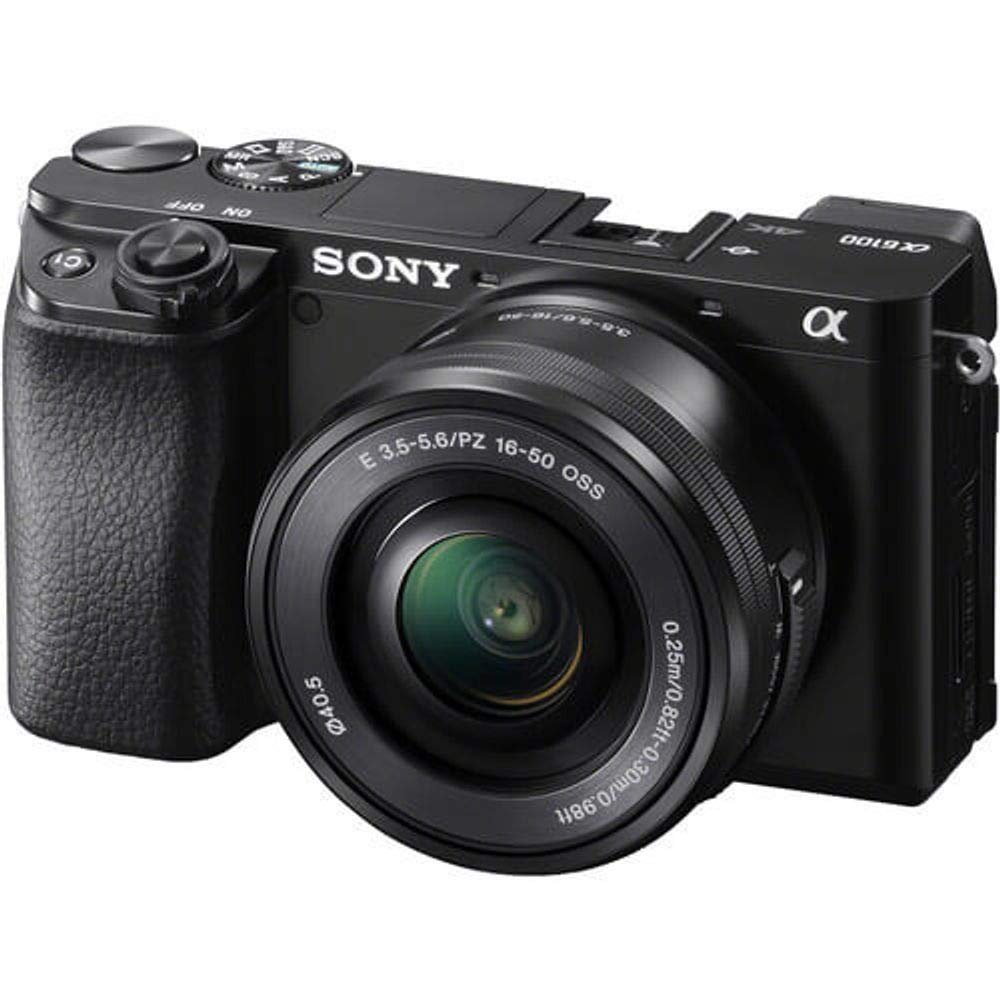
Image: Rear view of the Sony Alpha A6100 camera, displaying the LCD screen and various control buttons, including the playback button.
Maintenance
Proper care ensures the longevity and performance of your camera.
Cleaning the Camera
- Camera Body: Wipe with a soft, dry cloth. For stubborn dirt, use a slightly damp cloth and then dry thoroughly.
- Lens: Use a lens brush to remove dust, then a lens cleaning cloth with a specialized lens cleaning solution. Avoid touching the lens surface with your fingers.
- Sensor: Sensor cleaning should be performed with extreme caution. If dust spots appear on images, it is recommended to have the sensor professionally cleaned by a Sony service center.
- LCD Screen: Use a soft, dry cloth. Avoid harsh chemicals.
Storage
- Store the camera in a cool, dry place away from direct sunlight and extreme temperatures.
- If storing for an extended period, remove the battery to prevent leakage.
- Use a desiccant pack in the camera bag to absorb moisture, especially in humid environments.
- Keep the lens attached or use a body cap to protect the sensor from dust.
Troubleshooting
Here are solutions to common issues you might encounter.
| Problem | Possible Cause / Solution |
|---|---|
| Camera does not turn on. |
|
| Images are blurry. |
|
| Memory card error. |
|
| Flash does not fire. |
|
Specifications
Key technical specifications for the Sony Alpha A6100 camera.

Image: A diagram highlighting core specifications of the Sony Alpha A6100, including its APS-C CMOS sensor, approximately 24.2 effective megapixels, and an approximate weight of 396g with battery and memory card.
| Feature | Detail |
|---|---|
| Model Series | Alpha |
| Sensor Type | APS-C CMOS sensor |
| Effective Pixels | Approx. 24.2 MP |
| Image Resolution | 24 MP (Maximum) |
| Video Resolution | 2160p (4K) |
| Compatible Mounts | Sony E-mount |
| Lens Type | 16-50mm Zoom Lens (included) |
| Image Stabilization | Optical (Lens-based) |
| Autofocus Technology | Hybrid Autofocus |
| Shutter Speed | 1/4000 seconds (Max/Min) |
| Connectivity | Bluetooth, Wi-Fi |
| Weight | Approx. 396 Grams (with battery & memory card) |
| Display | Tilting LCD, Color Screen |
| Battery Type | Lithium-ion |

Image: Side view of the Sony Alpha A6100 camera with the port covers open, revealing the HDMI and USB ports. This illustrates the connectivity options.
Warranty and Support
For detailed warranty information, please refer to the warranty card included in your product packaging or visit the official Sony support website for your region. Sony provides a limited warranty for manufacturing defects.
For technical support, troubleshooting beyond this manual, or service requests, please contact Sony customer support. You can find contact details and online resources on the official Sony website:
Keep your proof of purchase for warranty claims.


