
1. Introduction
The Mesa 803A Steam Shower is a modern, rectangular steam shower unit designed for home use. It features a 3KW steam generator, rainfall and handheld showers, and a foot massager, providing a comprehensive showering experience. This manual provides essential information for safe installation, operation, and maintenance of your steam shower. Please read this manual thoroughly before installation and use, and retain it for future reference.
2. Safety Information
Before operating the Mesa 803A Steam Shower, please read and understand all safety instructions. Improper installation or use can lead to injury or damage to the unit. Ensure all electrical connections comply with local codes and that the unit is properly grounded. Do not operate the steam function if you have any medical conditions that may be exacerbated by heat or steam. Keep children and pets away from the unit during operation. Always test water temperature before entering the shower to prevent scalding. Do not use abrasive cleaners or sharp objects on any surfaces.
3. Product Overview
3.1 Key Features
- 3KW Steam Generator
- Rainfall Shower Head
- FM Radio
- Foot Massager
- ETL/CSA Certified - Meets all US and Canadian electrical safety standards - 220V, 15 amp plug
3.2 Components
The Mesa 803A Steam Shower includes a central control panel, a rainfall shower head, a handheld shower, body massage jets, and integrated seating. The unit is enclosed with clear glass and features a sliding door. The overall design is sleek and modern, intended to enhance any bathroom space.
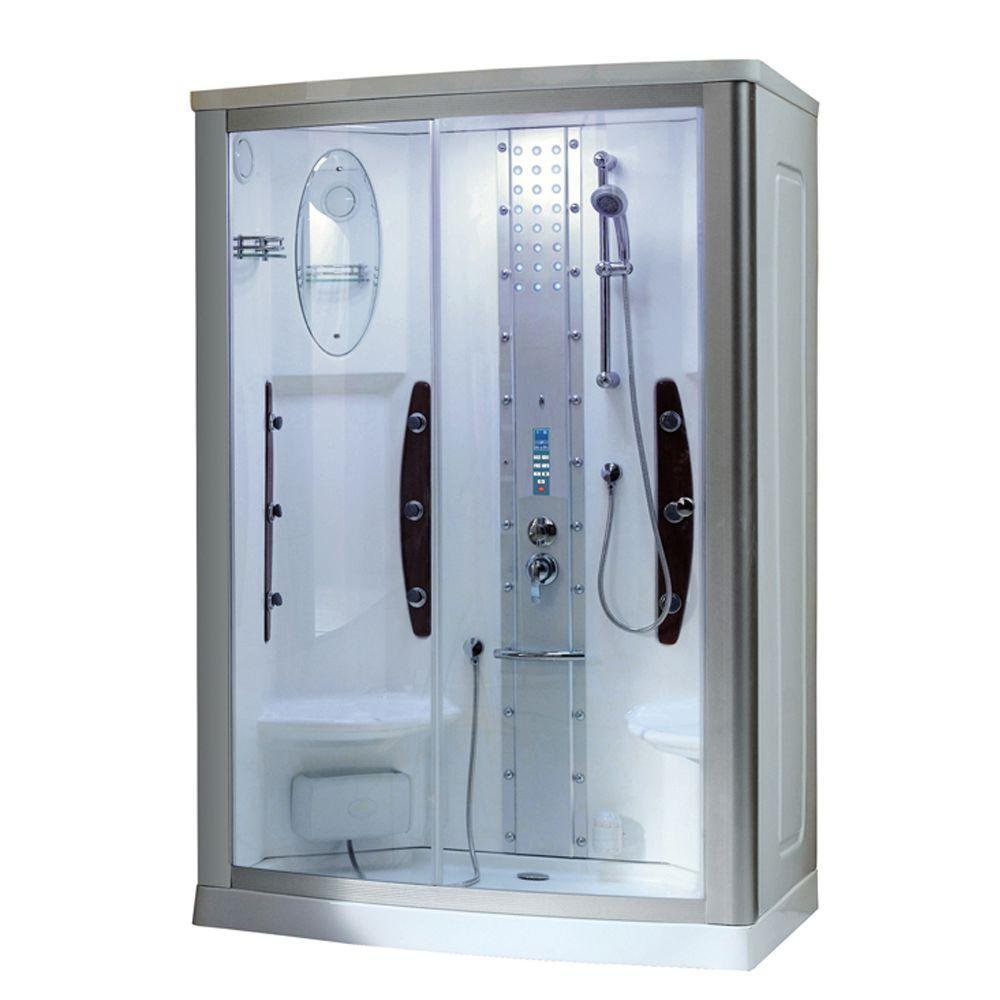
Figure 1: Overview of the Mesa 803A Steam Shower, showing its overall dimensions of 54 inches wide, 35 inches deep, and 85 inches high.
4. Setup and Installation
4.1 Pre-Installation Checklist
- Verify adequate space for the unit (35"D x 54"W x 85"H).
- Ensure proper 220V, 15 amp electrical supply is available.
- Confirm hot and cold water supply lines are accessible.
- Prepare a level surface for installation.
- Review all included assembly instructions and diagrams.
4.2 Assembly
The Mesa 803A Steam Shower requires assembly. Detailed assembly instructions are included with the product packaging. It is highly recommended that installation be performed by a qualified professional to ensure proper plumbing and electrical connections, and to comply with all local building codes. The unit is designed for screw-in installation. Follow the step-by-step guide provided in the separate assembly manual for detailed instructions on connecting water lines, electrical wiring, and assembling the enclosure components.
5. Operating Instructions
5.1 Control Panel
The central control panel manages all functions of the steam shower, including steam generation, lighting, FM radio, and temperature settings. Familiarize yourself with the buttons and display before first use.
Video 1: Demonstration of the Mesa 803A Steam Shower's features, including the control panel, lighting, and various shower functions.
5.2 Steam Function
To activate the steam generator, press the dedicated steam button on the control panel. The display will show the current temperature. Use the '+' and '-' buttons to adjust the desired steam temperature. Allow a few minutes for the steam to generate and fill the enclosure. Do not touch the steam outlet directly.
5.3 Shower Functions
Use the diverter knob on the main control column to select your preferred water outlet: rainfall shower head, handheld shower, or body massage jets. Adjust water temperature and flow using the main mixer handle. Ensure the handheld shower is securely placed in its holder when not in use.
5.4 Foot Massager
The integrated foot massager can be used during your shower for relaxation. Position your feet over the massager unit located at the base of the shower. Refer to the control panel for activation if it is electronically controlled.
5.5 FM Radio
To use the FM radio, press the 'FM' button on the control panel. Use the tuning buttons to find your desired station. Adjust the volume using the 'VOL+' and 'VOL-' buttons.
6. Maintenance
6.1 Cleaning
Regularly clean the glass, acrylic, and chrome surfaces with mild, non-abrasive cleaners and a soft cloth. Avoid harsh chemicals, ammonia-based products, or abrasive sponges, as these can damage the finishes. Rinse thoroughly after cleaning to prevent residue buildup.
6.2 Drain Maintenance
Periodically check and clean the drain to prevent blockages from hair and soap scum. A clogged drain can lead to water accumulation and potential overflow. The drain cover can typically be removed by hand for cleaning.
6.3 Descaling (Steam Generator)
Depending on your water hardness, the steam generator may require periodic descaling. Refer to the separate assembly instructions or contact customer support for specific descaling procedures and recommended products.
7. Troubleshooting
If you encounter issues with your Mesa 803A Steam Shower, refer to the following common problems and solutions:
- No Steam: Check if the unit is powered on and the steam function is activated on the control panel. Ensure water supply is connected and the steam generator tank (if applicable) is filled. Verify the circuit breaker has not tripped.
- Water Leaks: Inspect all plumbing connections for tightness. Check the seals around the sliding door and fixed panels for proper seating. Ensure the drain is not clogged.
- No Power/Electronics Not Working: Verify the main power supply to the unit. Check the circuit breaker. If the control panel is unresponsive, try resetting the power to the unit.
- Low Water Pressure: Ensure water supply valves are fully open. Check for any kinks in the water supply hoses.
- FM Radio Static: Ensure the antenna is properly connected (if external). Try repositioning the antenna or tuning to a stronger station.
If the problem persists after attempting these solutions, please contact Mesa customer support.
8. Specifications
| Specification | Detail |
|---|---|
| Brand Name | Mesa |
| Model Number | 803A |
| Product Dimensions (D x W x H) | 35"D x 54"W x 85"H |
| Material | Glass |
| Color | Clear |
| Finish Type | Chrome |
| Door Style | Sliding |
| Number of Doors | 1 |
| Installation Type | Screw-In |
| Required Assembly | Yes |
| Assembly Instructions Description | Assembly instructions included |
| Unit Count | 1.0 Count |
| Style | Modern |
| Handle Type | Handles |
| Manufacturer | Mesa |
9. Warranty and Support
For detailed warranty information, including coverage periods and terms, please refer to the warranty card or documentation provided with your Mesa 803A Steam Shower at the time of purchase. Keep your original purchase receipt as proof of purchase for any warranty claims. For technical support, replacement parts, or further assistance, please contact Mesa customer service directly. Contact information can typically be found in your product packaging or on the manufacturer's official website.


