
AcuRite 06008RM
AcuRite Notos 3N1TXC (3-in-1) Wireless Weather Sensor User Manual
Model: 06008RM
Product Overview
The AcuRite Notos 3N1TXC (3-in-1) Wireless Weather Sensor is designed to accurately measure three key outdoor conditions: wind speed, temperature, and humidity. This high-precision sensor wirelessly transmits its readings at up to 18-second intervals, with a range of up to 330 feet (100 meters). It can be paired with an indoor digital display (sold separately) for at-a-glance viewing of current conditions, or integrated with the AcuRite smartHUB (sold separately) for remote monitoring via smartphone, computer, or tablet. The sensor is built for easy setup and features a 2-year battery life for reliable, maintenance-free operation.

Image: The AcuRite Notos 3-in-1 Wireless Weather Sensor, showing its white, multi-tiered design with wind cups at the top.
Setup and Installation
1. Unpacking and Components
Carefully remove all components from the packaging. Ensure you have the following:
- AcuRite Notos 3-in-1 Wireless Weather Sensor
- Mounting Hardware (plastic anchors, long screws, set screw)
- Mounting Bracket
- Instruction Manual (this document)

Image: A diagram illustrating the 3-in-1 sensor and its included mounting hardware, including the temperature & humidity sensors (internal), release lever for battery access, mounting point, wind speed anemometer, mounting hardware (anchors and screws), and mounting bracket.
2. Battery Installation
The sensor requires 4 AA alkaline or lithium batteries (not included). Lithium batteries are recommended for temperatures below -4°F (-20°C).
- Remove the sensor from its mounting post or bracket if already installed.
- Locate the release clip at the base of the sensor unit. Press the clip to detach the lower section, exposing the battery compartment.
- Insert 4 AA batteries, observing the polarity (+/-) diagrams inside the compartment.
- Locate the A-B-C switch inside the battery compartment. Select a channel (A, B, or C) that is different from any other AcuRite sensors you may have to avoid interference. Ensure your indoor display or smartHUB is set to the same channel.
- Close the battery compartment securely until it clicks into place.
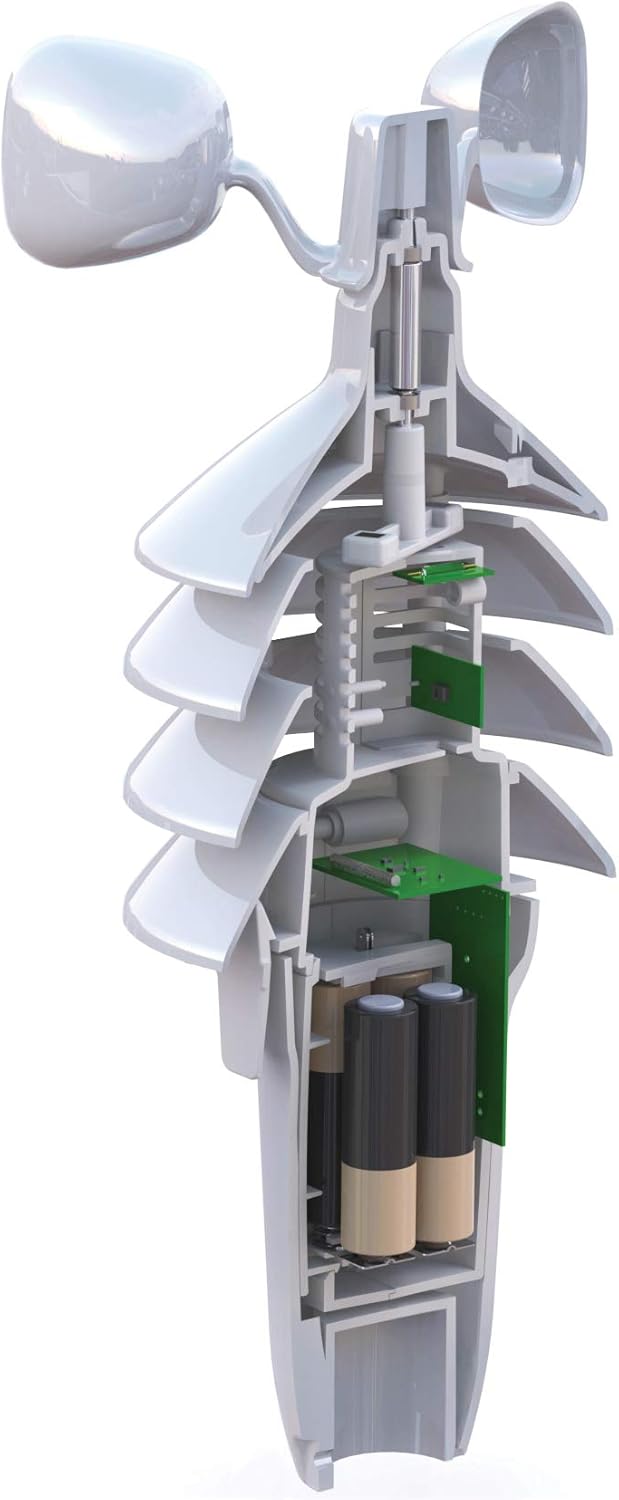
Image: A cutaway view of the AcuRite 3-in-1 sensor, revealing the internal components including the battery compartment at the base.
3. Mounting the Sensor
For optimal performance, choose a location that is:
- At least 5 feet (1.5 meters) off the ground.
- Away from heat sources (e.g., air conditioners, exhaust vents).
- Away from large metal objects or thick walls that could interfere with wireless transmission.
- In an open area to allow for accurate wind speed measurement.
Use the included mounting hardware to secure the mounting bracket to a sturdy surface. Then, slide the sensor onto the bracket until it locks into place.

Image: The AcuRite 3-in-1 sensor mounted on a pole outdoors, with green foliage in the background, demonstrating a typical installation.
Operating the Sensor
Once batteries are installed and the sensor is mounted, it will automatically begin transmitting data. The sensor measures:
- Wind Speed: Measured by the rotating anemometer cups.
- Temperature: Measured by an internal sensor.
- Humidity: Measured by an internal sensor.
Data is sent wirelessly to a compatible AcuRite indoor display or smartHUB every 18 seconds. Ensure your display or smartHUB is within the 330-foot (100-meter) range and set to the same A-B-C channel as the sensor.
Maintenance
Battery Replacement
The sensor features a 2-year battery life under normal operating conditions. When the batteries are low, your connected indoor display or smartHUB will typically indicate a low battery warning. To replace batteries, follow the steps outlined in the "Battery Installation" section above.
General Care
- Periodically clean the exterior of the sensor with a damp cloth to remove dirt or debris that may accumulate.
- Ensure the wind cups rotate freely and are not obstructed.
- Avoid using abrasive cleaners or solvents, as these may damage the plastic components.
- In extreme weather conditions (e.g., heavy snow, ice storms), consider temporarily relocating the sensor to a sheltered area to prevent damage, if feasible.
Troubleshooting
| Problem | Possible Solution |
|---|---|
| No data reception on display/smartHUB |
|
| Inaccurate temperature/humidity readings |
|
| Wind cups not spinning or inaccurate wind speed |
|
Specifications
| Feature | Detail |
|---|---|
| Model Number | 06008RM |
| Power Source | Battery Powered (4 AA batteries required, not included) |
| Wireless Frequency | 433 MHz |
| Wireless Range | Up to 330 feet (100 meters) |
| Data Transmission Interval | Every 18 seconds |
| Temperature Accuracy | +/- 2 degrees Fahrenheit |
| Dimensions (H x W x D) | 9.25 x 5.3 x 5.3 inches |
| Weight | 1.14 Pounds |
| Material | Metal (internal components), Plastic (exterior) |
| Included Components | Mounting Hardware, Instruction Manual |
Warranty and Support
For detailed warranty information, please refer to the official AcuRite website or the full user manual. AcuRite products are designed for reliability and performance.
If you require further assistance or have questions not covered in this manual, please visit the AcuRite support website or consult the comprehensive user manual available online:
Related documents06008RM


Ask a question about this manual
Ask about setup, troubleshooting, compatibility, parts, safety, or missing instructions. Manuals+ will review the question and use this page’s manual context to help answer it.