
Xpelair DX100TR
Xpelair DX100TR Simply Silent DX100 Bathroom Fan
User Manual
Model: DX100TR | Brand: Xpelair
Introduction
This manual provides essential information for the safe and efficient installation, operation, and maintenance of your Xpelair DX100TR Simply Silent DX100 Bathroom Fan. Please read these instructions carefully before installation and retain them for future reference.
Key Features
- Ghost Air Movement Technology: Engineered for virtually silent operation, ensuring minimal disturbance.
- Dual-Speed Extraction: Offers selectable extraction rates of 54 or 76 cubic meters per hour (15 or 21 liters per second) to suit varying ventilation needs.
- Ultra-Quiet Operation: Achieves a quiet sound level of 22 or 34 dBA at 3m, independently tested by ISVR.
- Integrated Wall Kit: Includes a 300mm telescopic wall tube and an external grille for comprehensive wall installation.
- Building Regulation Compliance: Designed for use in bathrooms and shower rooms, fully compliant with Building Regulations Part F and L.
Safety Information
Always observe the following safety precautions to prevent injury or damage to the product.
- Installation must be carried out by a qualified electrician in accordance with current wiring regulations.
- Ensure the power supply is disconnected before commencing any installation, maintenance, or cleaning.
- This appliance is not intended for use by persons (including children) with reduced physical, sensory or mental capabilities, or lack of experience and knowledge, unless they have been given supervision or instruction concerning use of the appliance by a person responsible for their safety.
- Children should be supervised to ensure that they do not play with the appliance.
- Do not immerse the fan in water or other liquids.
- Ensure that the air intake and exhaust vents are not obstructed.
Package Contents
Verify that all components are present and undamaged upon unpacking.

This image displays the Xpelair DX100TR fan unit alongside its accompanying wall fitting kit, which includes the telescopic wall tube, external grille, and sealing strips.
- Xpelair DX100TR Fan Unit
- Telescopic Wall Tube (300mm)
- External Grille
- Sealing Strips
- Fixings (screws, wall plugs)
Setup and Installation
Pre-installation Checks
- Ensure the chosen location complies with all relevant building and wiring regulations (e.g., IP rating for zones in bathrooms).
- Confirm the wall or ceiling material is suitable for mounting and can support the fan's weight.
- Verify that the power supply is isolated at the mains before starting any work.
Mounting the Fan Unit
The DX100TR features Quick Fit Clamps for straightforward installation into a prepared opening.
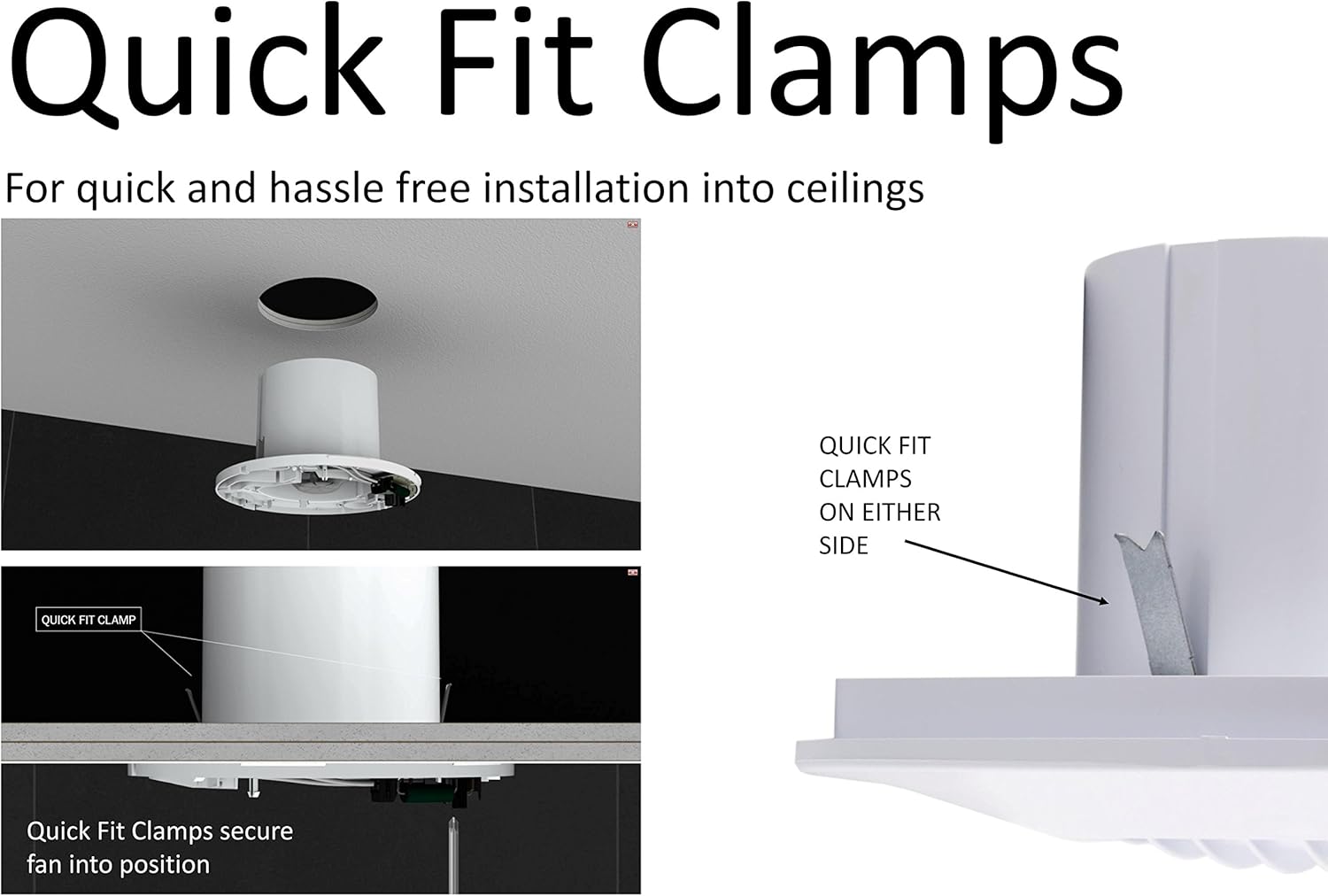
An illustration demonstrating the use of Quick Fit Clamps for easy and secure installation of the fan into a ceiling or wall opening. The image shows the fan being inserted and the clamps engaging.
- Create a circular opening in the wall or ceiling of appropriate diameter (refer to specifications for exact dimensions).
- Insert the fan unit into the opening. The Quick Fit Clamps will automatically engage to secure the fan in position.
- Ensure the fan is flush with the surface and securely held.
Wall Fitting Kit Installation
For through-the-wall installations, use the provided wall fitting kit.

A detailed view of the components included in the wall fitting kit: the telescopic wall tube, the external grille, and sealing strips, all necessary for a complete wall installation.
- Insert the telescopic wall tube through the wall opening from the inside.
- Attach the external grille to the outer end of the telescopic tube, ensuring a weather-tight seal.
- Apply sealing strips as necessary to prevent air leakage and improve insulation.
Electrical Connection
All electrical connections must be performed by a qualified electrician.
- Connect the fan to a suitable switched fused spur, ensuring it is adequately protected by a residual current device (RCD).
- Follow the wiring diagram provided with the product packaging for correct live, neutral, and switched live connections (for timer function).
- Ensure all connections are secure and insulated.
Operating Instructions
Basic Operation
The Xpelair DX100TR fan is designed for continuous or intermittent operation, typically controlled via a light switch or a separate pull cord switch.
- When connected to a light switch, the fan will activate when the light is turned on.
- For independent operation, connect to a dedicated switch.
Timer Function
The integrated timer allows the fan to continue operating for a set period after the main switch is turned off.
- The timer overrun period is adjustable. Refer to the specific instructions provided with the fan's wiring terminal block for details on setting the timer duration.
- Typically, the timer can be adjusted using a small potentiometer or dip switches located within the fan's wiring compartment.
Speed Settings
The fan offers dual-speed operation to optimize ventilation based on requirements.
- The desired speed setting (54 or 76 m³/h) is usually selected during installation via a switch or jumper setting inside the fan's casing.
- Consult the wiring diagram for instructions on how to select the fan speed.
Maintenance
Regular maintenance ensures optimal performance and longevity of your fan.
Cleaning
- Frequency: Clean the fan grille and impeller periodically, depending on the environment and usage, typically every 3-6 months.
- Procedure:
- Disconnect the power supply to the fan at the mains.
- Carefully remove the front grille.
- Use a soft, damp cloth to wipe down the grille and the fan blades. Do not use abrasive cleaners or solvents.
- Ensure all parts are completely dry before reassembling and restoring power.
Inspection
- Periodically check for any signs of damage to the casing, wiring, or mounting.
- Ensure that the fan operates smoothly and quietly. Unusual noises may indicate a problem.
- If any issues are detected, disconnect power and consult a qualified technician.
Troubleshooting
Refer to the table below for common issues and their potential solutions.
| Problem | Possible Cause | Solution |
|---|---|---|
| Fan does not operate | No power supply Incorrect wiring Faulty switch | Check power at mains and fuse box Verify wiring connections (consult electrician) Test or replace switch |
| Fan is noisy | Obstruction in fan blades Loose mounting Motor issue | Disconnect power and clear any obstructions Ensure fan is securely mounted Contact qualified technician |
| Fan runs continuously (timer model) | Timer setting incorrect Switched live wire always active | Adjust timer potentiometer Check wiring for switched live connection (consult electrician) |
| Poor extraction | Blocked grille/duct Fan speed set too low | Clean grille and check ducting for obstructions Adjust fan speed setting (if applicable) |
Specifications
Detailed technical specifications for the Xpelair DX100TR Simply Silent DX100 Bathroom Fan.

This technical drawing provides precise dimensions of the Xpelair DX100TR fan, including its diameter, depth, and the length of the spigot, crucial for installation planning.
| Specification | Value |
|---|---|
| Model Number | DX100TR |
| Brand | Xpelair |
| Color | Cold White |
| Product Dimensions (L x W x H) | 2 x 2 x 2 cm (approximate, refer to diagram for detailed) 178.5mm (diameter) x 98mm (depth) |
| Item Weight | 1.19 Kilograms |
| Material | Acrylonitrile Butadiene Styrene (ABS) |
| Sound Level | 22 dB (low speed) / 34 dB (high speed) at 3m |
| Extraction Rate | 54 m³/h (15 l/s) or 76 m³/h (21 l/s) |
| Fan Design | Extractor Fan |
| Power Source | Corded Electric |
| Mounting Type | Wall Mount |
| Special Feature | Lightweight, Timer Delay |
Warranty and Support
Xpelair products are manufactured to high standards and are backed by a manufacturer's warranty. For specific warranty terms and conditions, please refer to the documentation included with your purchase or visit the official Xpelair website.
If you encounter any issues or require technical assistance, please contact Xpelair customer support. Ensure you have your product model number (DX100TR) and proof of purchase available when contacting support.
Related documentsDX100TR


Ask a question about this manual
Ask about setup, troubleshooting, compatibility, parts, safety, or missing instructions. Manuals+ will review the question and use this page’s manual context to help answer it.