
1. Product Overview
The ELVID Heavy Duty Camera Shoe Mount Adapter with Ball Head (Model SHOEHD) is designed to securely attach accessories such as monitors or small lights to your camera or camcorder. This adapter features a robust aluminum construction and a versatile ball head for precise positioning.
Key features include:
- Integrated ball head with a 1/4"-20 threaded screw for accessory attachment.
- Removable shoe mount with a 3/8"-16 screw for flexible mounting options.
- Single locking knob for secure and rapid adjustments, allowing 90° tilt.
- Durable aluminum construction.
- Supports a load capacity of up to 15 lb (6.8 kg).

Figure 1.1: Front view of the ELVID Heavy Duty Camera Shoe Mount Adapter with Ball Head.
2. Setup Instructions
Follow these steps to properly set up your ELVID Shoe Mount Adapter.
2.1 Attaching to a Camera Shoe Mount
- Locate the shoe mount on your camera or camcorder. Note: This adapter is not compatible with Sony flash shoes.
- Slide the shoe mount base of the adapter into your camera's shoe mount.
- Tighten the knurled locking ring at the base of the adapter until it is secure. Ensure the adapter is firmly attached and does not wobble.
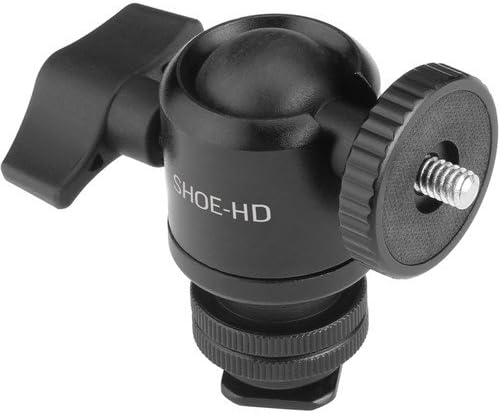
Figure 2.1: The ELVID Shoe Mount Adapter showing the removable shoe mount at the base.
2.2 Attaching an Accessory to the Ball Head
- Ensure the accessory (e.g., monitor, LED light) has a 1/4"-20 threaded mounting point.
- Align the accessory's mounting point with the 1/4"-20 screw on top of the ball head.
- Rotate the accessory clockwise onto the screw until it is finger-tight. Do not overtighten.

Figure 2.2: Top view of the adapter, highlighting the 1/4"-20 screw for accessory attachment.
2.3 Using the Removable Shoe Mount Separately
The shoe mount base can be detached from the ball head and used independently. It features a 3/8"-16 mounting screw.
- To remove the shoe mount, unscrew the knurled ring at the base of the ball head.
- The shoe mount can then be used to attach to any device with a 3/8"-16 female thread.
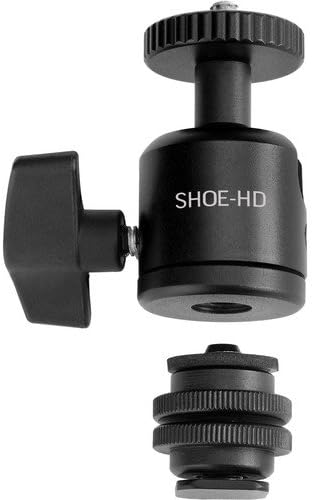
Figure 2.3: The adapter separated into its ball head and removable shoe mount components.
3. Operation
The ball head allows for flexible positioning of your attached accessory.
3.1 Adjusting the Ball Head
- To adjust the angle of the attached accessory, loosen the large single locking knob on the side of the ball head by turning it counter-clockwise.
- Position your accessory to the desired angle. The ball head allows for 90° vertical articulation (tilt) and 360° panning.
- Once the desired position is achieved, tighten the locking knob by turning it clockwise until the accessory is securely held in place. Ensure it is tight enough to prevent movement but do not overtighten.

Figure 3.1: Side view of the adapter, indicating the single locking knob for adjustments.
4. Maintenance
Proper care will ensure the longevity and optimal performance of your ELVID Shoe Mount Adapter.
- Cleaning: Wipe the adapter with a soft, dry cloth to remove dust and debris. For stubborn dirt, a slightly damp cloth can be used, followed by immediate drying. Avoid harsh chemicals or abrasive cleaners.
- Storage: Store the adapter in a dry, cool place away from direct sunlight and extreme temperatures.
- Inspection: Periodically check all screws and connections to ensure they are secure. Do not attempt to disassemble the ball head beyond the removable shoe mount.
- Lubrication: The ball head mechanism is designed for smooth operation without external lubrication. Do not apply oils or greases.
5. Troubleshooting
This section addresses common issues you might encounter.
5.1 Accessory Not Holding Securely
- Issue: The attached monitor or light moves or sags after adjustment.
- Solution: Ensure the single locking knob is tightened sufficiently. The knob should be firm to the touch. Verify that the accessory's weight does not exceed the 15 lb (6.8 kg) load capacity.
5.2 Adapter Does Not Fit Camera Shoe Mount
- Issue: The shoe mount base cannot be inserted into the camera's shoe.
- Solution: This adapter is designed for most standard shoe mounts but is not compatible with Sony flash shoes. Confirm your camera's shoe mount type. Ensure no obstructions are present in the camera's shoe mount.
5.3 Difficulty Attaching Accessory to 1/4"-20 Screw
- Issue: The accessory does not screw onto the ball head's 1/4"-20 thread.
- Solution: Verify that your accessory has a 1/4"-20 female thread. Some accessories may use a 3/8"-16 thread, which is not compatible with the ball head's top screw.
6. Specifications
| Feature | Detail |
|---|---|
| Model Number | SHOEHD |
| Material | Aluminum |
| Type | Ball Head (with removable bottom shoe mount) |
| Load Capacity | 15 lb (6.8 kg) |
| Bottom Tripod Mount Thread Size | With shoe adapter: Male shoe; Without shoe adapter: 3/8"-16 female thread |
| Camera Mount Thread Size (Ball Head Top) | 1/4"-20 male thread |
| Adjustments | Tilt: ±90°, Panning: 360° |
| Item Weight | 0.3 lb (136 g) |
| Package Dimensions | 3 x 2.9 x 1.1 inches |
7. Warranty Information
This ELVID product is covered by a Limited 1-Year Warranty from the date of purchase. This warranty covers manufacturing defects and workmanship under normal use. It does not cover damage caused by misuse, accident, unauthorized modification, or improper operation. Please retain your proof of purchase for warranty claims.
8. Customer Support
For technical assistance, troubleshooting beyond this manual, or warranty inquiries, please contact ELVID customer support. Refer to the ELVID official website or your product packaging for the most current contact information.
