
Janome MB-4S
Janome MB-4S Four-Needle Embroidery Machine User Manual
Model: MB-4S
Introduction
This manual provides comprehensive instructions for the setup, operation, maintenance, and troubleshooting of your Janome MB-4S Four-Needle Embroidery Machine. Please read this manual thoroughly before operating the machine to ensure safe and efficient use and to maximize the lifespan of your product.

Setup
1. Unpacking and Placement
Carefully remove the machine and all accessories from the packaging. Place the machine on a stable, level surface with adequate space for operation and maintenance. Ensure the power outlet is easily accessible.
2. Power Connection
Connect the power cord to the machine and then to a grounded electrical outlet. Ensure the power switch is in the OFF position before connecting.
3. Hoop Attachment
Select the appropriate embroidery hoop for your project. Align the hoop's attachment points with the machine's embroidery arm and gently push until it clicks securely into place.

4. Threading the Machine
The MB-4S features four needles, allowing for multi-color embroidery without frequent thread changes. Follow the numbered threading path for each needle, ensuring the thread passes through all guides and tension discs correctly. Refer to the machine's on-screen guide for detailed threading instructions.
5. Bobbin Installation
Open the bobbin case cover. Insert a pre-wound bobbin into the bobbin case, ensuring the thread unwinds in the correct direction. Guide the bobbin thread through the tension spring and close the cover securely.

Operating Instructions
1. Control Panel Overview
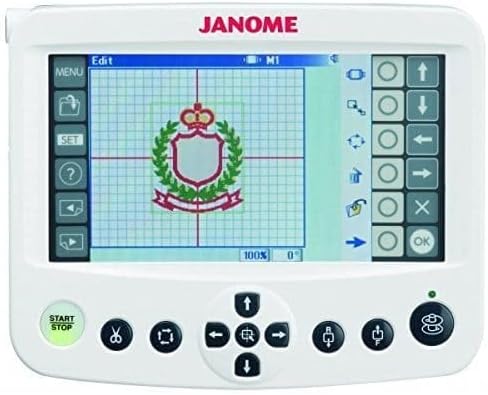
The Janome MB-4S features a user-friendly touch screen control panel. This panel allows you to select designs, adjust settings, and monitor the embroidery process. Familiarize yourself with the main menu, design selection, and editing options.

2. Loading Embroidery Designs
Designs can be loaded into the machine via a USB drive. Insert the USB drive into the designated port. Navigate the control panel to select the desired design file. The machine supports various embroidery file formats.
3. Design Selection and Editing
Once loaded, designs can be previewed, resized, rotated, and combined directly on the control panel. Ensure the design fits within the selected hoop area before proceeding.
4. Starting Embroidery
After preparing your fabric and hoop, and selecting your design, press the "Start/Stop" button on the control panel to begin the embroidery process. The machine will automatically change needles as per the design's color sequence.
5. Changing Threads
If a design requires more than four colors, or if a thread breaks, the machine will pause. Follow the on-screen prompts to change the thread for the indicated needle, then resume operation.
Maintenance
1. Regular Cleaning
To ensure optimal performance, regularly clean lint and dust from the bobbin area, needle plate, and around the needles. Use a small brush or vacuum cleaner designed for sewing machines. Avoid using compressed air as it can push debris further into the machine.
2. Needle Replacement
Replace needles frequently, especially after extended use or if they become bent or dull. Dull needles can cause skipped stitches or damage fabric. Always use the correct type and size of needle for your project.
3. Bobbin Case Maintenance
Periodically remove the bobbin case and clean any accumulated lint or thread fragments. This helps maintain consistent bobbin tension and prevents stitching issues.
4. Lubrication
Refer to your machine's specific lubrication guidelines in the full manufacturer's manual. Some parts may require occasional oiling to ensure smooth operation.
Troubleshooting
This section addresses common issues you might encounter. For more complex problems, consult a qualified service technician or Janome customer support.
- Thread Breaks: Check thread path, ensure proper tension, replace old or damaged needles, and verify bobbin installation.
- Skipped Stitches: Often caused by a bent or dull needle, incorrect needle type for fabric, or improper threading.
- Machine Not Starting: Ensure power cord is securely connected, power switch is ON, and the safety cover (if any) is closed. Check for error messages on the control panel.
- Design Not Loading from USB: Verify the USB drive is properly inserted and formatted correctly. Ensure the design file is in a compatible format (e.g., .DST, .JEF) and not corrupted.
- Needle Breaking: Can be due to incorrect needle installation, hitting the hoop, or issues with hook timing. If persistent, professional service may be required.
- Error Codes: Refer to the machine's on-screen help or the comprehensive manual for specific error code definitions and solutions.
Specifications
| Feature | Detail |
|---|---|
| Brand | Janome |
| Model Number | MB-4S |
| Product Dimensions | 18"D x 26"W x 25.5"H (45.7 cm D x 66 cm W x 64.8 cm H) |
| Item Weight | 64 pounds (29 kg) |
| Needle System | 4-Needle |
| UPC | 708038743783 |
| First Available | April 14, 2015 |
Warranty and Support
For detailed information regarding the product warranty, please refer to the warranty card included with your machine or visit the official Janome website. For technical support, service, or to order replacement parts, please contact Janome customer service or an authorized Janome dealer.
You can find contact information and additional resources on the Janome Store on Amazon or the official Janome website.
Ask a question about this manual
Ask about setup, troubleshooting, compatibility, parts, safety, or missing instructions. Manuals+ will review the question and use this page’s manual context to help answer it.