
Alecto BC-125
Alecto BC-125 Lullabies Night Light Star Projector User Manual
Model: BC-125
Introduction
The Alecto BC-125 Lullabies Night Light Star Projector is designed to assist babies and children in falling asleep by projecting colorful images and playing soothing lullabies. This device features adjustable volume, customizable playback times, and sound activation for convenience.
Package Contents
Upon opening the package, please ensure all components are present and undamaged.
- Alecto BC-125 Star Projector Unit
- Battery (Note: 3 x 1.5V AA batteries are required and may not be included. Please check packaging.)

Figure 1: Product Packaging. The packaging illustrates the Alecto BC-125 projector and highlights its key features such as music, light, 3 colors, sound activation, adjustable play time, and adjustable volume.
Setup
1. Battery Installation
The BC-125 projector operates on battery power. Locate the battery compartment on the underside of the unit. Insert 3 x 1.5V AA batteries, ensuring correct polarity (+/-) as indicated inside the compartment. Close the battery compartment securely.
2. Placement
Place the projector on a stable, flat surface in the child's room, such as a bedside table or dresser. For optimal projection, position the unit where the projected images can be clearly seen on the ceiling or a wall.

Figure 2: Optimal Placement. The projector is shown on a nightstand, demonstrating how the star projection appears on a nearby wall.
Operating Instructions
The BC-125 features intuitive touch controls for easy operation.
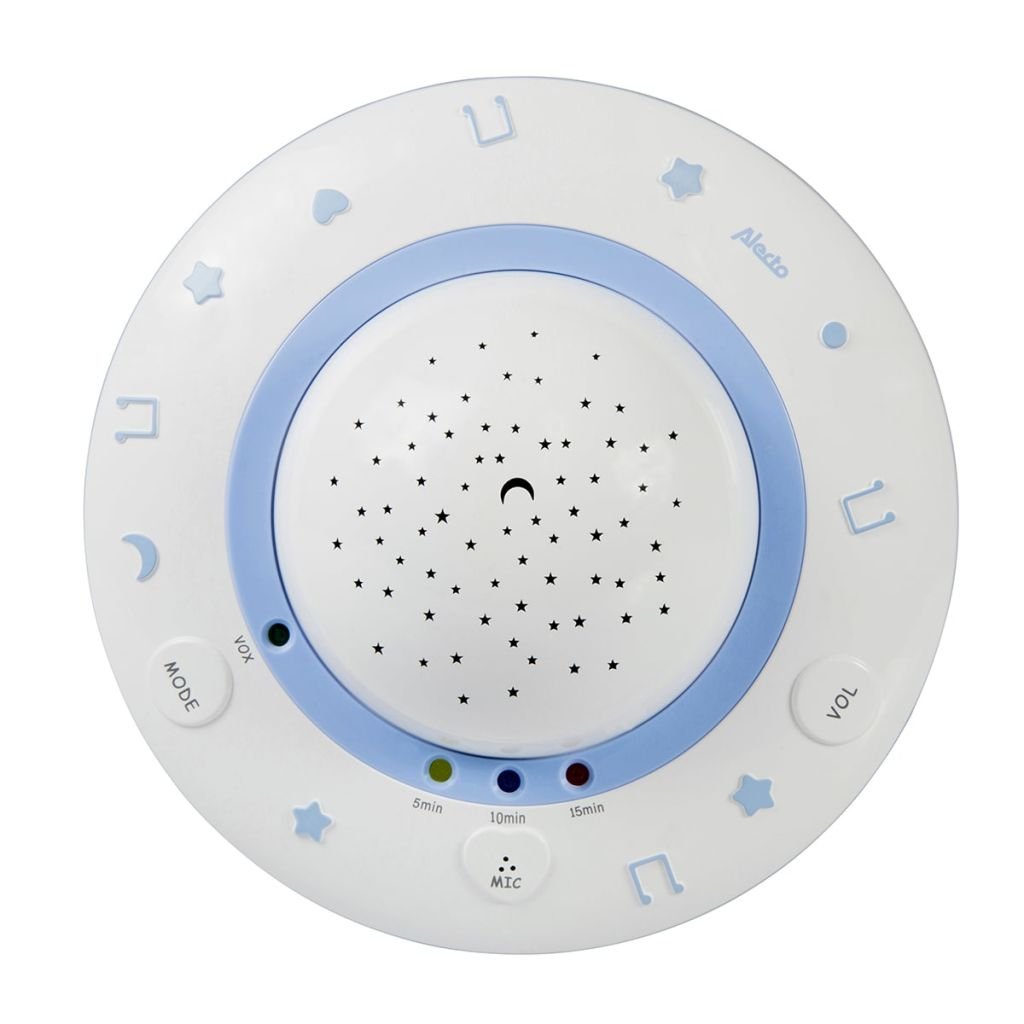
Figure 3: Top View of Controls. This image provides an overhead view of the projector, highlighting the touch-sensitive buttons for various functions.
1. Power On/Off
To turn the unit on or off, gently touch the designated power sensor. The projector will begin its operation or shut down accordingly.
2. Adjusting Volume
The volume of the lullabies can be adjusted to three different levels. Use the 'VOL' touch sensor to cycle through the volume settings until the desired level is reached.
3. Setting Playback Time
The projector offers adjustable playback times of 5, 10, or 15 minutes. Touch the corresponding timer button (5min, 10min, 15min) to select the desired duration for the projection and music.

Figure 4: Timer and Microphone. A detailed view of the timer buttons and the integrated microphone for sound activation.
4. Sound Activation (VOX Function)
The BC-125 features a sound activation function. When a sound is registered, the projector will automatically turn on for 5 minutes. To prevent false activations (e.g., from a door closing), the sound activation is triggered only by sustained tones at a specific volume level for a few seconds.
5. Projection and Music
The projector displays colorful images on the wall or ceiling, accompanied by soothing sleep songs. The most sleep songs will change automatically. The projected colors are typically white, blue, colorful, orange, and green, providing a calming visual experience.

Figure 5: Front View. This image shows the overall design of the projector, including the star-patterned dome and surrounding control area.
Maintenance
To ensure the longevity and proper functioning of your Alecto BC-125 projector, follow these simple maintenance guidelines:
- Cleaning: The unit is made of Polyvinyl Chloride (PVC). Wipe the exterior surfaces with a soft, dry, or slightly damp cloth. Do not use abrasive cleaners or solvents, as these may damage the finish.
- Battery Replacement: When the projection or sound quality diminishes, it is an indication that the batteries need to be replaced. Always replace all three AA batteries at the same time with new ones.
- Storage: If the projector will not be used for an extended period, remove the batteries to prevent leakage and store the unit in a cool, dry place.
Troubleshooting
| Problem | Possible Cause | Solution |
|---|---|---|
| Projector does not turn on. | Batteries are dead or incorrectly installed. | Check battery polarity. Replace with new 3 x 1.5V AA batteries. |
| No sound or distorted sound. | Volume is too low or batteries are weak. | Increase volume using the 'VOL' button. Replace batteries if necessary. |
| Projection is dim or unclear. | Batteries are low. Room is too bright. | Replace batteries. Ensure the room is sufficiently dark for optimal projection. |
| Sound activation (VOX) triggers too easily or not at all. | Ambient noise level. | The VOX function is designed to activate with sustained sounds. Ensure the environment is not excessively noisy for false triggers, or that the sound is loud enough to activate it. |
Specifications
- Model: BC-125
- Brand: Alecto
- Dimensions: 7.76"D x 7.76"W x 4.37"H (20 x 10 cm diameter x height)
- Weight: Approximately 0.26 Kilograms (9 ounces)
- Material: Polyvinyl Chloride (PVC)
- Power Source: 3 x 1.5V AA Batteries (not included unless specified on packaging)
- Light Source Type: LED
- Wattage: 3 watts
- Voltage: 1.5 Volts
- Features: Color Changing, Sound Activation (VOX), Adjustable Volume (3 levels), Adjustable Playback Time (5/10/15 minutes), Touch Sensors
- Recommended Age: 0 to 3 years
Warranty and Support
Specific warranty information for the Alecto BC-125 is not provided in this manual. For details regarding warranty coverage, technical support, or service inquiries, please refer to the product packaging, any included warranty cards, or contact Alecto customer service directly through their official website or contact channels.
Ask a question about this manual
Ask about setup, troubleshooting, compatibility, parts, safety, or missing instructions. Manuals+ will review the question and use this page’s manual context to help answer it.