
Introduction
This manual provides essential information for the safe and efficient operation, installation, and maintenance of your Panasonic CS-YC12RKY3 Split Air Conditioner. Please read this manual thoroughly before using your air conditioner and retain it for future reference.
Safety Information
Always observe the following basic precautions to reduce the risk of fire, electric shock, or injury:
- Ensure the power supply matches the unit's specifications.
- Do not operate the unit with wet hands.
- Do not insert objects into the air outlet or inlet.
- Keep children away from the unit.
- Turn off the power supply before cleaning or maintenance.
- Do not attempt to repair the unit yourself. Contact qualified service personnel.
Setup
The Panasonic CS-YC12RKY3 is a split-system air conditioner, requiring both an indoor and an outdoor unit. Professional installation is highly recommended to ensure proper functioning and safety.
Installation Guidelines:
- Location: Choose a location for the indoor unit that allows for even air distribution and is away from direct sunlight or heat sources. The outdoor unit should be placed in a well-ventilated area, away from obstructions.
- Mounting: Ensure both units are securely mounted according to the manufacturer's instructions.
- Drainage: Proper drainage for condensate water is crucial to prevent leaks.
- Electrical Connection: Connect the unit to a dedicated power circuit as specified in the electrical requirements.
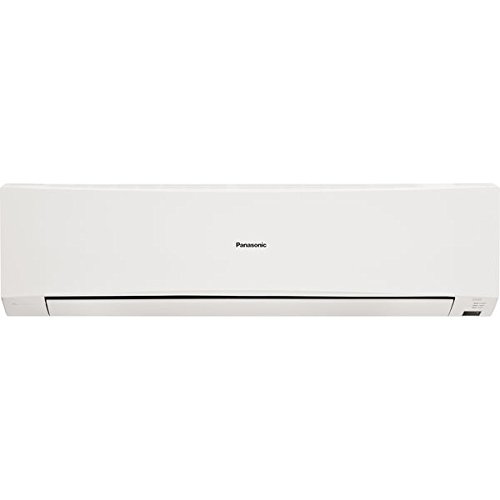
Image: The outdoor unit of the Panasonic CS-YC12RKY3 Split AC. This unit houses the compressor and condenser, responsible for releasing heat outside.
Initial Checks:
- Verify all connections are secure.
- Ensure no obstructions are blocking the air inlets or outlets of either unit.
- Confirm the power supply is stable.
Operating Instructions
Your Panasonic CS-YC12RKY3 AC is controlled via a remote control. Familiarize yourself with the remote's functions for optimal use.
Remote Control Functions:
- Power Button: Turns the unit ON or OFF.
- Mode Button: Cycles through operating modes: Cool, Fan, Dry.
- Temperature Adjustment: Use the Up/Down arrows to set the desired temperature.
- Fan Speed: Adjusts the fan speed (Low, Medium, High, Auto).
- Swing Button: Controls the louver movement for air direction.
- Timer: Sets the ON/OFF timer for automatic operation.
Image: A typical remote control for a Panasonic AC. It features a display screen and various buttons for power, mode selection, temperature adjustment, fan speed, and timer settings.
Operating Modes:
- Cool Mode: Provides cooling by removing heat from the room. Set your desired temperature (e.g., 24°C). The unit has a cooling power of 3200 Watts.
- Fan Mode: Circulates air without cooling. Useful for ventilation.
- Dry Mode: Reduces humidity in the room.
Special Features:
- Anti Bacterial Filter: This feature helps to maintain healthy air quality by filtering out dust particles and inhibiting bacterial growth.
Maintenance
Regular maintenance ensures optimal performance and longevity of your air conditioner.
Filter Cleaning:
- The Anti Bacterial Filter should be cleaned regularly, typically every two weeks or more often depending on usage and air quality.
- Open the front panel of the indoor unit and carefully remove the air filters.
- Wash the filters with lukewarm water and a mild detergent. Rinse thoroughly.
- Allow the filters to dry completely in a shaded area before reinserting them. Do not expose to direct sunlight.
General Cleaning:
- Wipe the indoor and outdoor units with a soft, dry cloth. For stubborn dirt, use a damp cloth with a mild detergent, then wipe dry.
- Do not use harsh chemicals, abrasive cleaners, or solvents.
Seasonal Maintenance:
- Before the cooling season, ensure the outdoor unit's coils are free from debris (leaves, dirt).
- Consider professional servicing annually to check refrigerant levels, electrical connections, and overall system health.
Troubleshooting
Before contacting service, check the following common issues:
- Unit does not turn ON: Check if the power plug is securely inserted and if the circuit breaker has tripped.
- Insufficient Cooling: Ensure doors and windows are closed. Check if the air filters are clean. Verify the temperature setting is appropriate.
- Unusual Noise: A slight gurgling sound is normal due to refrigerant flow. If the noise is loud or unusual, turn off the unit and contact service.
- Water Leakage: Check if the drainage hose is blocked or kinked.
If the problem persists after performing these checks, turn off the power supply and contact an authorized service center.
Specifications
| Feature | Specification |
|---|---|
| Brand | Panasonic |
| Model Number | CS-YC12RKY3 |
| Capacity | 1 Ton |
| Cooling Power | 3200 Watts |
| Energy Rating | 3 Star |
| Annual Energy Consumption | 100 Kilowatt Hours |
| Noise Level | 47 Decibels |
| Core Material | Copper |
| Installation Type | Split System |
| Voltage | 230 Volts |
| Wattage | 1125 Watts |
| Special Feature | Anti Bacterial Filter |
| Included Components | 1 Main unit, Warranty card |
Warranty
Your Panasonic CS-YC12RKY3 Split AC comes with the following warranty:
- Product Warranty: 1 year comprehensive warranty on the product.
- Compressor Warranty: 4 years warranty on the compressor.
Please refer to the warranty card included with your product for detailed terms and conditions.
Support
For technical assistance, service requests, or warranty claims, please contact Panasonic customer support. Have your model number (CS-YC12RKY3) and purchase details ready when you call.
You can find contact information for Panasonic customer service on their official website or in the documentation provided with your air conditioner.