
Onset U20L-04
HOBO U20L-04 Water Level Data Logger User Manual
Model: U20L-04 | Brand: Onset
Introduction
This manual provides comprehensive instructions for the setup, operation, maintenance, and troubleshooting of the Onset HOBO U20L-04 Water Level Data Logger. This device is designed for accurate and reliable measurement of water level in various environments.
The HOBO U20L-04 is a self-contained, submersible data logger capable of recording water level and temperature. It is ideal for monitoring water levels in wells, streams, lakes, wetlands, and tidal areas.
Product Overview
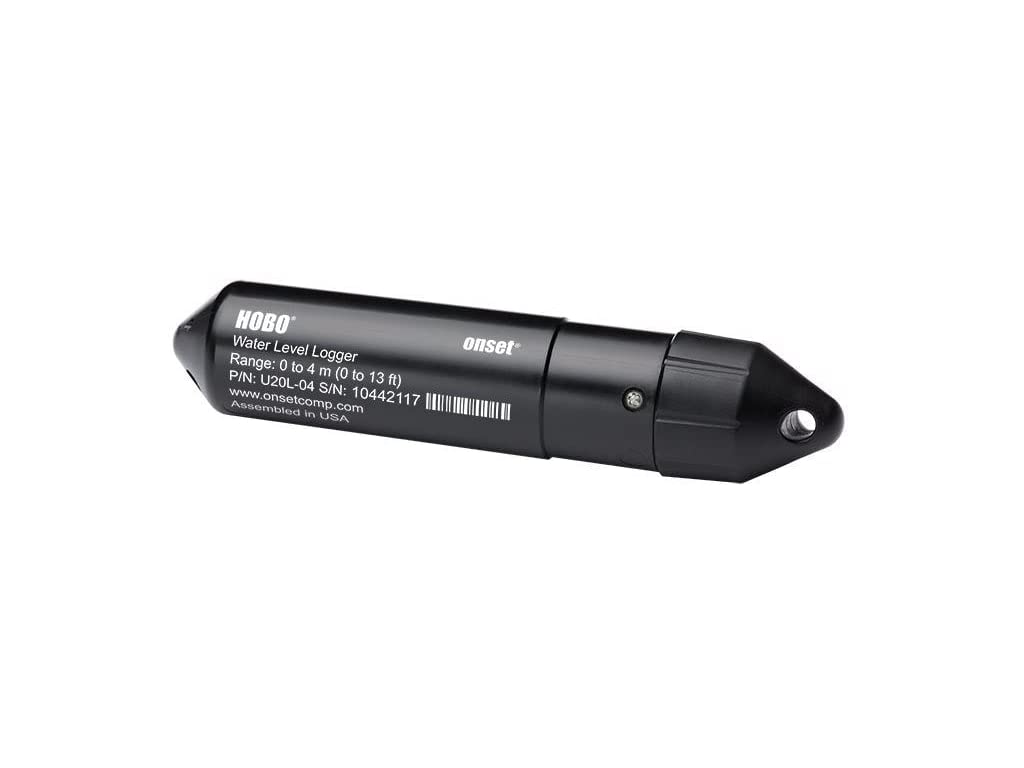
Figure 1: The HOBO U20L-04 Water Level Data Logger. This image shows the compact, cylindrical design of the logger, with the "HOBO Water Level Logger" and "Onset" branding visible, along with its part number (U20L-04) and serial number. The logger is black and designed for submersible use.
The HOBO U20L-04 is a robust, non-vented water level data logger. It measures water level (pressure) and temperature. The logger's range is 0 to 4 meters (0 to 13 feet) of water depth. It is constructed for durability in various aquatic environments.
Setup
1. Required Equipment
- HOBO U20L-04 Water Level Data Logger
- HOBOware software (available from www.onsetcomp.com)
- HOBO U-DTW-1 Water Level Logger Shuttle or HOBO Base Station (U-DT-1)
- Computer with USB port
2. Software Installation
- Download the latest version of HOBOware software from the Onset website.
- Follow the on-screen instructions to install HOBOware on your computer.
- Connect the HOBO Base Station or Shuttle to your computer's USB port.
3. Logger Preparation
- Ensure the logger's O-rings are clean and free of debris.
- Apply a thin layer of silicone grease to the O-rings if necessary.
- Carefully screw the logger cap back on, ensuring a tight seal.
Operating Instructions
1. Launching the Logger
- Connect the HOBO U20L-04 logger to the HOBO Base Station or Shuttle.
- Open HOBOware software.
- From the HOBOware menu, select Device > Launch.
- Configure the logging parameters, including:
- Logging Interval (e.g., 1 minute, 1 hour)
- Start Time (e.g., now, specific date/time)
- Stop Time (e.g., never, specific duration, specific date/time)
- Logging Mode (e.g., fixed interval, burst)
- Click Start to launch the logger. The logger will begin recording data according to the configured settings.
2. Deployment
Once launched, the logger is ready for deployment. Ensure the logger is securely fastened at the desired depth using a sturdy cable or rope attached to the eyelet at the top of the logger. Avoid deploying the logger in areas with strong currents or potential for physical damage.
For accurate water level measurements, it is crucial to also deploy a HOBO U20L-04 Barometric Pressure Data Logger (U20L-04-B) above the water surface to compensate for atmospheric pressure changes. This allows for true water level calculation.
3. Offloading Data
- Retrieve the logger from its deployment location.
- Connect the logger to the HOBO Base Station or Shuttle.
- Open HOBOware software.
- From the HOBOware menu, select Device > Readout.
- Save the data file to your computer. The data can then be viewed, graphed, and exported within HOBOware.
Maintenance
1. Cleaning
- Regularly clean the logger body and sensor area with fresh water to remove any biofouling, sediment, or debris.
- Avoid using abrasive materials or harsh chemicals that could damage the logger's housing or sensor.
- Pay particular attention to the pressure sensor opening to ensure it remains clear.
2. O-Ring Inspection and Lubrication
- Before each deployment, inspect the O-rings for any signs of cracks, nicks, or wear. Replace damaged O-rings immediately.
- Apply a thin, even coat of silicone-based O-ring grease to the O-rings to maintain a watertight seal.
3. Battery Replacement
The HOBO U20L-04 uses a non-replaceable internal battery designed for long-term use. If the battery life is depleted, the logger may need to be returned to Onset for service or replacement. Refer to the Onset website for battery life specifications and service options.
Troubleshooting
| Problem | Possible Cause | Solution |
|---|---|---|
| Logger not recognized by HOBOware |
|
|
| Inaccurate water level readings |
|
|
| Logger not launching |
|
|
Specifications
| Parameter | Value |
|---|---|
| Model | U20L-04 |
| Brand | Onset |
| Water Level Range | 0 to 4 m (0 to 13 ft) |
| Material | Plastic |
| Color | Black |
| Item Weight | 6.4 ounces (181.4 grams) |
| Operating Environment | Freshwater and Saltwater |
| Memory | Approximately 42,000 measurements (water level and temperature) |
| Battery Life | Typically 5 years (non-replaceable) |
| Assembly Location | Assembled in USA |
Warranty Information
Onset provides a limited warranty for the HOBO U20L-04 Water Level Data Logger. For detailed warranty terms and conditions, please refer to the official Onset website or the documentation included with your purchase. Typically, the warranty covers defects in materials and workmanship under normal use.
Note: Unauthorized repairs or modifications may void the product warranty.
Customer Support
For technical assistance, product inquiries, or service requests, please contact Onset Customer Support:
- Website: www.onsetcomp.com
- Email: Refer to the "Contact Us" section on the Onset website.
- Phone: Refer to the "Contact Us" section on the Onset website for regional phone numbers.
When contacting support, please have your logger's model number (U20L-04) and serial number (if available) ready for faster assistance.
Related documentsU20L-04


Ask a question about this manual
Ask about setup, troubleshooting, compatibility, parts, safety, or missing instructions. Manuals+ will review the question and use this page’s manual context to help answer it.