
FR MC-140
Contents
FR Limoss Compatible MC-140 Replacement Electric Recliner Lift Chair Power Supply with Battery Back up
Model: MC-140
Introduction
This manual provides essential information for the safe and effective use of your FR Limoss Compatible MC-140 Replacement Electric Recliner Lift Chair Power Supply. This power supply is designed to replace existing Limoss MC-140 units and is compatible with many brands of furniture utilizing Limoss, Okin, and Kaidi 2-pin prong connectors. It features a green power indication light and a battery backup system for emergency lowering.
Safety Information
Adherence to the following safety guidelines is crucial for preventing injury and ensuring proper operation of the power supply unit.
- Always follow assembly instructions provided with your recliner or lift chair.
- Do not exceed the maximum weight capacity of your recliner or lift chair.
- Keep all electrical components, including the power supply, away from water and moisture.
- Do not operate the power supply if it appears damaged or has been modified.
- Always use the chair's remote control to adjust its position.
- Ensure the power cord is routed safely, away from heat sources and high-traffic areas where it could be tripped over or damaged.
- Unplug the power supply from the wall outlet when the chair is not in use or when leaving it unattended for extended periods.
Setup
Follow these steps to properly set up your new power supply:
- Unpack the Components: Carefully remove the MC-140 power supply block and the wall outlet plug from the packaging.
- Identify Connections: Locate the 2-pin prong connector on your recliner or lift chair's motor cable.
- Connect Power Supply to Chair: Align the 2-pin connector from the power supply with the corresponding port on your chair's motor cable. Push firmly until it clicks into place.
- Connect Wall Plug: Insert the wall outlet plug into the designated port on the MC-140 power supply block.
- Plug into Wall Outlet: Insert the wall outlet plug into a standard 100-240V AC electrical outlet. The green power indication light on the power supply should illuminate, indicating it is receiving power.
- Install Backup Batteries (Optional but Recommended): The power supply features a slot for two 9V batteries for emergency lowering. Open the battery compartment (usually on the side or bottom of the unit) and insert two fresh 9V batteries, observing polarity. Close the compartment securely. These batteries are for emergency use only and do not power the chair for regular operation.
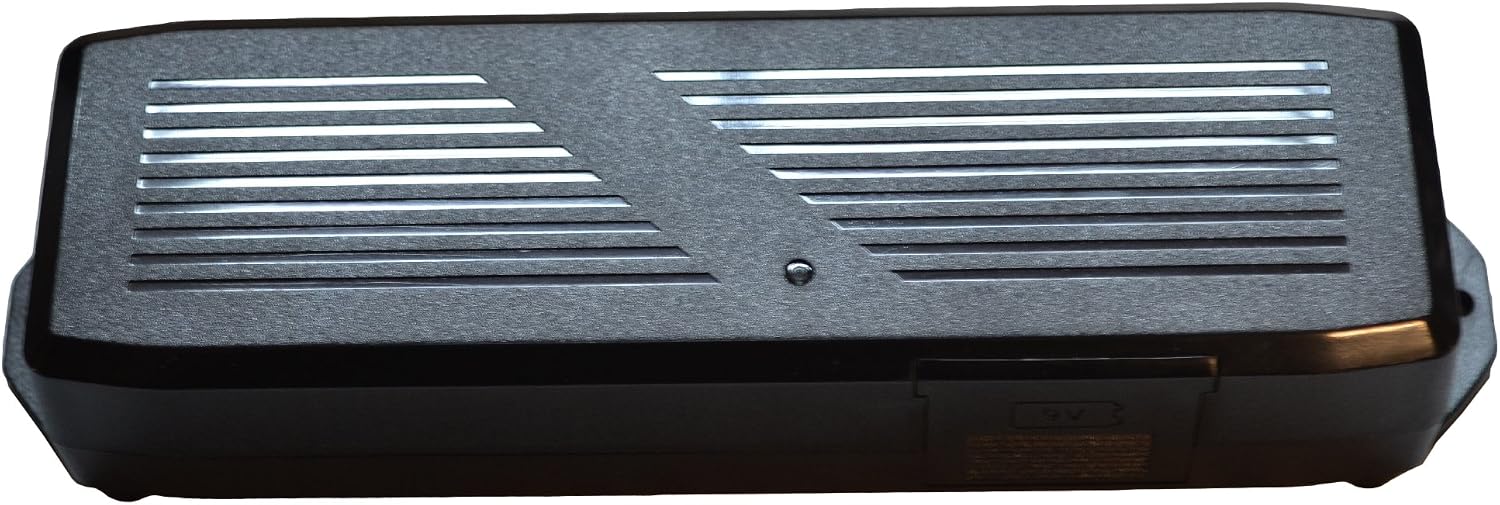
Image: The FR Limoss Compatible MC-140 Power Supply unit. This image shows the main body of the power supply, highlighting its compact design and the green power indicator light.

Image: Close-up view of the 2-pin prong connector on the MC-140 power supply. This is where the power supply connects to the recliner's motor cable.
Operating Instructions
Once the power supply is correctly installed and plugged in, your recliner or lift chair is ready for operation.
- Normal Operation: Use your chair's standard remote control to adjust the position of the recliner or lift chair. The power supply will provide the necessary 29V DC power.
- Intermittent Use: This power supply is designed for intermittent use with a 10% duty cycle, meaning a maximum continuous use of 2 minutes followed by a rest period. Avoid prolonged continuous operation to prevent overheating and ensure longevity.
- Emergency Lowering (with 9V Batteries): In the event of a power outage, the installed 9V backup batteries allow for emergency lowering of the chair. This function is typically activated by pressing and holding the 'down' button on your chair's remote control. The batteries provide enough power for a single or limited number of lowering cycles, not for full operation.

Image: View of the battery compartment on the MC-140 power supply, designed to hold two 9V batteries for emergency lowering.
Maintenance
Proper maintenance ensures the longevity and safe operation of your power supply.
- Cleaning: Disconnect the power supply from the wall outlet before cleaning. Wipe the unit with a dry, soft cloth. Do not use liquid cleaners or abrasive materials.
- Battery Replacement: If using the emergency lowering feature, check and replace the 9V backup batteries periodically (e.g., annually) or after each emergency use to ensure they are fresh and functional.
- Cord Inspection: Regularly inspect the power cord and all connectors for any signs of damage, fraying, or loose connections. If damage is found, discontinue use and replace the unit.
- Storage: If storing the power supply for an extended period, disconnect it from the chair and the wall outlet, and remove the 9V backup batteries. Store in a cool, dry place.
Troubleshooting
If you encounter issues with your power supply, refer to the following common problems and solutions:
| Problem | Possible Cause | Solution |
|---|---|---|
| Chair does not move / No power |
|
|
| Green indicator light is off |
|
|
| Emergency lowering not working |
|
|
| Unit feels hot |
|
|
Specifications
| Feature | Detail |
|---|---|
| Model Number | MC-140 |
| Input Voltage | 100-240V AC |
| Output Voltage | 29V DC |
| Compatibility | Limoss, Okin, Kaidi 2-pin prong connectors |
| Safety Features | NTC-temperature-sensor, primary fuse, overload protection |
| Duty Cycle | Intermittent mode with 10% duty cycle (max. 2 min continuous use) |
| Battery Backup | Slot for two 9V batteries for emergency lowering |
| Included Components | MC-140 power supply block, wall outlet plug |
| Product Dimensions | 8.5 x 3.5 x 2 inches |
| Color | Black |
Warranty and Support
Specific warranty details for this product are not provided in this manual. For warranty information, technical support, or to inquire about replacement parts, please contact the manufacturer or your point of purchase. Always refer to the original product packaging or manufacturer's website for the most current support contact information.
For general inquiries, you may visit the FR Store online: FR Furniture Rehab Store
Ask a question about this manual
Ask about setup, troubleshooting, compatibility, parts, safety, or missing instructions. Manuals+ will review the question and use this page’s manual context to help answer it.