
TRUPER ET-19
Truper ET-19 Light-Duty Staple Gun
Instruction Manual
Introduction
Thank you for choosing the Truper ET-19 Light-Duty Staple Gun. This manual provides essential information for the safe and effective operation, maintenance, and troubleshooting of your new tool. The ET-19 is designed for light-duty stapling tasks, featuring a durable chrome-plated steel construction and a tempered carbon steel internal mechanism for reliable, recoil-free performance.

Image: The Truper ET-19 Light-Duty Staple Gun, showcasing its chrome-plated steel body and ergonomic design.
Safety Information
Always follow basic safety precautions when using any tool to reduce the risk of personal injury. Read all instructions carefully before operation.
- Eye Protection: Always wear safety glasses or goggles to protect your eyes from flying debris.
- Hand Protection: Consider wearing work gloves to protect your hands.
- Keep Clear: Ensure hands and other body parts are clear of the stapling area.
- Proper Grip: Maintain a firm grip on the stapler during use.
- Unload When Not In Use: Always unload staples and engage the safety latch when the stapler is not in use or before performing maintenance.
- Inspect Before Use: Check the stapler for any damage or loose parts before each use. Do not use if damaged.
- Use Correct Staples: Only use staples recommended for this model (see Setup section).
- Keep Out of Reach of Children: Store the stapler in a secure place away from children.
Product Overview and Components
Familiarize yourself with the main parts of your Truper ET-19 staple gun.
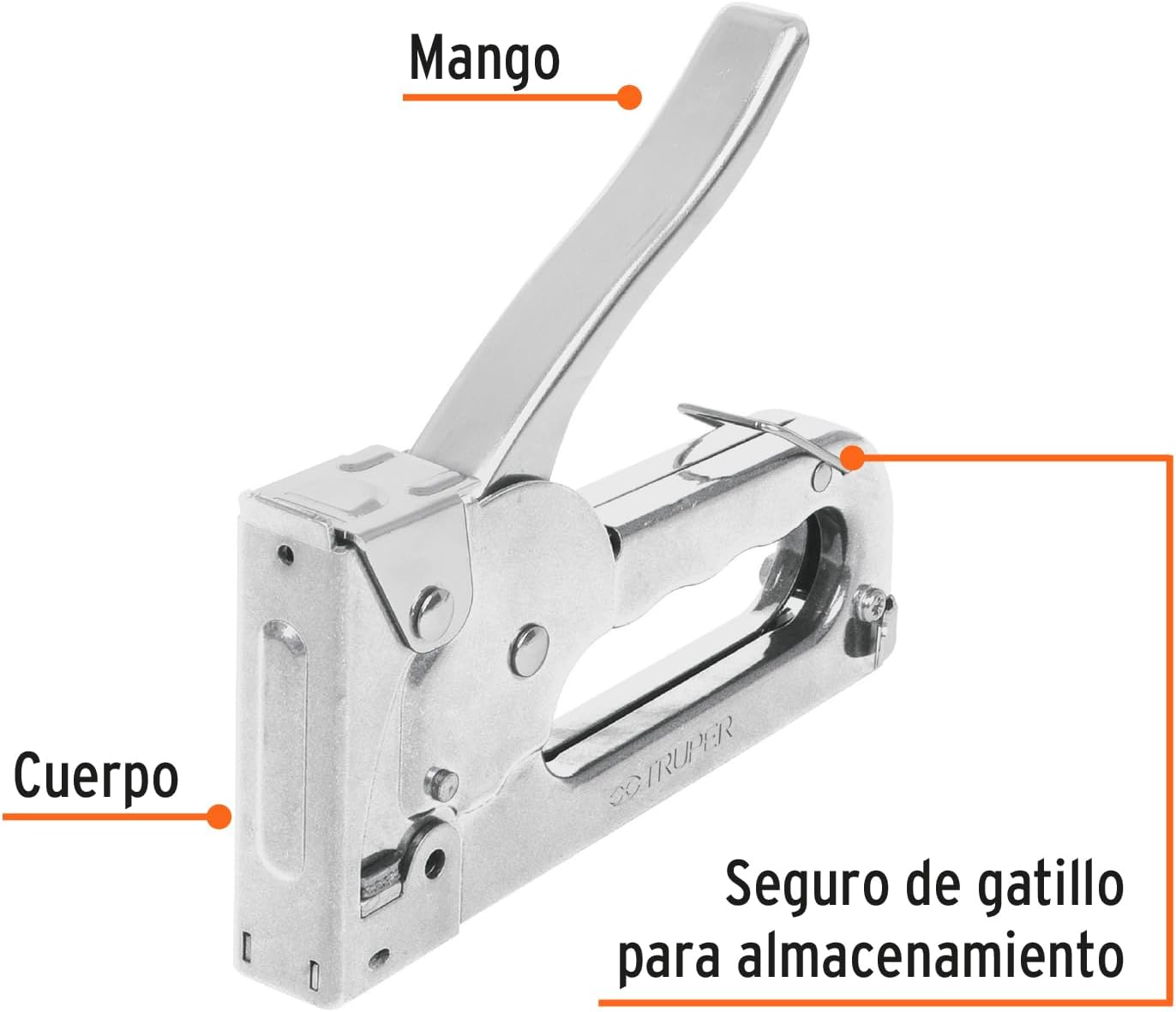
Image: Diagram showing the main components of the Truper ET-19 staple gun, including the handle, body, and trigger safety latch.
- Handle (Mango): The lever used to actuate the stapling mechanism.
- Body (Cuerpo): The main housing of the stapler, containing the internal mechanism and staple magazine.
- Trigger Safety Latch (Seguro de gatillo para almacenamiento): A mechanism to lock the handle in place for safe storage and to prevent accidental firing.
- Staple Magazine: Located at the bottom, where staples are loaded.
- Staple Exit: The opening from which staples are driven into the material.
Setup
Loading Staples
- Ensure the stapler is unloaded and the safety latch is engaged.
- Locate the staple magazine release at the rear or bottom of the stapler. Press or pull to open the magazine.
- Insert a strip of compatible staples into the magazine with the staple points facing down.
- Push the magazine closed until it clicks securely into place.
- Disengage the safety latch before use.
Compatible Staples
The Truper ET-19 is compatible with Truper brand staples. Refer to the image below for specific models:

Image: Information on compatible Truper staples for the ET-19, showing 1/4" (6.5 mm) ET-21-1/4 and 5/16" (8 mm) ET-21-5/16 sizes.
- 1/4" (6.5 mm): Truper ET-21-1/4
- 5/16" (8 mm): Truper ET-21-5/16
Operating Instructions
- Prepare the Surface: Ensure the material you are stapling is clean and free of obstructions.
- Position the Stapler: Place the nose of the stapler firmly against the surface where you want to drive the staple. Ensure it is perpendicular to the surface for best results.
- Apply Pressure: Apply firm, even downward pressure on the stapler.
- Actuate the Handle: Squeeze the handle firmly and completely until the staple is driven.
- Release and Repeat: Release the handle and lift the stapler from the surface. Reposition for the next staple as needed.
- Engage Safety: When finished or taking a break, always engage the trigger safety latch.
Maintenance
- Cleaning: Keep the stapler clean and free of dust and debris. Use a dry cloth to wipe down the exterior. Do not use harsh chemicals or solvents.
- Lubrication: Periodically apply a small amount of light machine oil to the moving parts, such as the pivot points of the handle and the staple feeder mechanism, to ensure smooth operation.
- Storage: Store the stapler in a dry place, away from moisture and extreme temperatures. Always engage the safety latch before storage.
- Inspection: Regularly inspect the stapler for any signs of wear, damage, or loose fasteners. Address any issues promptly.
Troubleshooting
| Problem | Possible Cause | Solution |
|---|---|---|
| Staples not firing or jamming. |
|
|
| Staples not fully penetrating the material. |
|
|
| Handle is stiff or difficult to squeeze. |
|
|
Specifications
| Feature | Detail |
|---|---|
| Model Number | ET-19 |
| Brand | TRUPER |
| Part Number | ET-19 |
| Material | Chrome-plated alloy steel |
| Color | Silver |
| Staple Capacity | Full strip |
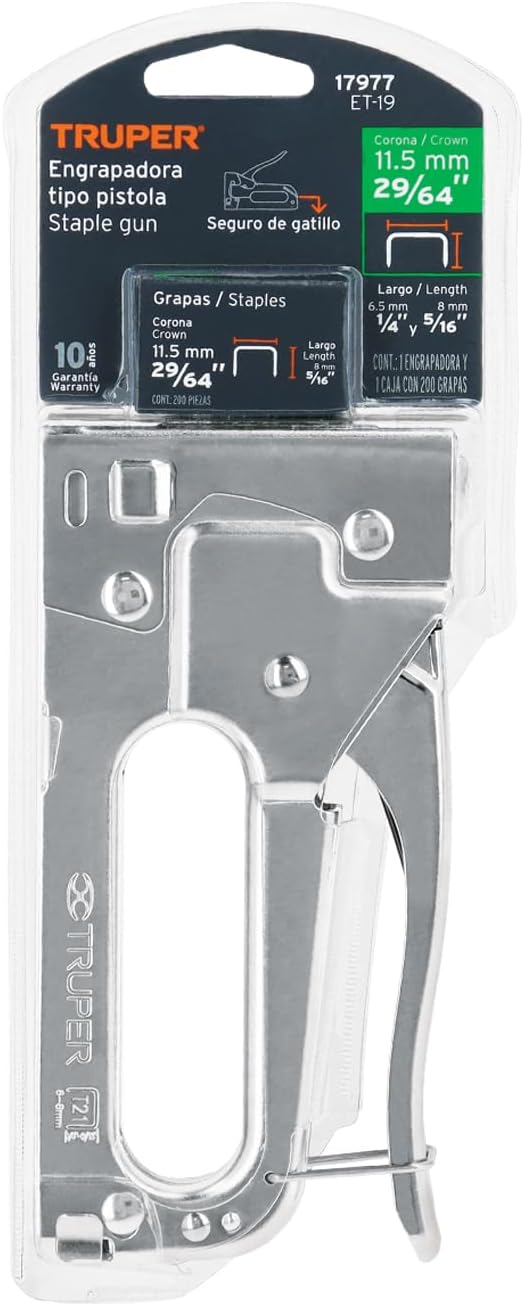
| Compatible Staple Sizes | 1/4" (6.5 mm) and 5/16" (8 mm) Truper staples (e.g., ET-21-1/4, ET-21-5/16) |
| Dimensions (Package) | 23.11 x 7.37 x 2.54 cm |
| Weight (Product) | 460 g |
Image: The Truper ET-19 staple gun in its original packaging, displaying product information and compatible staple sizes.
Warranty and Support
For warranty information or technical support, please refer to the official TRUPER website or contact their customer service directly. Keep your purchase receipt as proof of purchase.
TRUPER is committed to providing quality tools. If you encounter any issues not covered in this manual, please reach out to their support team for assistance.
You can visit the TRUPER store on Amazon for more products and information: TRUPER Store
Ask a question about this manual
Ask about setup, troubleshooting, compatibility, parts, safety, or missing instructions. Manuals+ will review the question and use this page’s manual context to help answer it.