
1. Introduction
This manual provides comprehensive instructions for the proper setup, operation, and maintenance of your EMOS E0041 Digital Outdoor and Indoor Thermometer. Please read this manual thoroughly before using the device to ensure correct functionality and to prevent damage.
The EMOS E0041 thermometer features a clear, easy-to-read display with large digits, designed for straightforward temperature monitoring. It accurately measures both indoor and outdoor temperatures with a resolution of 0.1 °C.
2. Package Contents
- EMOS E0041 Digital Thermometer Unit
- Wired Outdoor Sensor (2 meters cable length)
- User Manual
3. Safety Information
- Do not expose the main unit to direct moisture or extreme temperatures.
- The outdoor sensor is designed for outdoor use but should be protected from direct heavy rain or snow for prolonged durability.
- Use only 2 x 1.5 V AAA micro batteries. Do not mix old and new batteries, or different types of batteries.
- Dispose of used batteries according to local regulations.
- Keep the device out of reach of children.
4. Product Overview
The EMOS E0041 thermometer consists of a main display unit and a wired outdoor sensor. The display shows both indoor ('IN') and outdoor ('OUT') temperatures simultaneously.

Figure 4.1: Front view of the EMOS E0041 Digital Thermometer, displaying indoor and outdoor temperatures.
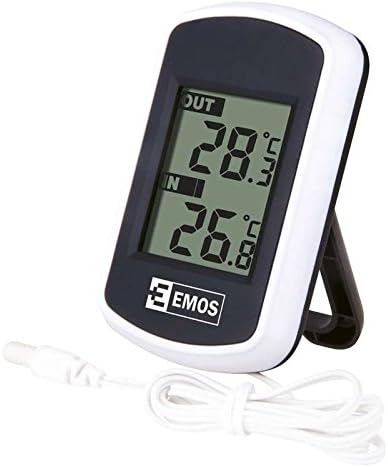
Figure 4.2: The EMOS E0041 thermometer unit with its wired outdoor sensor cable.
5. Setup
5.1 Battery Installation
- Locate the battery compartment on the back of the thermometer unit.
- Slide the battery compartment cover downwards to open it.
- Insert two (2) 1.5 V AAA micro batteries, ensuring the correct polarity (+/-) as indicated inside the compartment.
- Replace the battery compartment cover. The display should activate.
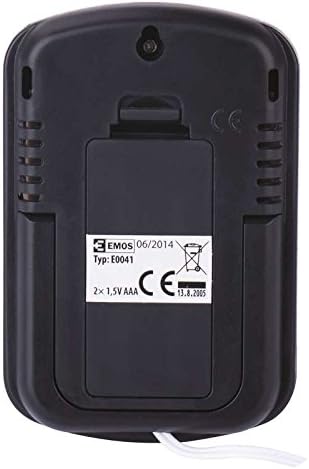
Figure 5.1: Rear view of the thermometer, highlighting the battery compartment.
5.2 Sensor Placement
The wired outdoor sensor has a 2-meter cable. For accurate outdoor temperature readings:
- Route the sensor cable through a window frame or a small opening to the outside.
- Position the sensor in a shaded area, away from direct sunlight, heat sources, or reflective surfaces, which can affect temperature accuracy.
- Ensure the sensor is protected from direct heavy precipitation.
5.3 Mounting Options
The EMOS E0041 thermometer is designed for versatile placement:
- Standing: Utilize the integrated stand on the back of the unit to place it on a flat surface, such as a desk or shelf.
- Wall Mounting: Use the hanging hole located on the back of the unit to mount it on a wall using a screw or nail (not included).

Figure 5.2: Rear view showing the integrated stand and wall mounting option.
6. Operating Instructions
6.1 Power On
The device powers on automatically once batteries are correctly installed. There is no separate power button.
6.2 Reading Temperatures
The large LCD display simultaneously shows two temperature readings:
- The upper reading, labeled 'OUT', indicates the temperature measured by the wired outdoor sensor.
- The lower reading, labeled 'IN', indicates the temperature measured by the internal sensor within the main unit.
Both temperatures are displayed in degrees Celsius (°C) with a resolution of 0.1 °C.
7. Maintenance
7.1 Cleaning
To clean the thermometer unit, gently wipe it with a soft, damp cloth. Do not use abrasive cleaners, solvents, or immerse the unit in water.
7.2 Battery Replacement
When the display becomes dim or the readings are inconsistent, it is time to replace the batteries. Follow the battery installation steps in Section 5.1. Always replace both AAA batteries simultaneously.
8. Troubleshooting
- No display or dim display:
Check if the batteries are inserted correctly with the right polarity. Replace old batteries with new 1.5 V AAA batteries. - Incorrect outdoor temperature reading:
Ensure the outdoor sensor is properly connected to the main unit. Verify the sensor is placed in a shaded area, away from direct sunlight or heat sources. - Incorrect indoor temperature reading:
Ensure the main unit is not placed near heat sources (e.g., radiators, direct sunlight) or cold drafts (e.g., open windows). - Display shows '---' or 'LL.L' / 'HH.H':
This indicates the temperature is outside the measurable range or the sensor connection is faulty. Check sensor connection and ensure temperatures are within the specified operating range.
9. Specifications
| Feature | Specification |
|---|---|
| Model Number | E0041 |
| Indoor Temperature Range | 0 °C to +60 °C |
| Outdoor Temperature Range | -40 °C to +60 °C |
| Temperature Resolution | 0.1 °C |
| Sensor Cable Length | 2 meters |
| Power Supply | 2 x 1.5 V AAA micro batteries (not included) |
| Product Dimensions | 1.8 x 5.7 x 8.5 cm |
| Item Weight | 78 g |
| Material | Plastic |
| Display Type | LCD |
| Connectivity Technology | Wired |
10. Warranty and Support
For warranty information or technical support, please refer to the official EMOS website or contact your local retailer. Keep your purchase receipt as proof of purchase.


